CG in Live Action: a practical CGI guide
On set, capture HDRI (5–9 exposures, 2–3 stops apart), a gray and a chrome ball, measurements and lens data.
To place a CG product on a real table, a creature in a street or a logo in a city shot, you must match four things: the camera, the light, the scale and the image quality. Each is a measurable thing. this article connects the camera and set practice.
Key points
- On set, capture HDRI (5–9 exposures, 2–3 stops apart), a gray and a chrome ball, measurements and lens data.
- Camera tracking solves the real camera path and focal length.
- Match light, shadows, grain, lens and motion blur to the plate.
- Contact shadows make CG objects sit on real surfaces.
What to Capture on Set
- Camera data: Camera model, sensor mode, focal length, aperture, shutter, ISO, white balance, height and tilt, frame rate.
- Lens grid: A photographed grid chart at each focal length for distortion measurement.
- Gray and chrome spheres: Gray shows light direction and color on a neutral surface; chrome shows the environment reflection.
- Color checker: A chart of known colors to match white balance and color.
- HDRI: A panoramic photograph of the set, taken from the position of the CG object. Shoot 5–9 exposures (bracketing) with 2–3 stops between them, with a fisheye lens or a chrome ball.
- Measurements: Heights, distances and sizes of key objects; a tape measure or a known-size object in the frame.
- Tracking markers: Visible points on flat or featureless surfaces to help camera tracking.
- Clean plate: A take of the empty scene, without actors or objects, for removal and shadows.
- Reference of the real product: Photographs and, if possible, the physical product lit exactly like the shot.
Camera Tracking and Matchmove
- 2D tracking: Follow image points through the shot.
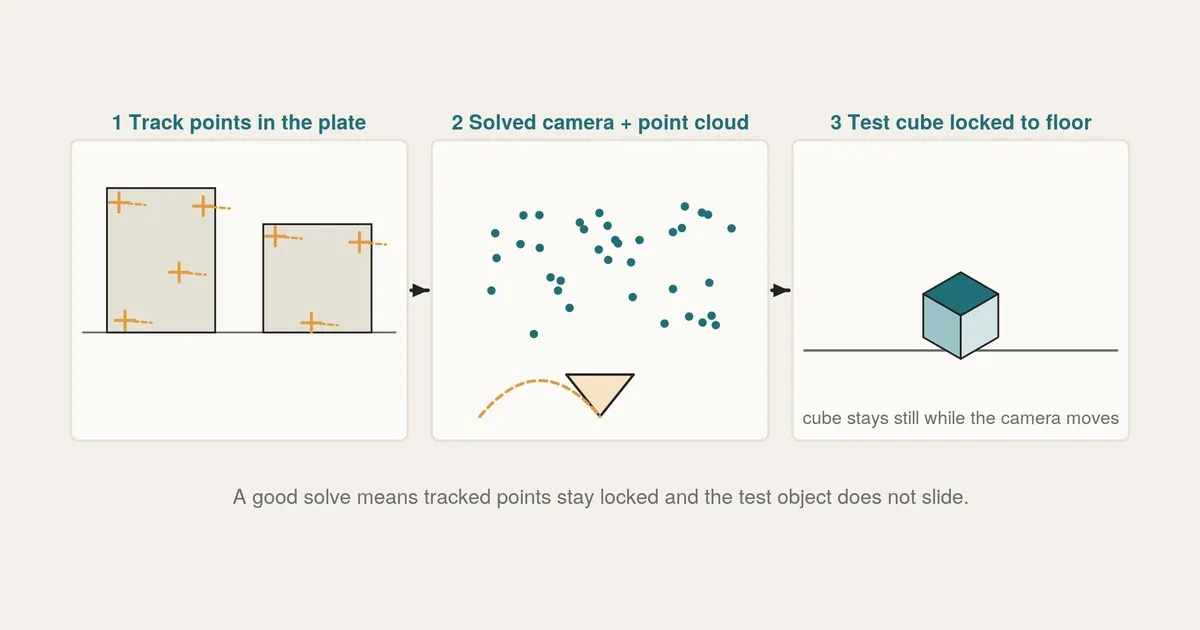
- Camera solve: From the 2D tracks, software calculates the 3D camera path and focal length, plus a sparse cloud of 3D points.
- Requirements: Parallax (camera that moves, not only pans), enough texture, no heavy motion blur, a known sensor size and a lens distortion model.
- Scale and ground plane: Set the real scale from a measurement and place the ground plane on the real floor.
- Solve error: Check the reprojection error in pixels; below about one pixel is good for most work; locking a test object to the floor catches slips.
- Object tracking: Track a moving real object (a hand or a product) to attach CG to it.
- Tools: SynthEyes, 3DEqualizer, PFTrack, Nuke CameraTracker, Blender’s motion tracking, DaVinci Resolve’s tracker.
- Export: Camera and point cloud to the 3D package via FBX, Alembic or USD.
Lighting Match
- Observe: Light direction, hardness, color temperature, intensity relative to the exposure, reflections in glossy surfaces.
- HDRI-based match: Build or use a captured HDRI to light the CG object with the real environment; add the real key and fills as area lights for control.
- Exposure: Match the object’s exposure to the plate and to its distance from the light.
- Check with spheres: Render a CG gray and chrome sphere in the same position; compare them to the on-set spheres.
- Color: Match white balance and the color of the bounce light; if the plate is warm, the object’s shadows are warm too.
- Reflections: Glossy products reflect the set. Use the HDRI or a projected image of the set.
Shadows and Interaction
- Shadow catcher: A proxy surface (the real table or floor, modeled simply) that receives CG shadows and outputs them as a mask or multiply layer for the plate. Cycles has a Shadow Catcher option for this purpose.
- Reflection catcher: The same proxy outputs only the reflection of the CG on the real surface.
- Contact shadows: Where the product touches a surface, a soft dark shadow anchors it; this is the biggest realism cue.
- Occlusion: If real objects pass in front of the CG, they need a roto or matte (a hand over a product).
- Interaction: Footprints, ripples, dust, light spill from the CG onto the real set. Subtle effects greatly increase integration.
- Proxy geometry: Build simple 3D versions of key real objects for shadows, reflections and collisions.
Matching the Image
- Resolution and sharpness: Match the plate’s softness; real lenses are not infinitely sharp.
- Lens distortion and vignette: Apply the plate’s distortion to the CG, or undistort the plate and redistort at the end.
- Depth of field and motion blur: Match the plate’s depth and shutter.
- Black levels and color: Match the shadows’ lift and color cast; do not leave CG blacks deeper than the plate.
- Grain and noise: Match the amount, size and color of grain from a clean area of the plate.
- Edge treatment: A very slight softening and light wrap — real light from the background spilling onto the object’s edges — helps integration.
- Chromatic aberration and halation: Add subtly if the real lens shows them.
- Atmosphere: Haze, dust and heat match depth and distance.
- Flicker and compression: Match camera artifacts if visible.
- Test: Flip between the plate and the composite; any element that jumps out is mismatched.
Green Screen and Clean-up
- Keying: Remove a uniform color background by creating an alpha; a good key needs even lighting, no spill and separation.
- Spill suppression: Remove green light reflected onto the subject.
- Roto: Hand-drawn masks where a key is impossible.
- Clean-up: Remove wires, rigs, markers, stands and logos you have no right to show.
- Plates for AI and virtual production: LED walls replace green screens in some productions.
In the tools
- Blender: Movie Clip Editor for tracking and camera solve, Set as Background and Scene Camera, Shadow Catcher (Cycles Object Properties → Visibility), Holdout, Compositor nodes.
- Houdini: Camera import (FBX/ABC/USD), Karma with Holdout and shadow catcher AOVs, Solaris for assembly.
- Nuke: CameraTracker, LensDistortion, ScanlineRender for 3D in comp, Keylight, Grain, LightWrap.
Common mistakes
- No set data; the match relies on guessing.
- Tracking on a pan-only shot.
- CG without contact shadows.
- Perfectly clean CG on a grainy plate.
- Forgetting the real product reference.