Home / Journal / Technical research
Colour for beginners: why pixel values are not amounts of light
Averaging red and green in sRGB gives a colour darker than both. sRGB 0.5 is only 21% of the light. The linear workflow, explained with numbers.
If I could teach a young designer only one technical fact about colour, it would be this: the numbers in an image file are not amounts of light. A pixel value of 128 does not mean “half as bright” as 255. Most strange results in blending, blurring, resizing and compositing come from forgetting this. In this article I show it with a calculation you can repeat in any tool, and explain the linear workflow that fixes it.
Why files are not linear
Our eyes are far more sensitive to differences between dark tones than between bright ones. To spend the limited 8 bits per channel wisely, image files store values through a curve, the transfer function (often loosely called “gamma”). It puts more of the code values into the darks. The common standard for screens and the web is sRGB (IEC 61966-2-1:1999).
The numbers show how far from linear this is:
- A pixel value of 0.5 (128 in 8 bits) in sRGB corresponds to only 21.4% of the light of white.
- To get 50% of the light, the sRGB value must be 0.735 (about 187 in 8 bits).
The experiment: mixing red and green
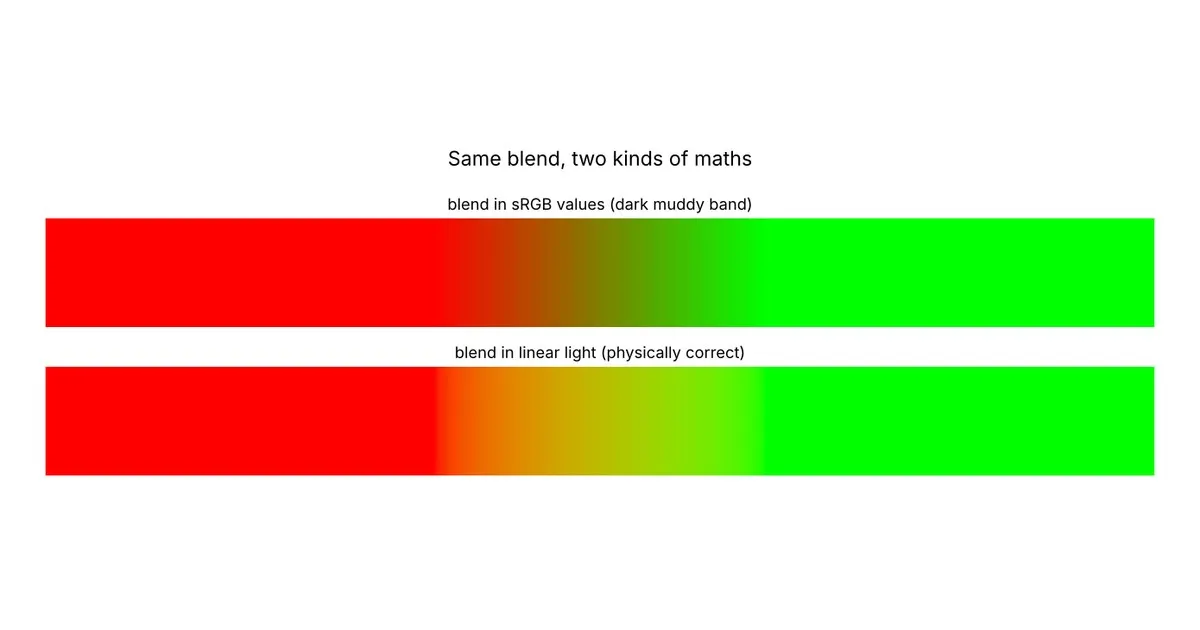
Mix pure red and pure green 50/50, as any blur, soft brush or anti-aliased edge does.
| Method | Resulting RGB | Relative luminance |
|---|---|---|
| Pure red | (1, 0, 0) | 0.213 |
| Pure green | (0, 1, 0) | 0.715 |
| Average of sRGB numbers | (0.5, 0.5, 0) | 0.199, darker than both inputs |
| Average of light (linear), re-encoded | (0.735, 0.735, 0) | 0.464, the true midpoint |
Averaging the stored numbers produces a muddy band that is darker than either colour (see the cover). Physically, mixing two lights can never be darker than both of them. The correct result comes from converting to linear light, mixing, and converting back.
The same error makes resized images too dark around fine bright details, makes blurred highlights lose their glow, and makes soft edges of composited elements look dirty.
The linear workflow
- Decode inputs to linear light. Textures that hold colour (base colour, albedo) are sRGB-encoded; data textures (normal, roughness, masks) are not colour and must stay “raw” or “non-colour”.
- Work in linear: render, light, blur, blend and composite with values proportional to light. Renderers and compositors such as Blender, Nuke and DaVinci Resolve can do this when they are set up correctly.
- Use a scene-referred space with enough range for highlights brighter than white. Film and VFX standardised this with ACES, the Academy Color Encoding System.
- Encode for the display only at the end, with a view transform that maps scene light to the screen.
Colour spaces in one breath
A colour space has three parts: primaries (which red, green and blue), a white point (for example D65 daylight) and a transfer function (linear, sRGB, PQ for HDR). “sRGB”, “Rec.709”, “Display P3”, “Rec.2020” and “ACEScg” differ in one or more of these. Converting between them is maths, not taste. Mislabelled colour spaces are the main reason colours look different in two programs.
Charles Poynton’s Digital Video and HD (2012) is the classic reference if you want to go deeper.
What this means for my work
Every step of my work depends on this: matching lighting from a film set in 3D, grading in DaVinci, and SMART ONE’s estimates of materials and lighting. A wrong transfer function silently breaks all of them. In SMART ONE, material maps such as albedo and roughness are only meaningful if the image is first decoded to linear light.
If you are just starting
- In Blender, set colour textures to sRGB and data textures (normal, roughness) to Non-Color.
- Never blur, resize or blend final images in 8-bit sRGB if you can avoid it. Use 16-bit or 32-bit float linear.
- Memorise one fact: sRGB 0.5 ≈ 21% of the light. It explains half of all colour surprises.
Reproduce it
import numpy as np
dec = lambda c: np.where(c <= 0.04045, c/12.92, ((c+0.055)/1.055)**2.4)        # sRGB -> linear
enc = lambda l: np.where(l <= 0.0031308, l*12.92, 1.055*l**(1/2.4) - 0.055)   # linear -> sRGB
Y = lambda c: float(np.dot(dec(np.asarray(c)), [0.2126, 0.7152, 0.0722]))    # luminance
red, green = np.array([1., 0, 0]), np.array([0, 1., 0])
print(Y((red+green)/2), Y(enc((dec(red)+dec(green))/2)), dec(0.5), enc(0.5))
References
- IEC. (1999). IEC 61966-2-1: Multimedia systems and equipment – Colour measurement and management – Default RGB colour space – sRGB.
- Poynton, C. (2012). Digital Video and HD: Algorithms and Interfaces (2nd ed.). Morgan Kaufmann.
- Academy of Motion Picture Arts and Sciences. ACES: Academy Color Encoding System (documentation and specifications).
SEMEN KLENOV · Visual science for beginners. Drafted with AI assistance; calculations checked by the author.