Home / Journal / Technical research
Compression explained: what JPEG and video codecs throw away
JPEG at quality 90 keeps 36 dB with 8% of the data; 95 costs 44% more for 1.6 dB. How compression works and how to choose settings, with measured numbers.
Every image and video you publish is compressed, usually several times on its way to the viewer. As someone who delivers films, renders and photos to clients, platforms and my own website, I think compression is one of the most practical sciences a visual creator can learn. In this article I explain how it works and measure what it costs with a short experiment, so that you can choose settings instead of guessing.
Two kinds of compression
- Lossless (ZIP, PNG, FLAC, EXR with lossless codecs): the file gets smaller, and the data comes back bit for bit. How much it saves depends strongly on the content.
- Lossy (JPEG, WebP, H.264, H.265, AV1): the file gets much smaller by throwing away information the viewer is least likely to notice. The data never comes back.
How JPEG decides what to throw away
The JPEG standard (Wallace, 1992) works in steps, and each one exploits a fact about human vision:
- Colour transform: split the image into brightness (Y) and two colour-difference channels (Cb, Cr).
- Chroma subsampling: store colour at lower resolution (4:2:0 keeps a quarter of the colour samples), because the eye sees detail mainly in brightness.
- DCT: convert each 8 × 8 block into frequencies, from smooth to fine detail.
- Quantisation: divide fine-detail frequencies by large numbers and round them. This is where the loss happens, and the “quality” slider controls it.
- Entropy coding: pack the many resulting zeros efficiently.
Video codecs add the most powerful trick: motion compensation. Most of a video frame is predicted from previous frames, and only the differences are stored (Wiegand et al., 2003, describe this for H.264).
The experiment: quality, size and error
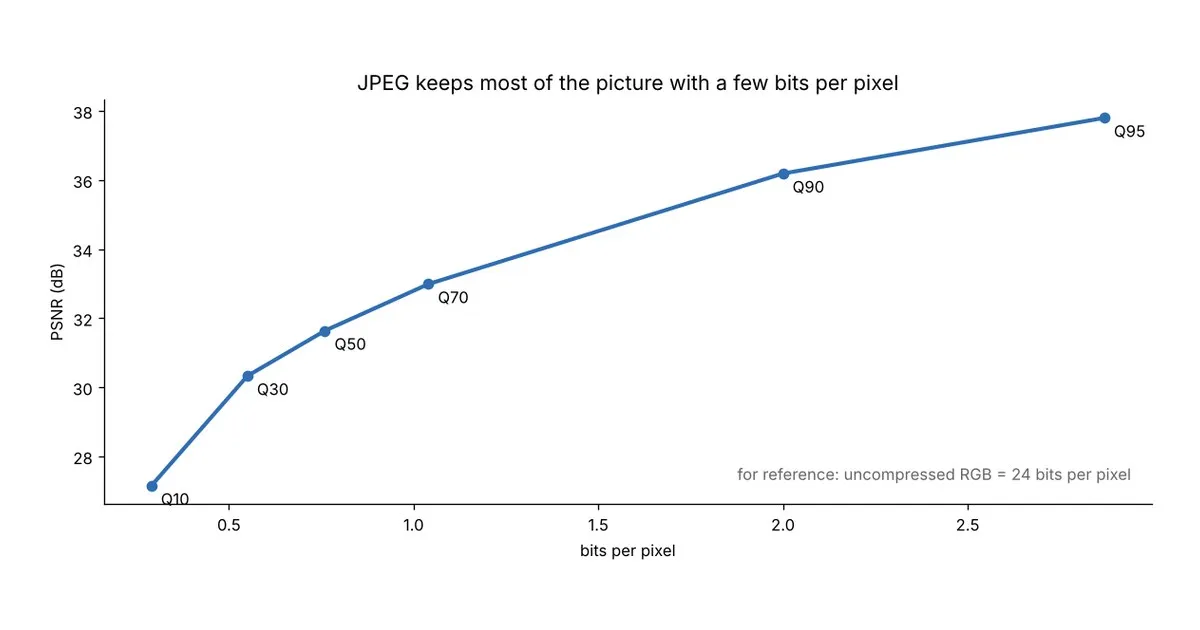
I saved three colour test images (coffee, cat, rocket) as JPEG at different quality settings and measured file size (in bits per pixel) and PSNR. Uncompressed RGB is 24 bits per pixel.
| JPEG quality | Bits per pixel | Size vs uncompressed | PSNR |
|---|---|---|---|
| 10 | 0.29 | 1.2% | 27.2 dB |
| 30 | 0.55 | 2.3% | 30.3 dB |
| 50 | 0.76 | 3.2% | 31.6 dB |
| 70 | 1.04 | 4.3% | 33.0 dB |
| 90 | 2.00 | 8.3% | 36.2 dB |
| 95 | 2.87 | 12.0% | 37.8 dB |
Going from quality 90 to 95 makes the file 44% larger and gains only 1.6 dB. Going from 50 to 10 saves little in absolute size and costs visible quality. For most web images, a common sweet spot is quality 75–90.
Chroma subsampling at quality 90:
| Image | 4:4:4 size | 4:2:0 size | PSNR 4:4:4 | PSNR 4:2:0 |
|---|---|---|---|---|
| coffee | 91.8 KB | 70.6 KB | 37.2 dB | 35.5 dB |
| cat | 42.0 KB | 34.2 KB | 40.2 dB | 39.1 dB |
| rocket | 72.2 KB | 50.7 KB | 38.4 dB | 34.0 dB |
Subsampling saves 19–30% of the file. The cost is small on natural photos, but larger on the rocket image, which has sharp, saturated colour edges. That is why text, logos and graphics should be saved without chroma subsampling, or as PNG.
Practical rules
- Keep masters uncompressed or lossless (TIFF, PNG, EXR, ProRes for video). Compress only for delivery.
- Never re-save a JPEG repeatedly. Each save adds loss and leaves traces.
- Match the format to the content: photos as JPEG, WebP or AVIF; graphics and screenshots as PNG or lossless WebP.
- For video, think in bitrate. Platforms recompress your upload, so upload at high quality to give their encoder good material.
What this means for my work
On my website I compress films and images to keep pages fast, so I make these trade-offs regularly. In SMART ONE, compression is also a source of evidence: JPEG blocks and quantisation steps are measurable traces of a file’s history. Knowing how they are created is the only way to interpret them honestly.
If you are just starting
- Try one image at quality 50, 75 and 95, and compare at 200% zoom.
- Learn the words: bitrate, codec, container, chroma subsampling, keyframe.
- Keep one folder of masters you never compress.
Reproduce it
import io, numpy as np
from PIL import Image
from skimage import data
from skimage.metrics import peak_signal_noise_ratio as psnr
a = data.coffee()
for q in [10, 30, 50, 70, 90, 95]:
    b = io.BytesIO(); Image.fromarray(a).save(b, 'JPEG', quality=q, subsampling=2)
    bpp = b.tell()*8/(a.shape[0]*a.shape[1]); b.seek(0)
    print(q, round(bpp, 2), round(psnr(a, np.asarray(Image.open(b))), 2))
References
- Wallace, G. K. (1992). The JPEG still picture compression standard. IEEE Transactions on Consumer Electronics, 38(1), xviii–xxxiv.
- Wiegand, T., Sullivan, G. J., Bjøntegaard, G., & Luthra, A. (2003). Overview of the H.264/AVC video coding standard. IEEE Transactions on Circuits and Systems for Video Technology, 13(7), 560–576.
SEMEN KLENOV · Visual science for beginners. Drafted with AI assistance; experiment code and numbers checked by the author.