Home / Journal / Technical research
Gaussian splatting for artists: what a splat is and where the bytes go
From EWA splats to NeRF to 3D Gaussian Splatting, and a byte-by-byte look at the .ply format: 180 of 248 bytes per Gaussian store view-dependent colour.
Gaussian splatting moved from a research paper to Blender, Unreal Engine and phone apps in about three years. SMART ONE produces Gaussian splats, and the first question many artists ask about them is simple: what is actually inside these .ply files that weigh hundreds of megabytes? In this article I explain it and calculate where the bytes go. The answer also explains why compression is now the hottest topic in the field.
From points to radiance fields to splats
Point-based rendering is old. EWA splatting (Zwicker et al., 2001) drew each point as a small elliptical Gaussian “splat” instead of a single pixel, which removed holes and aliasing.
Neural radiance fields (NeRF, Mildenhall et al., 2020) represented a scene as a neural network that returns colour and density for any point and view direction. The quality was stunning, but every pixel needed hundreds of network evaluations, so rendering was slow.
3D Gaussian Splatting (Kerbl et al., 2023) combined the two ideas. The scene is a cloud of millions of 3D Gaussians, each with a position, a shape and a view-dependent colour. These parameters are optimised directly from photos with known camera poses, and the Gaussians are rasterised with a fast sort-and-blend renderer. The result is radiance-field quality at real-time frame rates.
What one splat contains
In the standard .ply layout of the reference implementation, each Gaussian stores 32-bit floats:
| Group | Properties | Floats |
|---|---|---|
| Position | x, y, z | 3 |
| Normals (unused, kept by the reference code) | nx, ny, nz | 3 |
| Base colour (SH degree 0) | f_dc_0..2 | 3 |
| View-dependent colour (SH degrees 1–3) | f_rest_0..44 | 45 |
| Opacity (stored as a logit) | opacity | 1 |
| Shape: scale (log) | scale_0..2 | 3 |
| Shape: rotation (quaternion) | rot_0..3 | 4 |
| Total | 62 floats = 248 bytes |
Spherical harmonics (SH) let the colour change with the viewing angle, which is how splats reproduce reflections and sheen. Degree 3 needs 16 coefficients per colour channel: 1 base + 15 extra.
Where the bytes go
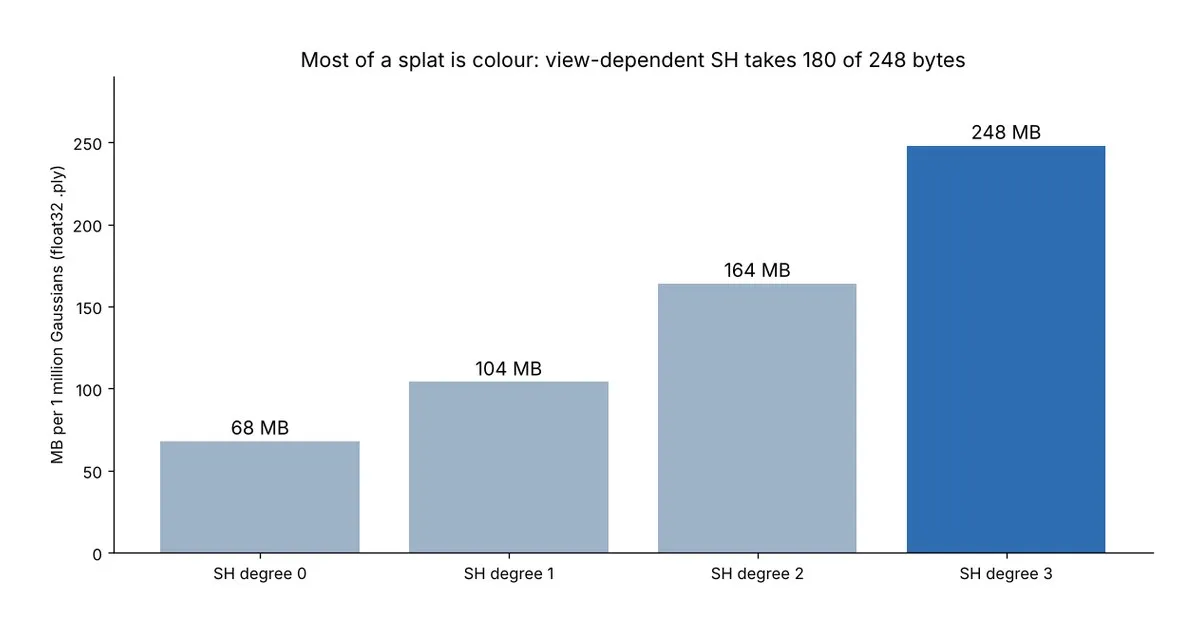
| SH degree | Floats per Gaussian | Bytes | MB per 1 million Gaussians |
|---|---|---|---|
| 0 (no view dependence) | 17 | 68 | 68 |
| 1 | 26 | 104 | 104 |
| 2 | 41 | 164 | 164 |
| 3 (reference default) | 62 | 248 | 248 |
At the default degree 3, 180 of the 248 bytes (73%) store view-dependent colour, and only 44 bytes store geometry and opacity: position, scale, rotation and opacity together. A typical outdoor scene with a few million Gaussians therefore weighs several hundred megabytes before any compression. The survey by Bagdasarian et al. (2024) collects the compression methods that attack exactly this budget: lower SH degree where it is not needed, quantisation, codebooks and pruning of redundant Gaussians.
Practical rules for artists
- Ask what the splat is for. A matte object in diffuse light barely needs SH above degree 0 or 1, which cuts the file by a factor of 2.4–3.6.
- Drop the normals if your pipeline ignores them. That saves 12 bytes per Gaussian, about 5%.
- Prune before you compress. Many Gaussians are nearly transparent or hidden. Removing them saves memory and render time.
- Splats are not meshes. They are great for viewing and poor for editing, physics or collisions. If you need geometry, plan a mesh-extraction step and judge it with a neutral clay render.
What this means for my work
SMART ONE produces 3D Gaussian splats as one of its outputs, and the public demo shows pre-computed examples so that visitors do not need a GPU. The storage table above is the reason the demo ships reduced versions and why I treat splats as a viewing format. For a solid, hole-free mesh, the goal of my light-based reconstruction research, splats are an intermediate representation, not the final answer.
If you are just starting
- Try it yourself: a phone capture app and a free viewer such as SuperSplat are enough to start.
- Think of a splat as a ‘photo you can walk into’, not as a mesh you can model.
- Watch the file size: the colour data, not the geometry, makes splats heavy.
Reproduce the numbers
for d in range(4):
    floats = 3 + 3 + 3 + 3*((d+1)**2 - 1) + 1 + 3 + 4
    print(d, floats, floats*4, "bytes")
References
- Bagdasarian, M. T., et al. (2024). 3DGS.zip: A survey on 3D Gaussian Splatting compression methods. arXiv:2407.09510.
- Kerbl, B., Kopanas, G., Leimkühler, T., & Drettakis, G. (2023). 3D Gaussian Splatting for real-time radiance field rendering. ACM Transactions on Graphics, 42(4), 139.
- Mildenhall, B., Srinivasan, P. P., Tancik, M., Barron, J. T., Ramamoorthi, R., & Ng, R. (2020). NeRF: Representing scenes as neural radiance fields for view synthesis. ECCV 2020.
- PlayCanvas. The PLY format (Gaussian splatting documentation). https://developer.playcanvas.com/user-manual/gaussian-splatting/formats/ply/
- Zwicker, M., Pfister, H., van Baar, J., & Gross, M. (2001). EWA volume splatting. IEEE Visualization 2001.
SEMEN KLENOV · Research notes on visual data. Drafted with AI assistance; calculations checked by the author.