Home / Journal / Technical research
How motion design works: timing, spacing and easing
The same 100-pixel move in one second feels mechanical or premium depending on easing. Frame-by-frame numbers and the classic principles of animation.
Motion design is at the heart of my advertising work: logos that assemble themselves, products that turn in light, interfaces that slide into place. Beginners usually think it is about effects. In practice it is about timing: where an object is on each frame. In this article I explain the principles behind good motion, with a small calculation that shows why the same move can feel cheap or premium.
Motion is an illusion built from frames
Film and video show still images fast enough for the brain to see movement: 24 frames per second in cinema, 25 or 30 in video, 60 or more in games and interfaces. Everything a motion designer controls comes down to two things:
- Timing: how many frames an action takes.
- Spacing: how far the object moves between frames.
The calculation: same move, different spacing
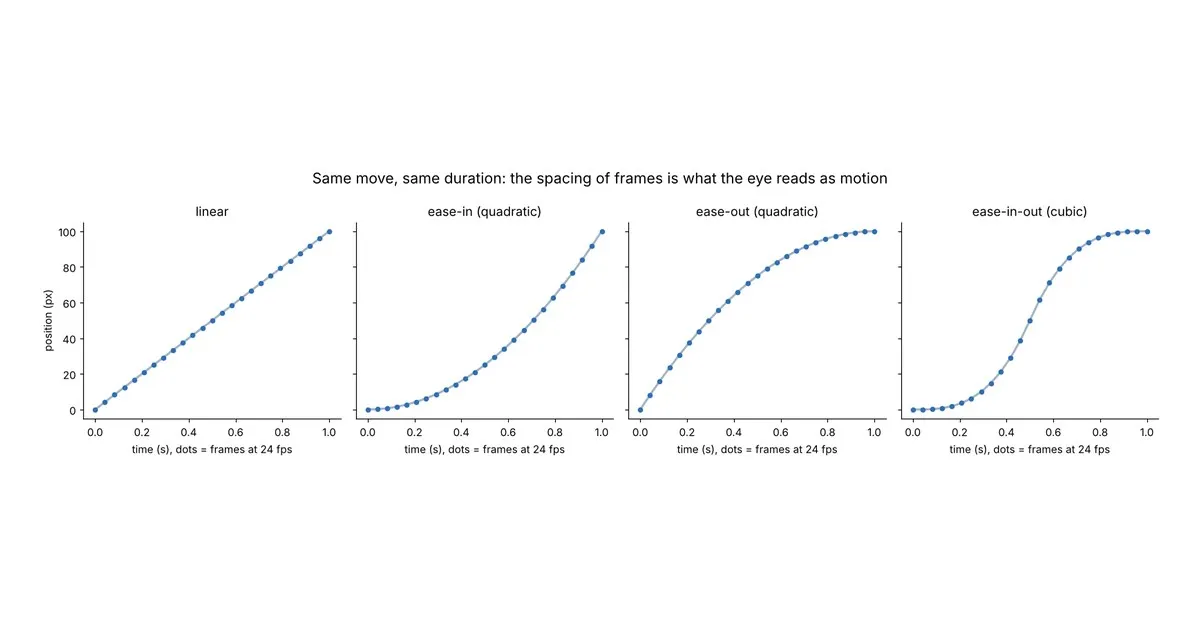
An object moves 100 pixels in 1 second at 24 fps. Here is how far it travels on individual frames with four common curves:
| Curve | Move on frame 1 | Move in the middle | Largest single step |
|---|---|---|---|
| Linear | 4.17 px | 4.17 px | 4.17 px |
| Ease-in (quadratic) | 0.17 px | 4.34 px | 8.16 px |
| Ease-out (quadratic) | 8.16 px | 3.99 px | 8.16 px |
| Ease-in-out (cubic) | 0.03 px | 11.49 px | 11.49 px |
Same distance, same duration, but four different feelings:
- Linear looks mechanical, like a machine or a loading bar. Nothing in nature starts and stops instantly.
- Ease-in starts slowly and accelerates. It fits objects leaving the frame or falling.
- Ease-out starts fast and settles. It is the workhorse of interfaces, because it feels responsive.
- Ease-in-out feels natural and “expensive”. It also makes the middle of the move almost three times faster than linear, which the eye reads as energy.
This is the most practical lesson in motion design: the graph editor is where quality happens. Two animators can set identical keyframes and produce completely different work, just by shaping the curves between them.
The classic principles
In The Illusion of Life, Disney animators Frank Thomas and Ollie Johnston (1981) described the principles of animation that still guide motion work. John Lasseter (1987) showed how they apply to 3D computer animation. The ones that matter most in motion design:
- Slow in and slow out: the easing above.
- Anticipation: a small move in the opposite direction before the main action, so the eye is ready.
- Follow-through and overlapping action: parts keep moving and settle at different times. A logo’s letters arrive one after another, not all at once.
- Squash and stretch: volume stays constant while shape deforms, which gives weight.
- Arcs: natural movement follows curves, not straight lines.
- Staging: one clear idea at a time, so the viewer knows where to look.
- Exaggeration: physics, pushed just far enough to read clearly on a small screen.
Rhythm and frame rate as style
Frame rate is also a creative choice. For the SMART ONE promo film I used a stop-motion look: animation “on twos”, where each drawing is held for two frames, giving 12 new images per second inside a 24 fps film. The slight stutter reads as handmade and tactile, which suited the story of a toy mouse, a cat and a camera.
A simple workflow
- Storyboard and animatic: decide what happens and for how long, with sound.
- Blocking: key poses only, stepped interpolation, no easing yet. Judge timing.
- Splining: switch to curves and shape the easing in the graph editor.
- Polish: overlap, follow-through, small details.
- Sound and final timing: cut to music beats. Rhythm sells motion.
If you are just starting
- Animate one square moving left to right ten times with different curves. Watch them side by side.
- Learn the graph editor of your tool (After Effects, Blender or Cinema 4D) before learning effects.
- Count frames. Write “this takes 12 frames” instead of “this is fast”.
- Study real motion: a ball bounce, a door closing, a person standing up.
Reproduce the calculation
import numpy as np
f = np.arange(25)/24   # 24 fps, 1 second
curves = {'linear': f, 'ease-in': f**2, 'ease-out': 1-(1-f)**2,
          'ease-in-out': np.where(f < .5, 4*f**3, 1-(-2*f+2)**3/2)}
for k, v in curves.items():
    print(k, round(v[1]*100, 2), round((v[13]-v[12])*100, 2), round(np.diff(v).max()*100, 2))
References
- Lasseter, J. (1987). Principles of traditional animation applied to 3D computer animation. Computer Graphics (SIGGRAPH 87), 21(4), 35–44.
- Thomas, F., & Johnston, O. (1981). The Illusion of Life: Disney Animation. Abbeville Press.
SEMEN KLENOV · Motion and 3D for beginners. Drafted with AI assistance; calculation checked by the author.