Fluids, Smoke, Fire and Volumes: a practical CGI guide
Liquids (FLIP) use particles plus a grid; particle separation sets the detail.
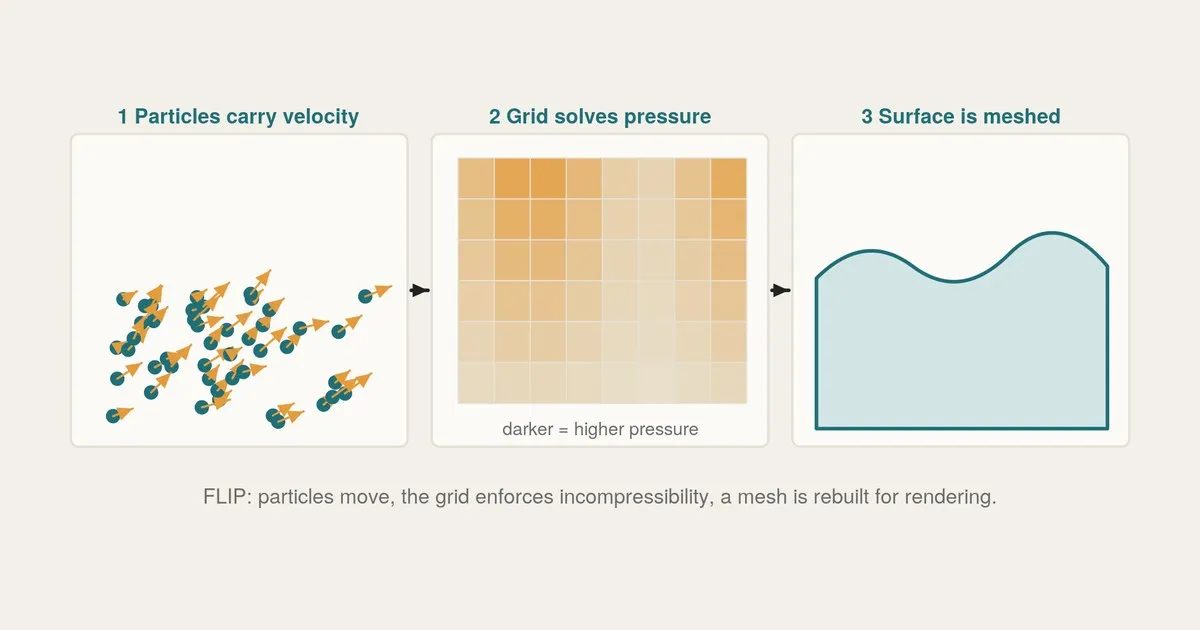
Liquids pouring into glasses, splashes around bottles, steam from a cup, sparks, smoke trails and fire are the visual signature of beverage, food and beauty advertising. They are also the most expensive simulations in render time and disk. The skill is to get the right art direction at a small scale first, then pay for quality only where the camera sees it.
Key points
- Liquids (FLIP) use particles plus a grid; particle separation sets the detail.
- Halving the separation gives about eight times the particles.
- Smoke and fire are volumes of density, temperature, fuel and velocity.
- A 256³ grid has 16.8 million voxels: one 32-bit field ≈ 67 MB per frame. Plan disk space before simulating.
Liquids: FLIP
- Liquids in numbers: water has a density of 1,000 kg/m³ and a viscosity of about 1 mPa·s; olive oil is about 80 times more viscous, honey about 2,000–10,000 times. Many solvers do not use these units directly, but the ratios tell you how far apart the settings must be.
- Resolution rule: halving the particle separation multiplies the particle count by about eight (2³) and the simulation time by even more.
- FLIP (Fluid-Implicit-Particle): A hybrid method. Particles carry the liquid and its velocity; a grid solves pressure and incompressibility; results are transferred back to particles. It gives realistic splashes and swirls.
- Particle separation: The spacing of particles: the main resolution control. Halving it multiplies the particle count by about eight and increases time and memory much more.
- Example: A 0.3 m cube of liquid at 5 mm separation has about 216,000 grid cells of that size and, at the default of about eight particles per cell, around 1.7 million particles.
- Container and colliders: Collision geometry must be watertight, in real scale, with sufficient thickness.
- Sources: Emit liquid from a surface or volume with velocity (a pour) or fill a region (a glass of water).
- Viscosity and surface tension: Change honey from water. Viscous fluids need different solver settings and are slower.
- Substeps and timestep: Fast splashes need smaller steps to stay stable.
- Scale: The simulation lives at the physical size of the object; a bottle simulated as 10 cm tall water behaves right, a bottle 10 m tall looks like slow motion.
Meshing, Foam and Spray
- Surface mesh: Convert particles into a smooth surface with a particle fluid surface or VDB from particles workflow. Keep the mesh watertight with a proper refractive shader.
- Whitewater: Secondary particles for foam, spray and bubbles, generated from the main sim where energy is high.
- Detail passes: A low-resolution base sim can drive a high-resolution detail pass (up-res), cheaper than a huge base simulation.
- Motion blur: Use per-point velocity so blur follows the liquid.
- Look: Water = IOR 1.33, low roughness, colored by absorption; milk, juice and syrup have scattering and different absorption.
- Art direction: The first pass defines timing and shape: iterate at low resolution, then raise it.
- Product tie-in: Liquids must interact with a clean, stable product model; cap the product as a collider early.
Smoke, Fire and Pyro
- Volume fields: The sim stores values in a 3D grid of voxels: density (smoke amount), temperature, fuel, velocity and sometimes color.
- Combustion model: Fuel burns when hot enough, producing heat, smoke and expansion. Temperature drives emission color (blackbody).
- Buoyancy: Hot gas rises: the main driver of smoke plumes.
- Turbulence and disturbance: Add detail (swirls) using noise or sharpening. Control the look of steam, soft vapor, sparks and smoke trails.
- Resolution: Voxel size controls detail. Smaller voxels = much larger memory and time.
- Sparse simulation: Simulates only where the gas exists, saving large amounts of memory.
- Use cases: Steam from coffee, cold fog around ice, incense smoke, flames of a candle, engine exhaust, explosions in action ads.
- Rendering: Volume shading with density, absorption, scattering and emission (below).
VDB and Volume Rendering
- VDB (OpenVDB): A sparse volume format that stores only the occupied voxels. The standard for exchanging volumes between programs.
- Volume shader: Controls how light is absorbed, scattered or emitted inside a volume: density scale, color, anisotropy, emission from temperature.
- Step size and bounces: Volume rendering steps through a medium; smaller steps give better detail and cost more; volume bounces add soft glow.
- Lighting volumes: Backlighting reveals steam and smoke; frontal light flattens them.
- Procedural volumes: Clouds, mist and fog from noise fields (no simulation) are cheaper and often enough.
- Mixing: Fog in a studio and a rim light gives atmosphere to a product shot.
Caches, Disk and Workflow
- Always cache: Simulation results are written to disk per frame; the render reads the cache.
- Estimating size:
- A 256³ grid has about 16.8 million voxels; one 32-bit field is about 67 MB per frame.
- Three fields over 250 frames:
67 MB × 3 × 250 ≈ 50 GBbefore compression and sparsity. - VDB sparsity and 16-bit storage cut this significantly; particle caches scale with particle count × attributes.
- Workflow:
- Block-in at very low resolution; check timing and shape.
- Lock the motion; only then raise resolution.
- Version the caches; never overwrite the approved one.
- Clean caches after delivery; keep what the archive needs.
- Time: A simulation can run for hours; start early and run overnight.
- Variants: Wedge several seeds and parameter sets to choose the best splash.
In the tools
- Blender: Mantaflow fluids (domain with Liquid and Gas types, flow and effector objects), Cache settings in the domain, Resolution Divisions and Particle settings; Quick Smoke for fast setups; Bake to disk.
- Houdini: FLIP Solver, FLIP Fluid from Objects, Particle Fluid Surface, Whitewater, Pyro Solver and Sparse Pyro, Volume Rasterize, File Cache and Karma volume shading.
Common mistakes
- Starting with the final resolution.
- No watertight collision geometry.
- Simulating at the wrong scale.
- Not caching; results change between runs.
- Too-large caches filling the disk.