Scene Data and File Formats: a practical CGI guide
A scene is geometry, transforms, materials, lights, cameras and animation. Each exchange format carries only part of it.
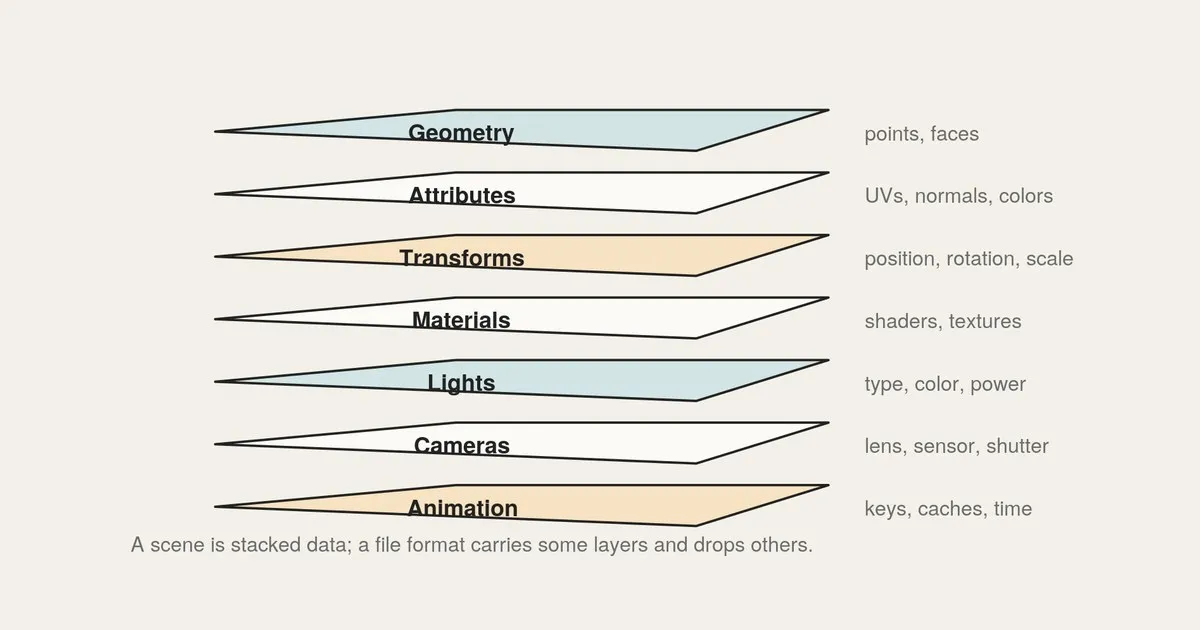
A commercial is rarely made in one program. The model comes as CAD from the client, is cleaned in Blender, simulated in Houdini, textured in Substance, rendered in Karma or Redshift and composited in Nuke or DaVinci. Each hand-off goes through a file, and each format keeps some information and silently drops the rest.
Key points
- A scene is geometry, transforms, materials, lights, cameras and animation. Each exchange format carries only part of it.
- FBX and OBJ for meshes, Alembic for baked caches, USD for whole scenes in layers, glTF for web and AR.
- Render to image sequences (EXR), never straight to a video file.
- Name files
project_shot_task_v###; use four-digit frame padding; never overwrite a version.
What a Scene Contains
- Geometry: Points, polygons (or curves, volumes), and their connectivity.
- Attributes: Data attached to points, vertices, faces or the whole object: normals, UVs, colors, velocity, IDs, custom values.
- Transforms and hierarchy: Where objects are and how they are parented.
- Materials and textures: Shading networks and the image files they reference.
- Lights and cameras: Including focal length, sensor size, focus distance, shutter.
- Animation: Keyframes and curves, or baked per-frame values.
- Deformation: Skinning, blend shapes, or point positions changing every frame.
- Simulation data: Particles, volumes, fluid surfaces, often too large to keep in the scene and stored as caches.
- Metadata: Units, up axis, frame rate, color space, author, version.
Exchange Formats
| Format | Carries well | Weak or missing | Typical use |
|---|---|---|---|
| OBJ | Static polygons, UVs, normals | Hierarchy, animation, materials | Simple static assets |
| FBX | Hierarchy, skinned animation, cameras | Complex shading; versions differ | Characters, game engines, mocap |
| Alembic (.abc) | Baked geometry and animation | Materials, lights, rigs | Simulations between programs |
| USD (.usd, .usdz) | Whole scenes in layers, variants | Needs a USD-aware pipeline | Studio pipelines, Apple AR |
| glTF / GLB | Compact real-time assets with PBR | Film-quality shading | Web 3D, AR, configurators |
| OpenVDB (.vdb) | Sparse volumes: smoke, fire, clouds | Polygons | Pyro and volume rendering |
| STEP / IGES | Exact CAD solids (NURBS) | Polygons, UVs | Product data from engineers |
| Native (.blend, .hip) | Everything the program knows | Other programs | Working files |
- Rule of thumb: FBX for rigs, Alembic for baked motion, USD for scenes, VDB for volumes, EXR for images.
- Baking: Converting live rigs and simulations into stored per-frame data so another program can read them without the original setup.
- CAD to polygons: Client engineering files (STEP) are exact surfaces; they must be tessellated into polygons with controlled density, then cleaned.
USD: Scene as Layers
- Stage: The assembled scene.
- Layer: A file contributing opinions to the stage. A lighting layer can change a light without touching the model file.
- Composition arcs: Rules for combining layers: sublayers, references, payloads (loaded on demand), variants (e.g. bottle color: red / green / gold), inherits.
- Strongest opinion wins: Later or stronger layers override earlier ones non-destructively.
- Why it matters for advertising: One product asset with variants for each color, size and market; several artists working in parallel; quick swaps late in the project without rebuilding scenes.
Image and Cache Formats
- Images: EXR (renders, float), TIFF/PNG 16-bit (textures), JPEG/PNG 8-bit (reference, delivery), HDR/EXR (HDRIs).
- Image sequences: Renders are written one file per frame (
shot010_beauty.1001.exr), never directly to a video file. A crashed render loses one frame, not the whole movie. - Houdini geometry:
.bgeo.sc— fast compressed native cache, keeps all attributes. - Point clouds:
.ply,.las,.e57from scanners; Gaussian splats in.plyor newer formats.
Naming, Versions and Paths
- Naming pattern:
project_shot_task_description_v###.ext— e.g.perfume_sh020_fx_splash_v012.hip. No spaces, no Cyrillic or special characters, consistent case. - Frame padding: Four digits (
.1001.exr) so files sort correctly. - Versioning: Never overwrite; save up (v011 → v012). Write a one-line note of what changed.
- Relative paths: Reference textures and caches relative to the project root or through a variable (
$HIP,$JOB,//in Blender) so the project opens on any machine and on a render farm. - Collect / package: Gather all external files into the project before sending it (File → External Data → Pack Resources in Blender; Collect Files or a USD package elsewhere).
- Checksums and archive: When a job is finished, archive the project with renders, caches you may need again, and a README that states the software versions and color config used.
In the tools
- Blender: File → Import/Export (FBX, OBJ, Alembic, USD, glTF); check Apply Transform, Forward/Up, Scale. File → External Data → Make Paths Relative / Find Missing Files.
- Unreal Engine 5: Imports FBX, glTF, USD and Alembic; check scale, normals and materials in the import dialog, then in the level next to a reference mannequin.
- DaVinci Resolve: Reads EXR and DPX image sequences and ProRes; the Deliver page writes the masters.
- Photoshop: Keep layered sources as PSD; export textures as PNG, TIFF or TGA, never JPEG for data maps.
- Validation: After every export, import the file back into a fresh scene and check scale, orientation, normals, UVs, animation range and frame rate.
Common mistakes
- Sending a project with absolute paths to the client’s or farm’s machine.
- Using FBX for a liquid simulation, or Alembic for a rig that still needs animating.
- Rendering straight to MP4.
- Version names like
final_final2_new.blend.