Project Organization: a practical CGI guide
Use the same folder structure for every project, from 00_admin to 09_archive.
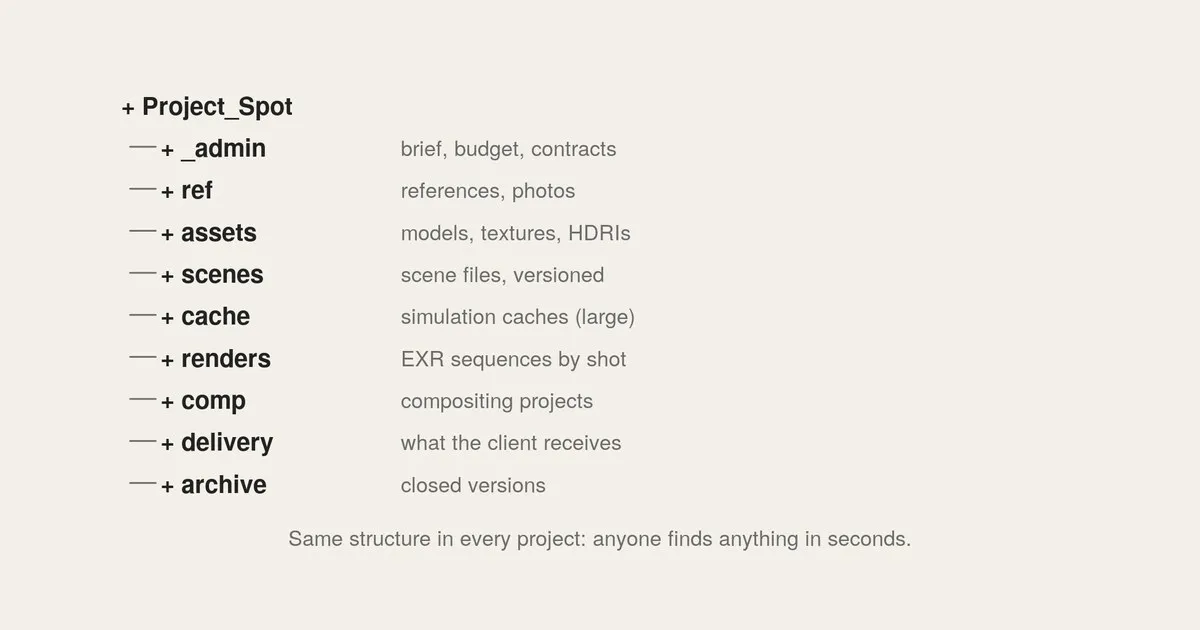
A finished shot depends on finding the right file at the right moment. Lost textures, “final_v3_REAL.blend” and a missing cache are the most common reasons a deadline fails. Organization is not bureaucracy: it is the cheapest insurance in production.
Key points
- Use the same folder structure for every project, from
00_adminto09_archive. - Name with versions (
v001,v002), never with “final”. - Follow the 3-2-1 backup rule: three copies, two media, one off-site.
- Keep notes: a short README in each project saves hours later.
Folder Structure
A standard structure is predictable, so anyone can open the project:
2026_ClientName_ProjectName/
├── 00_admin/        brief, contract, invoices, notes
├── 01_ref/          reference, moodboards, own photos
├── 02_assets/       models, textures, HDRIs, fonts
├── 03_scenes/       .blend / .hip files
├── 04_cache/        simulation and geometry caches
├── 05_renders/      EXR sequences by shot and version
├── 06_comp/         compositing projects
├── 07_audio/        music and sound
├── 08_delivery/     final files per platform
└── 09_archive/ closed versions and project backup- Numbered folders keep the order stable in every file browser.
- Relative paths: Reference textures and caches with paths relative to the project, so the folder can move to another machine.
- Separate source from result: The render and cache folders are large and regenerable; the scene and assets are the valuable part.
Naming and Versions
- Convention:
project_shot_task_v###.ext, for exampleblkbottle_sh010_light_v012.blend. - Rules:
- No spaces, no special characters, no accents; use
_and lowercase. - Version numbers have fixed padding (
v001, notv1). - Never use “final”, “new” or “latest” in a name; they are not versions.
- Increment the version on every saved milestone; do not overwrite.
- No spaces, no special characters, no accents; use
- Within a scene: Name objects, materials and nodes meaningfully; sort them in collections or groups.
- Shot codes:
sh010, sh020, sh030leave room to insert shots. - Image sequences:
name.####.exrwith a fixed frame padding.
Backup and Version Control
- 3-2-1 rule: Three copies of the data, on two different media, one off-site (cloud or another place).
- Automatic: Time Machine or an equivalent for the working disk; a cloud or NAS for the project; a monthly archive to cold storage.
- Version control for text files: Git for scripts, notes, HDA definitions and configuration. Git is not good at large binary files.
- Git LFS: An extension that stores large files (textures, caches, scenes) outside the repository while keeping history.
- Perforce (Helix Core): Studio standard for large binary projects: file locking, big repositories. Free for small teams.
- Cloud sync: Dropbox/Drive/iCloud are sync tools, not backups; a deleted file is deleted everywhere.
- Incremental save: Blender saves the next version with File → Save Incremental; most 3D programs have a similar command or an automatic backup.
Notes and a Knowledge Base
- Why: Every project teaches something: a shader trick, a render setting, a client’s habit. Without notes you relearn it.
- Obsidian: A free notes app on plain Markdown files with links between notes. It grows into a personal knowledge base; the same files can later feed an AI assistant as context.
- What to record: One note per tool/technique, per project post-mortem (what worked, what did not), per client, and a daily log.
- Link notes to chapters, references and project files. The structure of this book is itself a map for such a vault.
- Template: A project note with brief, deadline, delivery formats, contacts, decisions, and open questions.
In the tools
- Blender: File → External Data → Make Paths Relative / Pack Resources; File → Clean Up; use Collections and consistent naming; Save Versions in Preferences.
- Unreal Engine 5: Move and rename assets only inside the Content Browser, never in Finder or Explorer, so references stay intact; use Revision Control (Git LFS or Perforce) from the editor.
- DaVinci Resolve: Projects live in a database; export a
.drpproject file and use File → Media Management to archive the media with the project. - System: A short
README.mdin each project root with the structure, conventions and your contact.
Common mistakes
- “final_FINAL_v2.blend”.
- Absolute paths that break on another machine.
- Caches stored inside the scene file.
- Backup on the same disk as the project.
- No notes: the same mistake in the next project.