Code for the Artist: a practical CGI guide
Any task can be written as data plus steps: variables, conditions and loops.
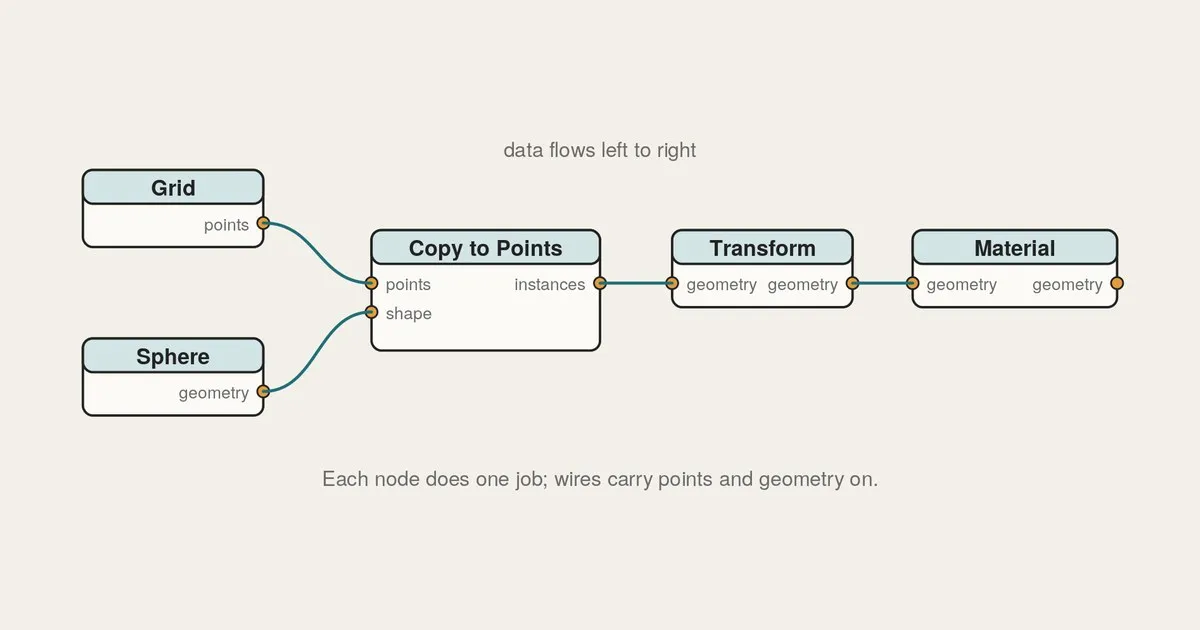
Every 3D program is, underneath, a set of data and operations on it. Once you can describe a task as data plus steps, you can automate renaming 400 objects, build a procedural system, or tell an AI assistant exactly what script you need. This is not computer science; it is a tool for removing repetition.
Key points
- Any task can be written as data plus steps: variables, conditions and loops.
- Blender’s Info editor shows every action as a line of Python; copy it to start a script.
- One short wrangle or node can process millions of points in parallel.
- AI assistants write good first drafts; you test them on copies and read what they do.
Thinking in Nodes and Data
- Node graph: A diagram where each node takes data, changes it and passes it on. It is code you can see.
- Procedural: The result is the output of a recipe, not a hand-made object. Change a parameter at the top and everything downstream updates.
- Attributes: Data stored on parts of geometry: position, color, normal, UV, and your own values. In Houdini nearly everything is an attribute; in Blender, Geometry Nodes also work with attributes on points, edges, faces and corners.
- Non-destructive: You can go back and change an early step. A destructive edit (applying a modifier, baking) cannot be undone later. Decide when to commit.
Variables, Logic and Loops
- Variable: A named value:
height = 1.8. - Types: Integer, float, vector (three floats: position or color), string (text), boolean (true/false), list.
- Condition:
if height > 2: ...runs steps only when the test is true. - Loop:
for each object in the scene: ...repeats the same steps. This is the core of automation. - Function: A named block of steps you reuse.
- Expressions: One-line formulas in parameter fields, such as
sin($F * 0.1) * 5: the value of the parameter changes with the frame.
Python in Blender and Houdini
- Python: The scripting language of both programs and most of the industry (Maya, Nuke, Substance, Unreal).
- Blender API (
bpy):bpy.data.objects— every object in the file.bpy.context.selected_objects— the current selection.- Properties are attributes:
obj.location,obj.scale,obj.name.
- Houdini API (
hou):hou.node("/obj/geo1")— get a node by path.node.parm("tx").set(2.0)— set a parameter.- Houdini Python Script and Shelf Tools let you attach scripts to buttons.
- Hello example (Blender): prefix every selected object’s name with
prod_:
import bpy
for obj in bpy.context.selected_objects:
obj.name = "prod_" + obj.name- Hello example (Houdini): move every selected node 1 unit in X:
import hou
for n in hou.selectedNodes():
n.setPosition(n.position() + hou.Vector2(1, 0))- Rule: Automate a task the third time you do it by hand. Before that you do not yet know what varies.
VEX and Wrangles (A First Look)
- VEX: Houdini’s fast expression language. It runs once per point, primitive or voxel, in parallel.
- Wrangle node: A node where you type a few lines of VEX that read and write attributes.
- Example: Move every point up by a noise value:
@P.y += noise(@P * 2.0) * 0.3;- Reading it:
@Pis the point position attribute;.yits height;noise(...)returns a smooth pseudo-random value from a position. - Why it matters: A wrangle replaces a chain of ten nodes.
AI Assistants for Scripts
- Good at: Writing short Blender/Houdini scripts, explaining an error, converting a manual task to code, suggesting VEX.
- Bad at: Knowing your scene. Always give it context: program and version, node names, what you want to change, and what you tried.
- Verify: Run on a copy of the scene. Read the code before running it. AI-written scripts can delete objects or overwrite files.
- Version drift: APIs change between versions; if the code fails, paste the exact error and version.
- Your responsibility: Do not paste client confidential scenes or credentials into a public assistant.
- Learn from it: Ask it to explain each line until you can write the next script yourself.
In the tools
- Blender: Scripting workspace: Text Editor, Python Console (interactive), Info editor (every action shown as a Python line — copy it). Geometry Nodes for no-code procedural work; custom operators and add-ons for sharing tools.
- Houdini: Python Shell and Python Script windows; Wrangle nodes; Shelf Tools for buttons; Digital Assets (HDA) to package a node network into your own tool.
- Outside: A code editor (VS Code) with Python; Git for versioning scripts.
- Unreal Engine 5: Blueprints (visual scripting) and the Python Editor Script Plugin for editor automation.
- Photoshop: Actions and File → Automate → Batch repeat steps over a folder of images without code.
Common mistakes
- Running AI-generated scripts on the only copy of the file.
- Writing a script for a task done once.
- No variable names or comments — you cannot read it next month.
- Applying modifiers early and losing the recipe.
- Ignoring errors instead of reading the message and line number.