Procedural Modeling: Introduction: a practical CGI guide
A handmade model is an answer; a procedural model is a recipe that changes with a number.
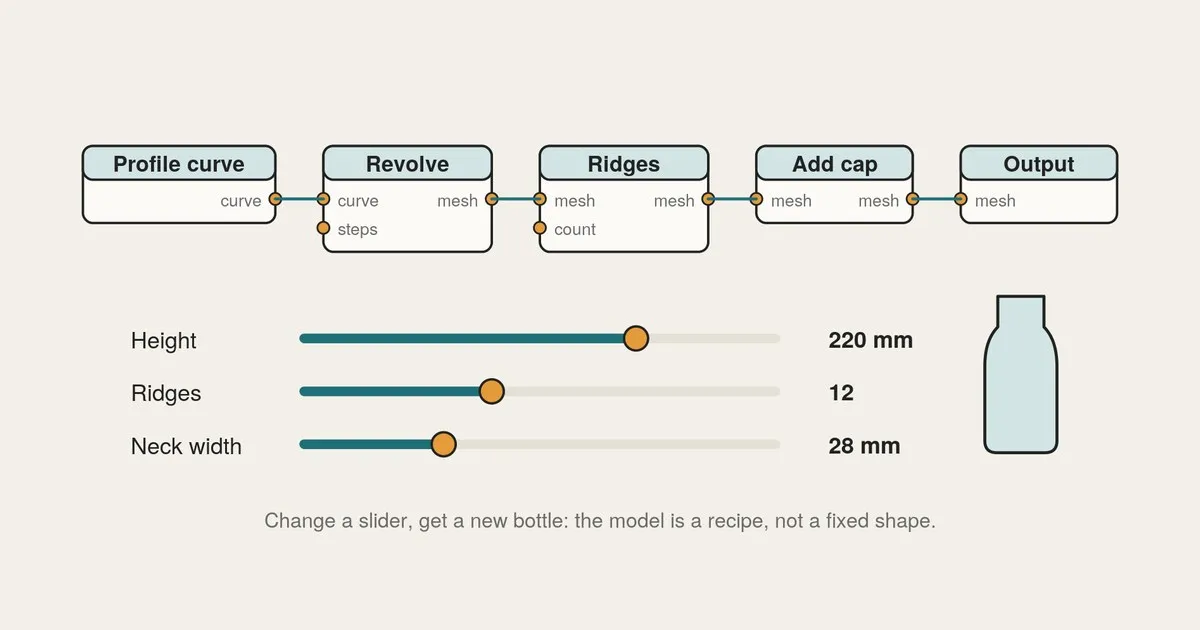
A handmade model is an answer; a procedural model is a recipe. When the client says “make the bottle 20 % taller, add three more ridges and make five color variants”, an answer must be rebuilt; a recipe changes a number. Procedural thinking is also the entrance to Houdini’s real power and to the author’s goal of building a generator of buildings.
Key points
- A handmade model is an answer; a procedural model is a recipe that changes with a number.
- Nodes pass geometry and attributes from left to right.
- Expose only the few parameters that a person really needs to change.
- Be procedural when there are variations, repetition or late changes.
Model as a Recipe
- Parameters: The numbers that control the result: height, radius, ridge count, seed.
- Pipeline of operations: Create → transform → copy/instance → combine → output. The order is part of the design.
- Non-destructive: Every step stays editable. You can insert a step in the middle.
- Reuse: The same recipe with different parameters produces a family of models.
- Debugging: Inspect the geometry after each node; find where the data goes wrong.
Geometry Nodes (Blender)
- Node groups: A reusable graph with inputs (the sliders) and outputs.
- Fields: Values evaluated per element (point, face) — for example “random per instance” or “height by position”.
- Instances: Geometry repeated without copying the data.
- Typical tasks: Scatter objects, arrays along curves, procedural railings, bolts and panel details, random variation, bevel/inset patterns.
- Realize Instances: Converts instances into real mesh when a later step needs it. Do it last, because it multiplies memory.
SOPs (Houdini)
- SOP (Surface Operator): A node working on geometry. A SOP network is the recipe.
- Attributes: Everything is data on points, vertices and primitives. Nodes read and write attributes, so a color, a random value or a group can control a later step.
- Core nodes: Box/Sphere/Tube, Transform, Copy to Points, Scatter, Boolean, PolyExtrude, Merge, Group, Attribute Wrangle, For-Each.
- HDA (Houdini Digital Asset): Package a network into a reusable asset with its own interface.
- Why Houdini for this: Arrays of millions of items, rules, loops and simulations coexist in one procedural system.
Patterns of Procedural Work
- Scatter: Distribute many items over a surface or volume, with random scale and rotation and avoidance of overlap.
- Array / repeat: Evenly spaced copies along a line, curve or grid.
- Rule-based: If this condition, do that (every third window is a balcony, corners get a pillar). This is the core of building generators.
- Iteration / loop: Repeat an operation many times, feeding the result back in (extrude a floor ten times).
- Variation: Seed values drive controlled randomness; the same seed always gives the same result, so a design can be saved and reproduced.
When to Be Procedural
- Yes: Many similar objects, designs that will change, family of products, background crowds of objects, scenes that must be easy to modify.
- No: A single hero model with unique shapes; the time to build the recipe exceeds the time to model by hand.
- Hybrid: Model the hero by hand, make its surroundings procedural. Most production work is hybrid.
In the tools
- Blender: Geometry Nodes workspace; the Spreadsheet editor shows attribute data per point/face; Node Group Assets to reuse trees across files.
- Houdini: SOP network view, Geometry Spreadsheet, Parameter Interface editor for a HDA, Wedge tool to see many parameter variants.
- Test: Build the same tree (a row of columns with random heights) in both programs and compare how each handles data.
- Unreal Engine 5: The PCG (Procedural Content Generation) framework applies the same ideas to scattering and layout inside a level.
Common mistakes
- Over-building a recipe for something done once.
- No parameters exposed; the tool cannot be reused.
- Realizing instances too early, filling memory.
- Unnamed nodes and a tangle of connections.
- Randomness without a seed: results change every time.