Polygons and Topology: a practical CGI guide
A mesh is built from vertices, edges and faces. Quads subdivide cleanly; triangles are fine on flat, rigid parts.
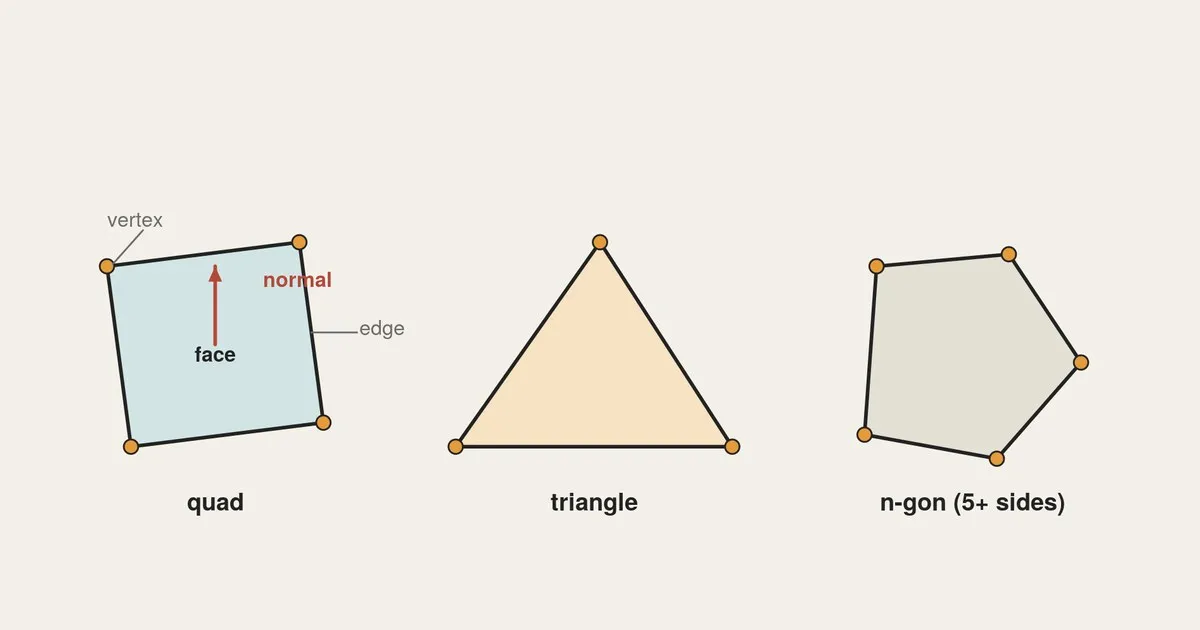
Nearly every object you will ever render is made of polygons. How the polygons are arranged — the topology — decides how smoothly a surface subdivides, how it deforms when animated, how well it takes a texture, and how fast it renders. Learning to read a mesh is as basic as learning to read a sentence.
Key points
- A mesh is built from vertices, edges and faces. Quads subdivide cleanly; triangles are fine on flat, rigid parts.
- A manifold mesh is closed and watertight: every edge has exactly two faces.
- Place poles (vertices with 3 or 5+ edges) away from highlights and joints.
- Choose density by what the camera sees; use levels of detail for distance.
Anatomy of a Mesh
- Vertex: A point in space.
- Edge: A line connecting two vertices.
- Face (polygon): A closed loop of edges. A triangle has 3, a quad 4, an n-gon 5 or more.
- Normal: A vector perpendicular to a face or vertex that tells the renderer which way the surface points. Flipped normals make a face look black or invisible.
- Winding order: The order of vertices around a face decides which side is the front.
- Manifold mesh: Every edge is shared by exactly two faces: a closed, watertight surface. Non-manifold geometry (an edge with three faces, loose vertices) breaks booleans, simulations and 3D printing.
- Poly count: The number of faces. Always count in triangles when comparing across programs, because every renderer converts to triangles in the end.
Why Quads
- Quads subdivide predictably: Each quad splits into four quads, so the surface stays regular.
- Quads make edge loops: A continuous ring of edges around a form. Loops let you select, move and add detail with control.
- Triangles are not forbidden: They are fine on flat surfaces, hidden areas and game models. The rule is to avoid them on curved, deforming or subdivided surfaces.
- N-gons: Acceptable on a flat face that will never deform or subdivide (a flat panel), but they cause shading and subdivision errors elsewhere.
- Poles: A vertex with 3 or 5+ edges. They are unavoidable; place them on flat or low-visibility areas, never on a highlight or a joint.
Edge Flow and Supporting Loops
- Edge flow: Edges should follow the form’s curvature and the lines of deformation (around an eye, along a muscle, around a bottle’s neck).
- Subdivision surface (SubD): An algorithm that smooths a low-poly cage into a smooth surface (Catmull-Clark). The model you build is the cage; the smooth surface is the result.
- Supporting (holding) loops: Extra edge loops placed close to an edge to keep it sharp after subdivision. Closer loops = tighter edge. Distance, not number of loops, controls sharpness.
- Creases: A per-edge value that sharpens an edge without extra loops (a faster alternative to support loops).
- Rule of thumb: Build the lowest density that holds the shape; add loops only where the form needs them.
Density, Level of Detail and Budgets
- Uniform density: Faces should be about the same size on a surface so shading, UV and sculpting are even.
- Budget by purpose: A background prop: low. A hero packshot: as high as needed, but not millions of unseen faces.
- LOD (levels of detail): Several versions of a model at different density for real-time engines.
- Instancing: Reuse one mesh many times without copying the data.
Mesh Hygiene
- Normals: Check them (face orientation overlay) and recalculate outside.
- Scale applied: A mesh with a scale of 1, 1, 1 and rotation applied avoids bad bevels, modifiers and physics.
- Delete hidden geometry: Interior faces and duplicate vertices produce artifacts.
- Merge by distance to remove doubles; clean up loose elements.
- Naming and pivots: Name the object and set its pivot at a sensible point.
In the tools
- Blender: Edit Mode (vertex/edge/face),
Ctrl+Bbevel,Ctrl+Rloop cut, Subdivision Surface modifier, edge Crease (Shift+E), overlays for Face Orientation and Statistics; Mesh → Clean Up tools. - Unreal Engine 5: Nanite renders very dense static meshes without hand-made LODs; anything that deforms or needs clean UVs still needs good topology. The Static Mesh Editor shows triangle counts and LODs.
- Check tools: Blender 3D Print Toolbox add-on (non-manifold check); the Static Mesh Editor statistics in Unreal Engine.
Common mistakes
- Starting with high density and no clear form.
- Triangles and n-gons on curved surfaces that will be subdivided.
- Poles on a highlight.
- Unapplied scale and negative scale.
- Interior and duplicate faces left in the mesh.