UV: a practical CGI guide
UV mapping unfolds a 3D surface onto a flat image. Hide seams where the camera rarely looks.
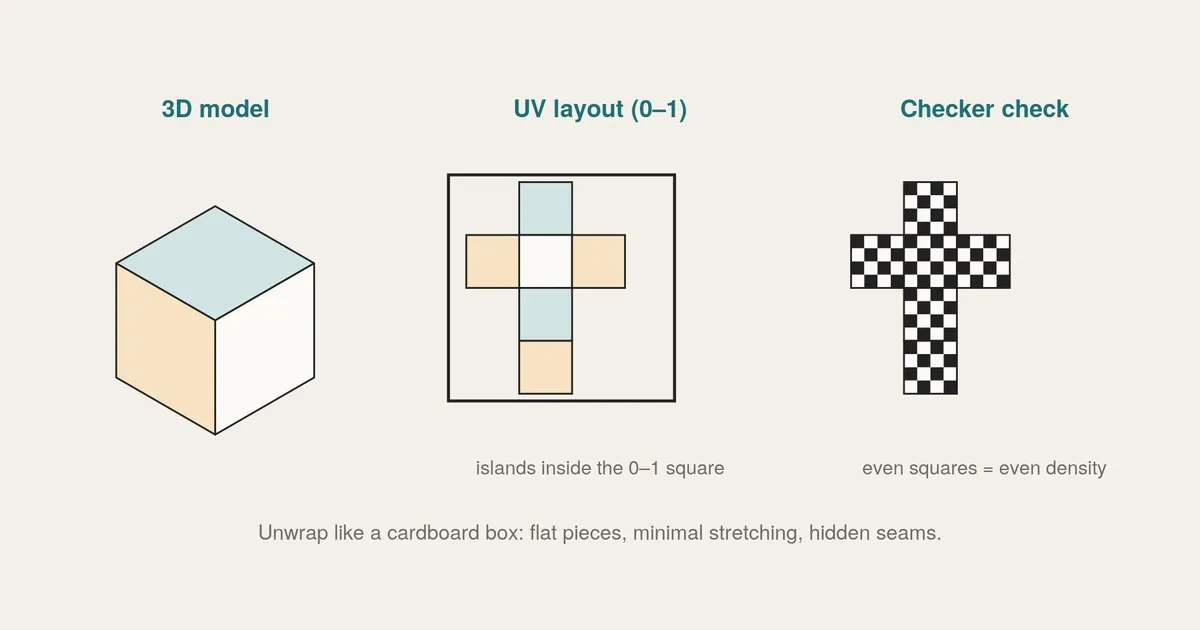
Textures are flat images; models are 3D. UV mapping is the unfolding that tells every surface point where to read the image. Bad UVs show as stretched textures, visible seams and blurry or pixelated areas that no shader tweak can repair. Good UVs are invisible, which is the point.
Key points
- UV mapping unfolds a 3D surface onto a flat image. Hide seams where the camera rarely looks.
- Texel density = texture pixels ÷ meters of surface. 4096 px over 0.5 m = 8192 px/m.
- Keep density consistent between objects seen at the same distance.
- UDIM tiles (1001, 1002, …) give hero assets more resolution than one image can.
The UV Idea
- UV space: A 2D coordinate system (U horizontal, V vertical) from 0 to 1. Each vertex has a UV coordinate in addition to its 3D position.
- UV island: A connected patch of faces unfolded flat.
- Seam: An edge where the surface is cut so it can unfold. Seams are where the texture is allowed to be discontinuous.
- Distortion: Flattening a curved surface always distorts something. The goal is to keep stretching low where the camera looks.
- Checker test: Apply a checkerboard texture; squares should look square and equal in size everywhere.
Unwrapping Method
- Plan the seams: Hide seams in natural corners, under overlaps, at hard edges or on the back. A seam across the front of a hero object is a mistake.
- Project or unwrap: Cylindrical projection for bottle bodies; planar for flat panels; automatic Smart UV for background props; manual Unwrap for hero assets.
- Straighten: Align islands to horizontal and vertical when the texture has a pattern (text, wood grain).
- Pack: Arrange islands to fill the 0–1 square with small gaps (padding) so bleeding does not cross islands.
- Consistency: All objects in a scene should have similar density, or a texture will look sharp on one object and soft on another.
Texel Density
- Texel: One pixel of a texture.
- Texel density: Texels per meter of surface. A table at 512 px/m and a bottle at 4096 px/m will clash on screen.
- Calculation:
density = texture resolution ÷ real surface length covered by the texture. A 4096 px texture across a 0.5 m product face gives about 8192 px/m. - Target by shot: Choose density by how close the camera gets. A 4K frame with a close-up needs more than a wide shot.
- Tool: Texel-density add-ons, or a checker with a ruler texture.
UDIM and Multiple Tiles
- UDIM: A tiling system where the UV space extends beyond 0–1 along U; each tile (1001, 1002, … 1011, 1012 for the next row) carries its own image.
- Why: One 8K image can’t give enough detail for a hero asset; several 4K tiles can.
- File naming:
name.1001.exr,name.1002.exr, with the tile number in the name. - Where it is used: Film and advertising hero assets, characters, vehicles. Real-time games prefer atlases and trim sheets.
- Cost: Memory scales with tiles. Use only where the camera sees detail.
Alternatives to Classic UV
- Triplanar / box projection: Projects a texture from three axes using the world or object position. Fast for terrain, rocks and background props; no UV work, but seams in blends and no texture painting by hand.
- Procedural textures: Generated from position, no UVs required.
- Ptex / per-face textures: Stores a small texture per face; no UVs but needs renderer support.
- Vertex colors / attributes: For flat colors and masks.
- Decal projection: A texture projected onto a surface for labels and logos.
In the tools
- Blender: UV Editing workspace; Mark Seam (
Ctrl+E), Unwrap, Smart UV Project, Pack Islands, UV Sync Selection; the UV Stretch overlay; UVPackmaster or built-in packing improvements. - Unreal Engine 5: The Static Mesh Editor shows every UV channel; a lightmap UV (channel 1) can be generated on import.
- Photoshop: Export the UV layout as a PNG and place it as the top layer when painting a texture by hand.
- Outside: RizomUV (fast and precise unwrapping), Substance Painter UV tile controls.
Common mistakes
- Seams across the most visible face.
- Overlapping islands in a texture that is painted or baked.
- Different density across parts of one asset.
- Zero padding: colors bleed across islands.
- Stretched UVs patched with a shader.