PBR: a practical CGI guide
A surface reflects, scatters, absorbs or transmits light, and never returns more than it receives.
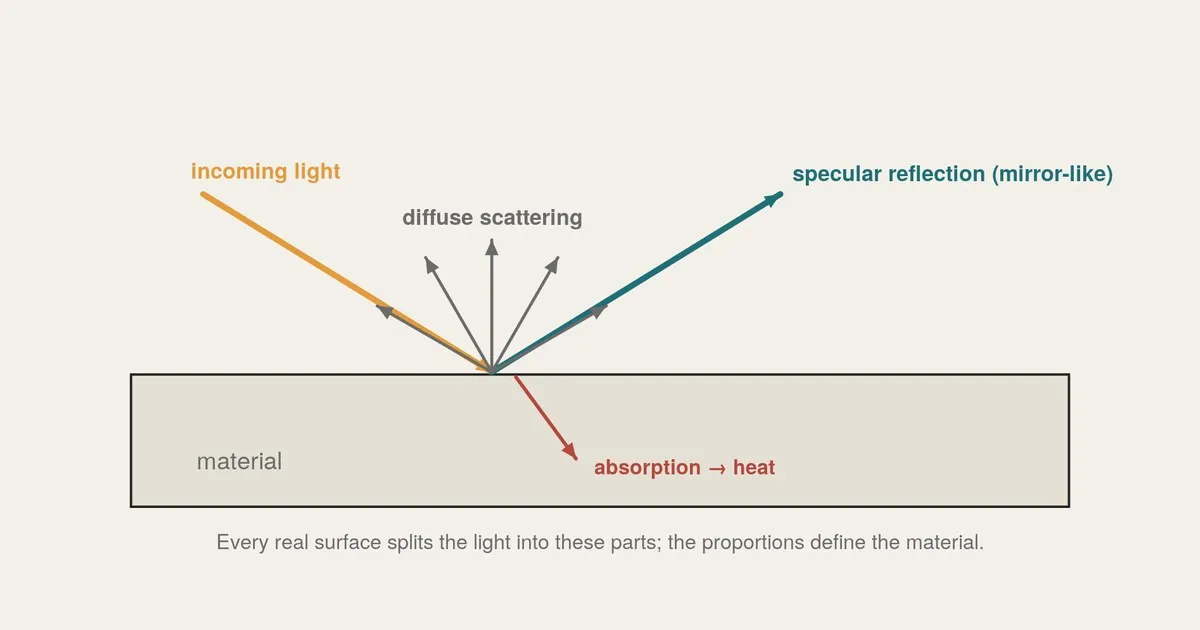
Physically based rendering (PBR) means materials are described by measurable properties, not by tricks tuned for one light. A PBR material that looks right in a neutral studio also looks right in a sunset or a night street. That is why every modern renderer and every texture library uses it, and why this article continues straight from the physics.
Key points
- A surface reflects, scatters, absorbs or transmits light, and never returns more than it receives.
- Non-metals reflect 2–5 % head-on, without color:
F0 = ((n − 1) ÷ (n + 1))²; glass (IOR 1.5) = 4 %. - Metals reflect 50–100 % head-on, with color. Metalness is 0 or 1, rarely in between.
- Keep albedo between about 3 % and 90 % in linear: charcoal ≈ 4 %, fresh snow ≈ 80–90 %.
- IOR: air 1.0, water 1.33, glass 1.5, diamond 2.42.
What Light Does at a Surface
- Reflection (specular): Light bounces off the surface at the mirror angle. It carries the color of the light (for dielectrics) or of the metal.
- Diffuse: Light enters a thin layer, scatters and exits in all directions, tinted by the material’s color.
- Transmission (refraction): Light passes through (glass, water) and bends by the index of refraction (IOR).
- Absorption: Light energy converted to heat; defines the darkness and color of a material (Beer–Lambert law in tinted glass and liquids).
- Subsurface scattering (SSS): Light enters, scatters inside and exits elsewhere: skin, wax, milk, marble, leaves.
- Energy conservation: A surface cannot reflect more light than it receives. What is reflected is not available for diffuse.
- Reciprocity: Swapping the light and the camera direction gives the same result; path tracers rely on it.
The BRDF and Microfacets
- BRDF: A function that says how much light leaves in each direction for each incoming direction.
- Microfacet model: A surface is a field of microscopic mirrors. Their orientation spread is the roughness. Low roughness → tight, bright highlight; high roughness → wide, dim highlight.
- Roughness is not shininess: Energy is conserved; a rough surface spreads the same light over a larger highlight.
- Anisotropy: Microfacets stretched in one direction (brushed metal, hair, CD surface): the highlight becomes a streak across the grain.
- Geometry and shadowing terms: Microfacets block each other at grazing angles; this darkens edges slightly and is built in.
Fresnel and the Two Families of Materials
- Fresnel effect: Every surface becomes more mirror-like at grazing angles. Look across a table and it reflects the window.
- F0: Reflectance at normal incidence (looking straight on).
- Dielectrics (non-metals): F0 is low and colorless: roughly 2–5 % for most plastics, glass and water. IOR 1.5 gives F0 ≈ 4 %.
- Formula:
F0 = ((n − 1) ÷ (n + 1))², where n is the IOR. Water (1.33) gives 2 %; glass (1.5) gives 4 %; diamond (2.42) gives 17 %. - Metals: F0 is high (about 50–100 %) and colored: gold looks yellow in the reflection itself; copper looks reddish.
- Metalness workflow: One map says “dielectric” (0) or “metal” (1). Values between are for transitions only (dust or paint over metal), not for “half-metal”.
- Specular workflow: Alternatively, separate specular color; more control but easier to break the physics.
- Albedo (base color): For dielectrics, the diffuse color; for metals, the reflectance color. Keep albedo between about 3 % and 90 % in linear: pure black or pure white do not exist in nature. Charcoal is about 4 %, fresh snow about 90 %.
Transparent Materials
- IOR values (approximate): air 1.0, water 1.33, common plastic 1.45–1.5, glass 1.5, diamond 2.4.
- Refraction and thickness: The apparent size and position of an object seen through glass depend on thickness and IOR.
- Tinted transparency: Color comes from absorption over distance, not from a flat tint at the surface. Thick liquid is darker than a thin film.
- Interfaces: Real glass with liquid has air → glass → liquid boundaries. A correct model matches this.
- Dispersion: IOR changes with wavelength; spreads white light into colors (diamond fire). Optional and costly.
- Thin-walled approximations: For bubbles and thin plastic films, treat the object as a single surface rather than a solid volume.
Reference Values and Measurement
- Measured databases: Published tables of IOR, albedo and metal F0 values.
- Metal F0 (linear RGB, approximate): silver 0.95 / 0.93 / 0.88; aluminum 0.91 / 0.92 / 0.92; gold 1.00 / 0.71 / 0.29; copper 0.95 / 0.64 / 0.54; iron 0.56 / 0.57 / 0.58.
- Albedo of common surfaces (linear, approximate): fresh asphalt 0.04–0.05; charcoal 0.04; green grass 0.2–0.25; concrete 0.3–0.4; dry sand 0.35–0.45; white paint 0.8; fresh snow 0.8–0.9.
- Gray card and color checker: Photograph your reference material beside them and compare the render with the same card.
- Neutral test: Always test a material under a neutral HDRI and a gray sphere before judging it in the final lighting.
In the tools
- Blender: Principled BSDF: Base Color, Metallic, Roughness, IOR, Transmission Weight, Subsurface Weight, Specular IOR Level, Anisotropic, Coat. Glass BSDF and Volume Absorption for colored liquids.
- Unreal Engine 5: The material’s main node has Base Color, Metallic, Specular, Roughness, Normal. Specular 0.5 is the default and equals F0 ≈ 4 %: leave it for most non-metals.
- Check: The Material Preview of any program is not the final render; always verify with the renderer you deliver in.
Common mistakes
- Pure white or pure black albedo.
- Partially metallic materials used to fake “shine”.
- Roughness 0 for everything: it is a perfect mirror and almost never exists.
- Colored glass made by tinting the surface rather than absorbing in volume.
- Judging materials only in the viewport.