Product Look Development: a practical CGI guide
Judge every material in one neutral rig: an 18 % gray sphere, a chrome sphere, a color checker and a neutral HDRI.
“lookdev” is the discipline of making a material look right — against reality and under all lighting — before the final shot. In advertising the same bottle may appear in twenty shots; if the glass and the liquid are wrong, they are wrong twenty times. this article gives a method and a recipe for each material class you will meet in commercials.
Key points
- Judge every material in one neutral rig: an 18 % gray sphere, a chrome sphere, a color checker and a neutral HDRI.
- Glass needs real thickness and IOR; liquid inside glass needs its own volume and IOR.
- Stress-test materials under hard, soft, back and colored light.
- A turntable of 100–150 frames is the standard lookdev deliverable.
The Lookdev Method
- Collect reference of the real object under neutral light.
- Build the neutral rig: Gray sphere (18 %), chrome sphere, color checker, a turntable and a neutral HDRI or three-point studio. The same rig for every asset.
- Match the reference: Compare render and photo side by side at the same angle and exposure.
- Stress test: Check under hard light, soft light, backlight, an environment with strong colors and a dark room. A good material works everywhere.
- Approve and lock: Save the material as an asset; version it.
Glass and Liquid in Glass
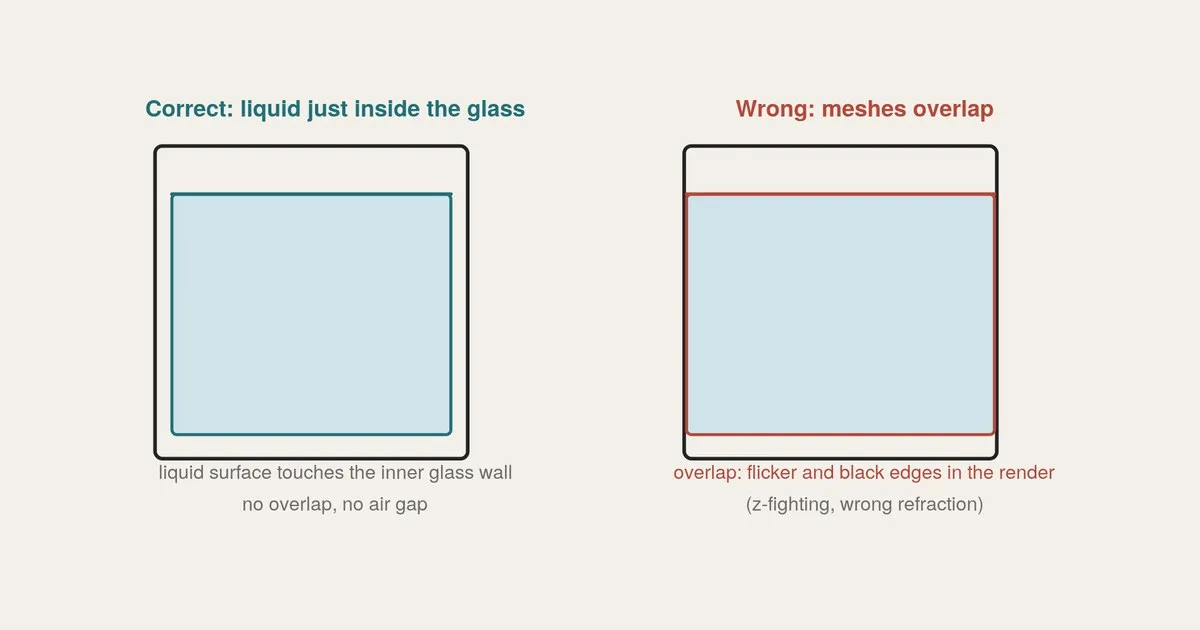
- Model thickness: Glass has real wall thickness and the liquid is a separate mesh that fits inside it.
- Interfaces: Air → glass → liquid. A tiny gap or overlap breaks refraction. Common practice: the liquid slightly overlaps the glass’s inner surface and the renderer is told which material has priority (nested dielectrics / material priority).
- IOR: Glass about 1.5; water about 1.33; sugar syrups higher.
- Color: Absorption over thickness. Thick liquid = darker; a thin edge stays light.
- Caustics and noise: Glass is hardest on path tracers. Use light-path limits, clamp, denoise, and fake shadows where physically correct caustics are not needed.
- Surface details: Fingerprints, condensation, bubbles and meniscus sell the realism.
Metal and Plastic
- Metal: Metalness = 1, roughness sets polished vs. brushed; the color is its F0. Metal reflects its environment, so a good HDRI and clean geometry are everything. Anisotropy for brushed finishes.
- Anodized or coated metal: A clear coat over metal; separate coat layer.
- Plastic: Dielectric; roughness variations produce molded vs. soft-touch finish; subtle bump from mold texture; parting-line detail.
- Chrome and mirror: Very low roughness; show whatever is around them, so what is around must be designed.
Fabric, Leather and Soft Materials
- Fabric: Sheen lobe (light scattering off fibers) at grazing angles; fine weave pattern via normal/displacement; fuzz on edges.
- Leather: Grain pattern in bump/normal, roughness variation, slight coating, wear on edges.
- Rubber and silicone: Diffuse with low specular and very slight SSS; dust pickup.
- Scale: Weave and grain must match real size.
Cosmetics, Food and Translucent Materials
- SSS materials: Wax, cream, milk, gummy candy, skin: subsurface weight and radius (scatter distance) define the look; thin parts glow when backlit.
- Liquids and gels: Volume absorption, scatter and a slight surface sheen; viscosity is seen in the shape.
- Food: Moisture and highlights sell freshness. Reference is essential: real food has specific gloss, crumbs, steam and imperfection.
- Cosmetics: Pearl, shimmer, metallic flakes — thin-film interference or flake layers; color accuracy matters.
- Packaging details: Foil, embossing and paper fibers.
Turntable and Lookdev Deliverables
- Turntable: A 360° rotation under neutral and studio light, 100–150 frames, plus a wire/clay version. Used for client approval and showreel.
- Material sheet: Names, values, texture sets, version.
- Approval: Present the render beside the real reference photo. Judgments are easier against reality than against opinion.
In the tools
- Blender: Principled BSDF layers (Coat, Sheen, Subsurface, Transmission); Light Paths limits; Asset Browser to store materials; Material Preview for fast, Cycles for approval.
- Unreal Engine 5: The Path Tracer gives reference-quality images for lookdev approval; the newer Substrate system builds layered materials (check its status in your version); the HDRI Backdrop plugin gives a quick neutral studio.
- Outside: Substance Sampler/Designer for material sources; Marmoset Toolbag for quick lookdev viewing.
Common mistakes
- Judging only in one HDRI.
- Liquid and glass meshes that perfectly coincide or have gaps.
- Tinted glass by surface color rather than volume absorption.
- Fabric with no sheen and no weave.
- Approving a look without comparing with the real object.