Shading Networks: a practical CGI guide
A shader network combines inputs, math, textures and masks into one material.
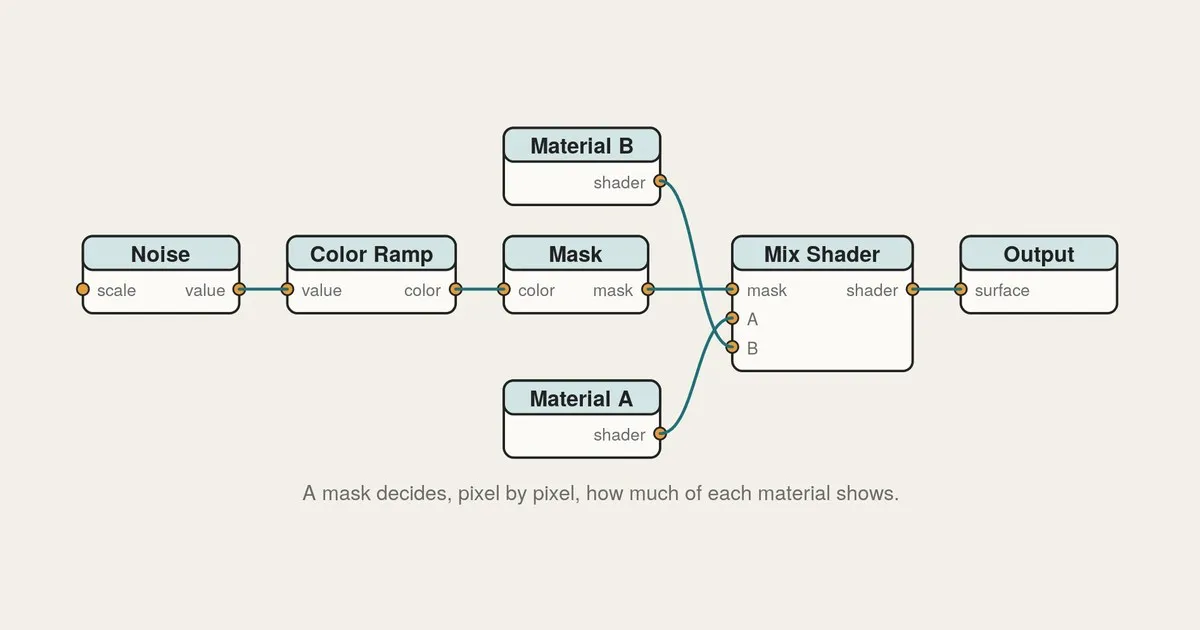
Real surfaces are never uniform: they have scratches, fingerprints, dust, wear on edges and subtle color variation. A flat parameter set looks like plastic toys. A shading network builds that variation from masks, noise and geometry data — and does it procedurally, so it adapts to any model.
Key points
- A shader network combines inputs, math, textures and masks into one material.
- Layer materials with masks: base, variation, wear, dirt, detail.
- Wear lives on edges, dirt in cavities: use curvature and occlusion as masks.
- Name and group nodes so another artist can read the network.
Building Blocks
- Textures as nodes: Noise, Voronoi (cells), gradients, waves, checkers; they generate values from position (no UVs needed with object/world coordinates).
- Color ramp / remap: Convert a gray value into other values — the most used node in shading. It controls contrast, thresholds and colors from one mask.
- Math nodes: Add, multiply, power, clamp, map range. Multiply masks together; add them to combine.
- Mix / layer: A mask decides how much of material B is blended into material A.
- Coordinates: UV, object, world, generated; choose by how the texture should move with the object.
- Scalar vs. color: Roughness, metalness and masks are scalar data (single numbers), not colors.
Masks and Layering
- Mask: A grayscale map used as a control. White = apply, black = do not.
- Curvature mask: Highlights convex edges: paint wear and exposed metal on edges.
- Ambient occlusion mask: Darkens crevices: dirt and dust gather in corners.
- Position/height mask: Gradients by world height: dust on top, wetness at the bottom.
- Noise mask: Breaks uniformity: patchy fingerprints, variation in finish.
- Layer stack: Base material → paint → wear → dirt → fingerprints/dust. Order matters; the last layer sits on top.
- Small variations: Roughness variation and slight bump matter more than strong color changes.
Wear and Imperfection
- Why imperfection: Perfect surfaces look fake because real ones are never perfect. But too much damage is also wrong for new products — choose by story.
- Typical imperfections:
- Fingerprints, smudges and dust: variation in roughness and a slight oily gloss.
- Edge wear: curvature-masked reveal of the base metal.
- Scratches: thin lines of lighter value and different roughness, strongest where light grazes.
- Fabric: micro-fiber displacement and sheen.
- New vs. aged: A brand-new product still has micro scratches and dust; an advertising “perfect” product is polished to look new but not flawless.
- Reference rule: Imperfections should look like observations, not like presets.
Shader Network Hygiene
- Group repeated logic into reusable node groups.
- Name nodes and frames: A network you cannot read is a network you cannot change.
- Expose parameters: Roughness amount, dirt strength, wear amount, color variation at the top level.
- Separate color and data paths: Never pass a color through a data node without conversion.
- Test with a neutral light and a turntable so the material works from every angle.
- Performance: Complex procedural networks cost render time; bake to textures when a material is final.
In the tools
- Blender: Shader Editor: Noise, Voronoi, Color Ramp, Map Range, Geometry → Pointiness (curvature) and Ambient Occlusion nodes, Mix Shader, Group Nodes; Material Output with Cycles.
- Unreal Engine 5: Material Functions reuse node groups; Material Instances change parameters without recompiling; Lerp nodes layer materials through a mask.
- Outside: Substance Designer builds procedural textures as exportable materials.
Common mistakes
- Using one image as the only source of variation.
- Strong, uniform noise on everything.
- Wear that does not follow the form (curvature).
- Color images used as masks without conversion.
- Giant tangled node trees with no groups.