Color as a Number: a practical CGI guide
Light adds up only in linear values. Render and composite in linear float; encode only for display and delivery.
Most “my render looks washed out / too contrasty / different on the client’s screen” problems are color-management problems, not lighting problems.
Key points
- Light adds up only in linear values. Render and composite in linear float; encode only for display and delivery.
- 18 % gray is 0.18 in linear and about 0.46 in sRGB: the same light, different numbers.
- Color textures are decoded from sRGB; data textures (roughness, normal, masks) are Non-Color.
- A view transform (AgX, ACES, Filmic) compresses scene values from 0–100+ into the 0–1 of a screen.
- One stop = twice the light. D65 white is about 6,500 K.
Values, Channels and Bit Depth
- Channel: One number per pixel per component: R, G, B, and A (alpha, coverage/transparency).
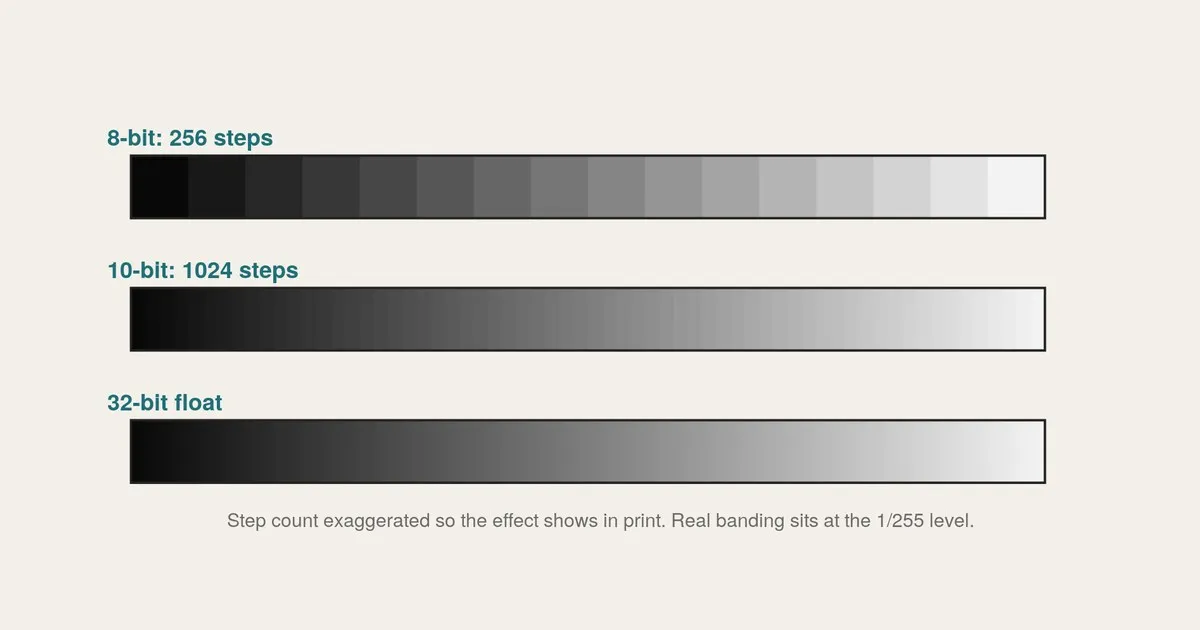
- Integer encoding: 8-bit stores 0–255, 10-bit 0–1023, 16-bit 0–65,535. White is the maximum; there is nothing brighter.
- Floating-point encoding: 16-bit half and 32-bit full float store fractions and values far above 1.0. A sun reflection can be 50.0; a deep shadow 0.0003. Nothing is clipped.
- Scene-referred values: Numbers proportional to real light in the scene. Float renders are scene-referred.
- Display-referred values: Numbers prepared for a particular screen, limited to its range (0–1). JPEGs and PNGs for the web are display-referred.
- Rule: Work and store masters in float, scene-referred. Convert to display-referred integer only at delivery.
Linear Light and the Transfer Function
- Linear: A value of 2.0 means exactly twice the light of 1.0. Physics of light (addition of lights, inverse-square falloff, blur, motion blur) is only correct in linear values.
- Transfer function (“gamma”, OETF/EOTF): A non-linear curve that spends more code values on dark tones, where human vision is most sensitive. The sRGB curve is close to a power of 1/2.2.
- Why encoding exists: In 8 bits, linear storage would waste most codes on highlights and band the shadows. Encoding is a storage trick, not an artistic look.
- Middle gray: An 18 % reflectance card is about 0.18 in linear and about 0.46 in sRGB-encoded values. Same light, different numbers.
- The linear workflow:
- Decode every color texture (albedo, base color) from its encoding to linear on input.
- Leave data textures (roughness, normal, displacement, masks) untouched — they are numbers, not colors. Mark them “Non-Color” / “Raw”.
- Render and composite in linear float.
- Apply a view transform only for display and delivery.
- Classic errors: Gamma applied twice (washed-out, gray image); roughness map treated as color (materials look wrong in a way that no slider fixes).
Color Spaces
A color space is defined by three things:
- Primaries: The exact red, green and blue that 1, 0, 0 / 0, 1, 0 / 0, 0, 1 mean. They outline the gamut — the range of colors the space can describe.
- White point: The color of R = G = B (D65 ≈ 6500 K daylight for most video and web spaces).
- Transfer function: Linear, sRGB curve, Rec.709 / BT.1886, PQ, HLG, etc.
| Space | Gamut | Typical encoding | Use |
|---|---|---|---|
| sRGB | Rec.709 primaries | sRGB curve | Web, most monitors, JPEG/PNG |
| Linear Rec.709 | Rec.709 primaries | Linear | Default working space in many 3D apps |
| Rec.709 | Same primaries | BT.1886 (≈2.4) | HD broadcast and video delivery |
| Display P3 | Wider than sRGB | sRGB curve | Apple devices, modern phones |
| Rec.2020 | Very wide | PQ or HLG | HDR and UHD delivery |
| ACEScg | Wide (AP1) | Linear | CG rendering and compositing working space |
| ACES2065-1 | Covers all visible colors (AP0) | Linear | Archive and exchange |
- Working (rendering) space: The linear space in which lights and materials are mixed. A wider working space (ACEScg) gives more natural mixing of saturated lights and colored bounce.
- Gamut mapping: Bringing colors outside the target gamut inside it without harsh clipping. Saturated brand colors (neon, deep blue, signal red) are where this shows first.
- Brand color rule: Clients give brand colors as sRGB hex or Pantone. Convert them into the working space through your color pipeline, then verify the delivered image against the original value on a calibrated screen.
View Transforms and Tone Mapping
- Problem: A scene-referred render has values from 0 to 100+. A screen shows 0 to 1. Something must compress the range.
- Plain clamp (“Standard” view): Cuts everything above 1.0. Highlights clip, bright saturated colors turn into flat cyan, magenta and yellow.
- Filmic / tone-mapping transforms: Roll off highlights smoothly and desaturate them toward white, like film and good digital cameras.
- AgX — Blender’s default view transform since 4.0.
- ACES output transforms — the industry standard in ACES pipelines.
- Display-specific transforms — the same scene prepared for sRGB monitors, Rec.709 broadcast or HDR screens.
- Look: A creative grade applied on top of the view transform (contrast, color style). Keep it separate so the look can change without re-rendering.
- Exposure: Multiplying scene values (in stops; +1 stop = ×2) before the view transform. Light the scene at a sensible exposure, as a cinematographer would.
OCIO: One Color Pipeline for All Programs
- OpenColorIO (OCIO): An open-source color-management system used by Blender, Houdini, Maya, Nuke, Substance and others. A single configuration file defines the spaces, roles and view transforms.
- Why it matters: When every program in the pipeline reads the same OCIO config, a texture painted in Substance, rendered in Houdini and composited in Nuke shows the same color everywhere.
- Roles: Named slots such as scene_linear, color_picking, data, compositing_log. Tools ask for roles, not for specific spaces.
- Practice: Choose one config per project (the program’s default or an ACES config), write it down in the project notes, and make sure every artist and every machine uses it.
HDR Images and File Formats for Color
- OpenEXR (.exr): The professional standard for renders: 16- or 32-bit float, multiple channels and layers in one file, lossless compression options (ZIP, PIZ, DWAA lossy). Linear by convention.
- HDRI: A high-dynamic-range panoramic photograph of real light (often .exr or .hdr), used for image-based lighting and for matching a live-action set.
- TIFF / PNG 16-bit: Integer textures with more levels than 8-bit; good for displacement and painted maps.
- JPEG / 8-bit PNG: Delivery and reference only; never as a render master.
- Video codecs: ProRes 4444 / 422 HQ and DNxHR for masters and editing; H.264 / H.265 for delivery to platforms.
In the tools
- Blender: Render Properties → Color Management (Display Device, View Transform: AgX / Standard / Filmic, Look, Exposure). Image texture nodes: set Color Space to sRGB for color maps and Non-Color for data maps. Save renders as OpenEXR (Half or Full float).
- DaVinci Resolve: Project Settings → Color Management: DaVinci YRGB Color Managed or ACES; set the input color space of EXR renders so they are read as linear.
- Unreal Engine 5: Works in linear with a filmic tone mapper; in each texture asset, keep sRGB on for color maps and switch it off for data maps.
- Photoshop: Edit → Color Settings and Edit → Convert to Profile; paint textures in 16 bits per channel; Image → Mode → 32 Bits/Channel opens linear EXR/HDR files, but many tools are unavailable in that mode.
- Monitors: Calibrate your display with a hardware colorimeter; on a Mac, choose the matching display profile and avoid “True Tone” and Night Shift while grading.
Common mistakes
- Judging lighting through the Standard (clamp) view and over-correcting.
- Data maps (roughness, normal, masks) marked as color.
- Mixing OCIO configs between programs or between artists.
- Approving color on an uncalibrated laptop screen with brightness and Night Shift on.
- Rendering the master as 8-bit PNG.