Pixels and Resolution: a practical CGI guide
An image is a grid of samples. Detail finer than two pixels cannot be stored and turns into aliasing; several samples per pixel fix it.
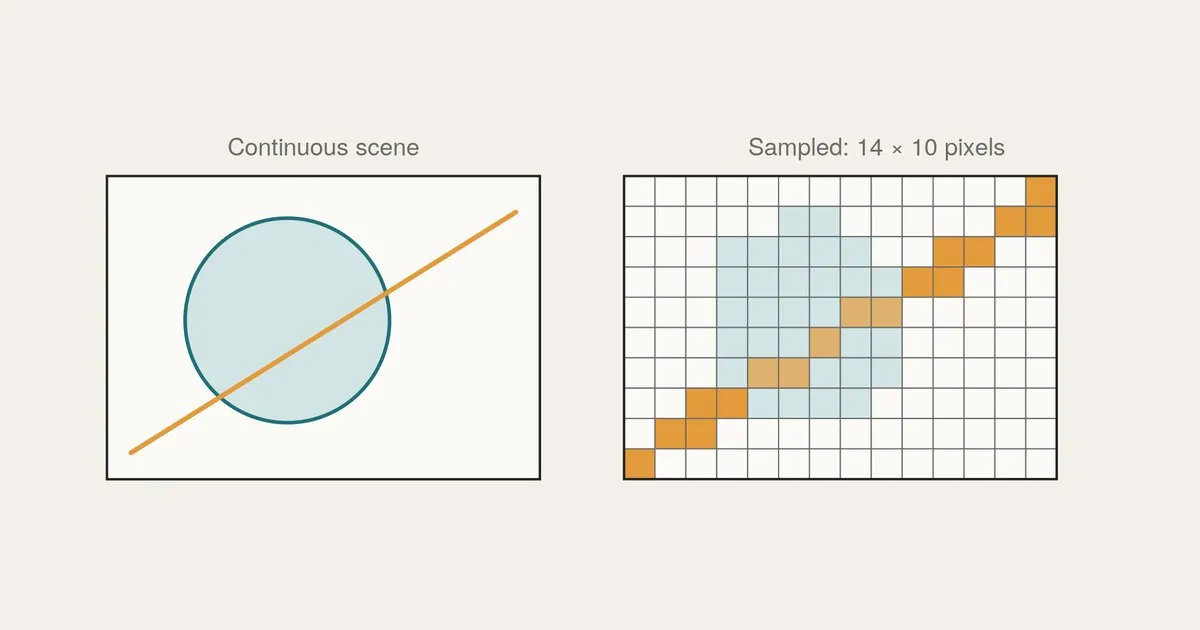
Every image a 3D artist delivers ends as a grid of numbers. Knowing how that grid is built explains three everyday problems: why edges shimmer, why a 4K render costs four times an HD one, and why one shot needs different renders for a cinema screen and a phone.
Key points
- An image is a grid of samples. Detail finer than two pixels cannot be stored and turns into aliasing; several samples per pixel fix it.
- Pixels grow with the square of the side: UHD (3840 × 2160) has four times the pixels of HD (1920 × 1080) and costs about four times the render time.
- A file has no physical size: print size = pixels ÷ PPI. 3000 px at 300 PPI = 10 inches = 25.4 cm.
- 8 bits = 256 levels per channel, 10 bits = 1,024, 16 bits = 65,536. Renders stay in float.
- Decide every delivery frame (16:9, 1:1, 4:5, 9:16) before the first render.
The Image as a Sampled Signal
- Continuous scene: In the virtual world, geometry and light are described mathematically with unlimited detail. A renderer must turn this continuous description into a finite set of values.
- Sample: One measurement of the scene at one position. A renderer shoots rays (or rasterizes triangles) and records what it finds.
- Pixel (picture element): One cell of the output grid. It is not a tiny square of color; it is a value that represents the light falling into a small area of the frame.
- Raster image: A rectangular grid of pixels, each storing one value per channel (usually red, green, blue, and optionally alpha).
- Vector image: A description of shapes as curves and fills (SVG, PDF, fonts). It is resolution-independent until it is rasterized for display.
- Sampling theorem (Nyquist–Shannon): To capture a detail without error, it must be sampled at more than twice its frequency. Detail finer than half the pixel pitch cannot be represented and turns into false patterns.
- Aliasing: The false pattern produced by under-sampling: jagged edges (“jaggies”), moiré on fine fabric or grilles, crawling and flickering edges in animation.
- Anti-aliasing: Taking several samples inside each pixel and averaging them. In a path tracer this happens naturally: every pixel receives many samples at slightly different positions.
- Pixel filter: The rule that weights samples when they are averaged (box, triangle, Gaussian, Blackman-Harris). Wider filters soften the image; narrow filters keep it crisp but can alias.
Resolution and Aspect Ratio
- Resolution: The number of pixels across × down, e.g. 1920 × 1080.
- Aspect ratio: Width divided by height. 1920 / 1080 = 1.78, written 16:9.
- Pixel count grows with the square of the side. Doubling width and height (HD → UHD) quadruples the pixels, the render time and the storage.
| Name | Resolution | Aspect | Typical use |
|---|---|---|---|
| HD (Full HD) | 1920 × 1080 | 16:9 (1.78) | Web, broadcast, previews |
| UHD (“4K” TV) | 3840 × 2160 | 16:9 (1.78) | Streaming, high-end web |
| DCI 2K | 2048 × 1080 | 1.90 | Cinema mastering |
| DCI 4K | 4096 × 2160 | 1.90 | Cinema mastering |
| Square | 1080 × 1080 | 1:1 | Social feed |
| Portrait | 1080 × 1350 | 4:5 | Social feed |
| Vertical | 1080 × 1920 | 9:16 | Stories, Reels, Shorts, TikTok |
- Advertising rule: one commercial is almost never delivered in one frame. Plan from the start which frames are needed and compose so the product survives a 16:9 → 9:16 crop.
- Overscan / render margin: Rendering a few percent wider than the delivery frame leaves room for stabilization, camera shake added in compositing, and reframing.
- Pixel aspect ratio: Modern formats use square pixels (1.0). Older broadcast and anamorphic workflows use non-square pixels; anamorphic lenses squeeze the image horizontally (commonly 2×), and it is stretched back in post.
PPI, DPI and Physical Size
- PPI (pixels per inch): Density of a display or of an image placed on a page.
- DPI (dots per inch): Density of a printer’s ink dots. People often say DPI when they mean PPI.
- A digital file has no physical size. A 3000 × 2000 image is 10 × 6.7 inches at 300 PPI, or 41.7 × 27.8 inches at 72 PPI. Only the pixel count is real.
- Print guideline: About 300 PPI at viewing distance for magazines and packaging; large billboards viewed from far away need far less.
- Screen guideline: Deliver at the native resolution of the target platform; let the platform scale down, never up.
Bit Depth at a Glance
- Bit depth: How many distinct values a channel can hold. 8 bits = 256 levels; 10 bits = 1024; 16-bit integer = 65,536.
- Floating point (16-bit half, 32-bit full): Stores values above 1.0 and very small values precisely. Renders and compositing use float; deliveries are usually integer.
- Banding: Visible steps in smooth gradients (skies, studio sweeps, glossy product surfaces) when too few levels are available. Fix with higher bit depth through the pipeline and a little noise (dither) before 8-bit delivery.
Resolution in Textures and Renders
- Texel: A pixel of a texture map. Texel density = texels per meter of surface; keep it consistent across objects that appear at the same distance.
- Power-of-two sizes (1024, 2048, 4096) are traditional for textures because GPUs and mipmaps handle them efficiently.
- Mipmaps: Pre-shrunk copies of a texture used when the surface is far from the camera, preventing texture aliasing.
- Render resolution percentage: Work at 25–50 % for look tests, 100 % only for finals. Render time drops roughly with the pixel count.
- Region render / crop: Render only the part of the frame you are judging.
In the tools
- Blender: Output Properties → Format sets resolution, percentage and frame rate. Render Properties → Sampling sets samples; Film → Pixel Filter sets the filter width.
- Unreal Engine 5: Movie Render Queue sets the output resolution and anti-aliasing (Spatial and Temporal Sample Count).
- DaVinci Resolve: Project Settings → Master Settings sets the timeline resolution; the Deliver page sets the output frame.
- Photoshop: Image → Image Size with Resample switched off changes only the PPI tag, not a single pixel.
- Everywhere: Keep a small preset list of your delivery frames so that every project starts from correct numbers.
Common mistakes
- Judging sharpness on a downscaled preview, then being surprised by noise at 100 %.
- Rendering finals at the wrong frame and reframing later, losing quality.
- Saving the master render as 8-bit JPEG or PNG and discovering banding in grading.
- Confusing DPI settings in an image file with real resolution.