Design and Composition: a practical CGI guide
Every image needs one focal point. Build hierarchy with contrast, size, sharpness and position.
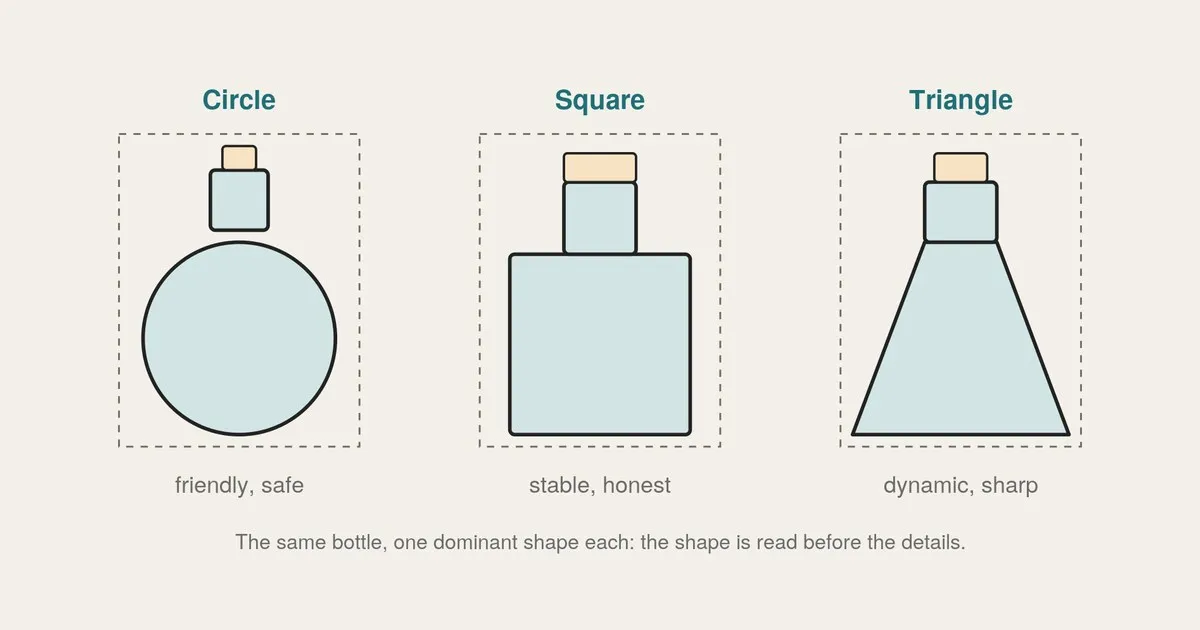
In CG nothing is accidental: every object, its place and its size are your decision. That freedom is why empty, cluttered or unfocused CG images are so common. this article gives a vocabulary for deciding.
Key points
- Every image needs one focal point. Build hierarchy with contrast, size, sharpness and position.
- Shapes carry meaning: circles feel soft, squares stable, triangles dynamic.
- Empty space is part of the composition, not wasted area.
- Compose so that the product survives every crop from 16:9 to 9:16.
The Language of Shape
- Basic shapes carry meaning: Circles read as soft, friendly, complete; squares as stable, rational, heavy; triangles as dynamic, sharp, directional.
- Silhouette: The outer shape alone, filled black. A strong product or character reads instantly in silhouette. Test every design this way.
- Shape contrast: One different shape among similar ones draws the eye (a round fruit among cubes).
- Straight vs. curved: Straight lines suggest precision and technology; curves suggest comfort and nature. Brand identity usually picks one family.
Hierarchy and Focal Point
- Hierarchy: The viewer must know in one second what is first, second and third.
- Tools of emphasis: Contrast of value, contrast of color, size, sharpness (depth of field), isolation, and leading lines.
- One hero: In an advertising frame, the product is the hero. Anything that competes with it — a bright prop, a sharp background — must be reduced.
- Squint and blur tests: Blur the image heavily. The hero should still be the first thing visible.
Structure of the Frame
- Rule of thirds, golden ratio, diagonals: Guides, not laws. They help place the hero off-center for tension or center it for authority.
- Symmetry: Suits luxury, calm and engineered products. Breaking symmetry slightly makes it feel alive.
- Leading lines: Lines in the scene that guide the eye to the hero — table edges, light beams, a ribbon of liquid.
- Framing within the frame: Foreground objects, windows, shadows enclosing the hero.
- Depth layers: Foreground, midground, background. Three layers make a flat frame feel three-dimensional.
Rhythm, Balance and Negative Space
- Rhythm: Repetition of elements at regular or varied intervals creates movement.
- Balance: A small bright element can balance a large dark one. Visual weight depends on size, value, saturation and position.
- Negative space: Empty areas that give the hero room. In advertising it is also where the client’s text, logo and legal line will go. Plan it from the start.
Composing for Multiple Formats
- Problem: A single 3D scene often has to be delivered in several ratios.
- Method: Keep the hero inside the center-safe zone that survives every crop, and set the camera wide enough to crop. Render the widest version once and cut the others from it. If the hero must change size between formats, give each format its own camera.
- Check: Overlay all four crops on the layout before the final render.
In the tools
- Blender: Camera → Viewport Display → Composition Guides (thirds, golden, diagonals); Passepartout to darken outside the frame; Safe Areas. Use Output Properties presets for each ratio.
- Photoshop: The Crop tool overlays (rule of thirds, golden ratio, diagonal, triangle) and Artboards let you test several formats side by side.
- DaVinci Resolve: Timeline → Output Blanking and View → Safe Area preview a wide or vertical crop over the edit.
- Layout in 2D: Quickly paint over a viewport screenshot to test hierarchy before committing to modeling and lighting.
Common mistakes
- Putting the hero dead center with nothing around it, by default.
- Props that are brighter or sharper than the product.
- Ignoring the client’s text space.
- Cropping vertical versions from a horizontal frame without checking.
- Using every guide at once.