The Virtual Camera: a practical CGI guide
Field of view = 2 · atan(sensor width ÷ (2 · focal length)). On 36 mm: 24 mm ≈ 74°, 50 mm ≈ 40°, 85 mm ≈ 24°.
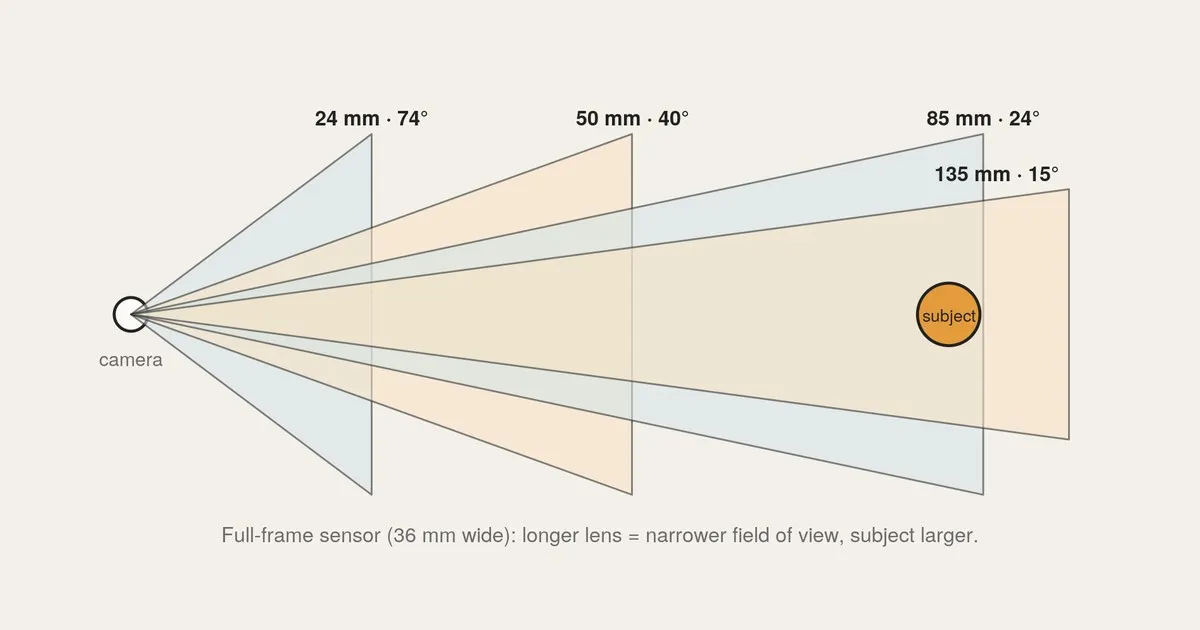
A virtual camera is a mathematical model of the real lens and sensor. If you set it with the same parameters, the image will have the same field of view, depth of field and exposure as a photograph. That match matters when CG must sit inside live action and when a client says “shoot it like a 85 mm”.
Key points
- Field of view = 2 · atan(sensor width ÷ (2 · focal length)). On 36 mm: 24 mm ≈ 74°, 50 mm ≈ 40°, 85 mm ≈ 24°.
- Perspective depends only on camera position; the lens only crops.
- EV = log₂(N² ÷ t): sun ≈ 15, overcast ≈ 12, office ≈ 8. One EV = twice or half the light.
- Close product shots have millimeters of depth of field: 100 mm at f/8 and 50 cm ≈ 12 mm.
- Match the real camera: sensor, focal length, f-stop, distortion.
Focal Length, Sensor and Field of View
- Field of view (FOV): Determined by focal length and sensor width.
- Formula:
FOV = 2 · atan( sensor width ÷ (2 · focal length) ). - Example: A 36 mm-wide sensor at 50 mm gives about 40°; at 24 mm about 74°; at 85 mm about 24°.
- Crop factor: A smaller sensor gives a narrower FOV for the same focal length. To match a real camera, set both the sensor size and the focal length.
- Common sensor sizes: full frame 36 × 24 mm; Super 35 about 24.9 mm wide (the height depends on the camera and format); APS-C about 23.5 × 15.6 mm; Micro Four Thirds 17.3 × 13 mm. Crop factor = 43.3 mm ÷ sensor diagonal (APS-C ≈ 1.5, Micro Four Thirds = 2).
- Perspective vs. FOV: Perspective (relative size of near and far objects) depends only on camera position, not on the focal length; a longer lens just crops the same view. To flatten perspective, move back and zoom in.
- Product choices: Long lenses (85–200 mm equivalent) reduce distortion of the product; wide lenses add drama and exaggeration.
Exposure, Aperture and Depth of Field
- f-stop / aperture: Sets the size of the opening: depth of field and light amount.
- Depth of field in CG: The renderer simulates it by sampling rays through a lens aperture; a lower f-stop and a closer subject give a shallower focus zone.
- Focus distance: Set it exactly: with a focus object, a distance or a picker. A small error softens the hero.
- Macro scale: Product shots are close; depth of field is only millimeters. Use a higher f-stop or focus-stacking in compositing when the product must be sharp end-to-end.
- Exposure: Combine aperture, shutter and ISO as in a real camera; or use an exposure value (stops) in the render settings. Light the scene at a sensible exposure, then trim.
- Exposure value:
EV = log₂(N² ÷ t)at ISO 100, where N is the f-number and t the shutter time. f/16 at 1/125 s ≈ EV 15. Typical scenes: bright sun ≈ 15, overcast ≈ 12, office ≈ 8, living room at night ≈ 5–6. One EV step = twice or half the light. - Depth of field in numbers: for a subject much closer than infinity,
total depth ≈ 2 · N · c · s² ÷ f². Here c is the circle of confusion (0.03 mm for full frame), s the focus distance and f the focal length. A 100 mm lens at f/8 focused at 50 cm gives about 12 mm of sharp depth: a perfume bottle cannot be sharp front to back. - Motion blur: Controlled by shutter angle.
Bokeh and Lens Character
- Bokeh: The shape of out-of-focus highlights; it is the shape of the aperture.
- Blades: The number of aperture blades gives polygonal bokeh; more blades make a rounder shape.
- Cat’s-eye: Highlights near the edge become lemon-shaped (vignetting by the lens barrel).
- Anamorphic: Oval bokeh and horizontal flares for a cinematic look.
- Lens imperfections: Vignette, chromatic aberration, flare, distortion and softness at edges — add them subtly in the camera or in post. Too much looks cheap; none looks sterile.
- Match: Use a bokeh image or blade count to mimic the real lens in your brief.
Distortion and Matching a Real Camera
- Lens distortion: Real lenses bend straight lines: barrel (wide) or pincushion (tele). CG cameras are perfectly rectilinear by default.
- Matching live action: Measure the plate’s distortion (a grid chart), apply it to the CG render or remove it from the plate before compositing.
- Sensor and resolution: Match the sensor size, resolution and pixel aspect of the real camera so mattes, tracks and overlays align.
- Rolling shutter, noise, grain: Add them in post when needed for match.
- Camera data: Record focal length, sensor, f-stop, height and tilt on set.
Camera Placement
- Height and angle: Shape the product’s character: low angle = powerful; high = diminutive; eye-level = neutral.
- Distance: Close camera plus wide lens vs. far camera plus long lens produce different perspectives of the same subject.
- Framing: Use composition guides and the safe areas of each delivery format.
- Shift lens: Vertical shift keeps vertical lines parallel (architecture and tall products) without tilting the camera.
- Camera rig: A null/empty parent controlling position and look-at target; a separate focus target.
In the tools
- Blender: Camera Properties: Focal Length, Sensor Fit and Size, Shift X/Y, Depth of Field with Focus Object/Distance, F-Stop, Aperture Blades/Rotation/Ratio (anamorphic); Output Properties for resolution; Passepartout.
- Unreal Engine 5: Cine Camera Actor: Filmback (sensor size), Focal Length, Aperture (f-stop), Focus Settings, Diaphragm Blade Count; physical exposure from aperture, shutter and ISO can be switched on in the post-process settings.
- Verification: Render a calibration chart (grid and gray card) at the start of every project and keep it with the camera notes.
Common mistakes
- Changing focal length when the real change needed is camera position.
- Wrong sensor size: FOV and crop do not match.
- Focus slightly in front of the hero.
- Constant f/1.4 depth of field on a macro product.
- A rectilinear lens in a plate that is distorted.