Camera Animation: a practical CGI guide
Each camera move has a meaning: a push-in focuses, a pull-out reveals, an orbit shows form.
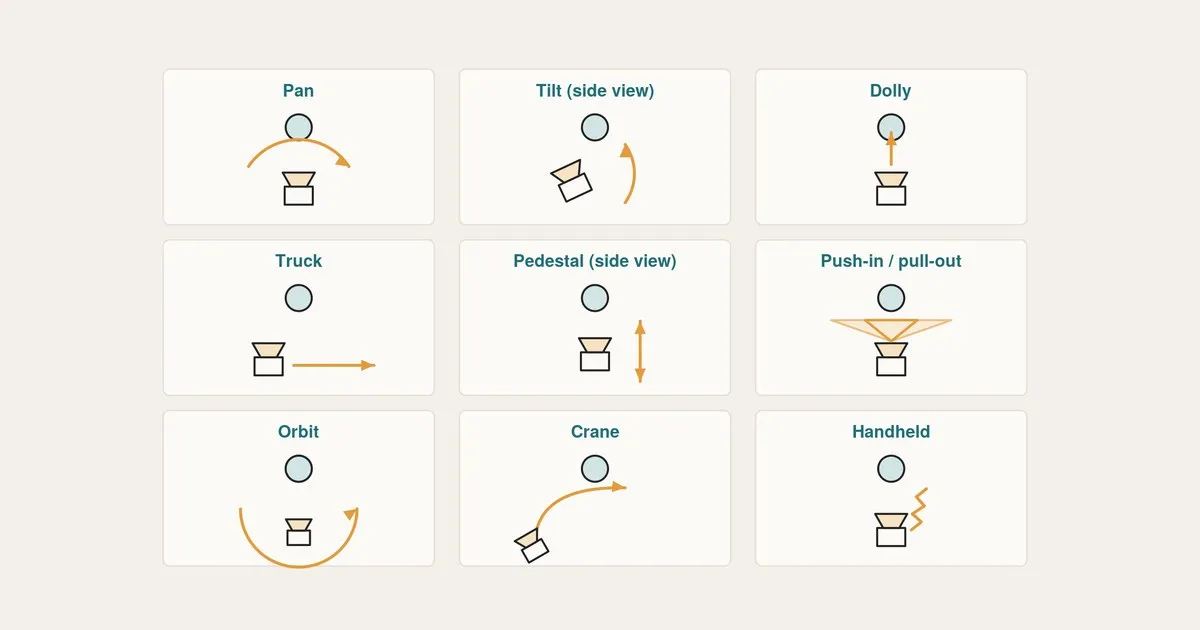
The camera is the narrator. In CG the camera has no weight and no operator, so it can do impossible moves; the good ones are those that feel physically plausible and serve the story.
Key points
- Each camera move has a meaning: a push-in focuses, a pull-out reveals, an orbit shows form.
- Real cameras have mass: start and stop moves with ease and avoid instant changes of direction.
- Pull focus on purpose and in time with the action.
- Build cameras on simple rigs: parent, target and separate focus control.
Moves and What They Say
| Move | Camera does | Effect |
|---|---|---|
| Pan / tilt | Rotates in place | Follows or reveals |
| Dolly in/out | Moves forward/back | Intimacy or distance; parallax |
| Truck / pedestal | Moves sideways / vertically | Parallax across the product |
| Orbit | Circles the subject | Shows form, dimension |
| Crane / jib | Large arc up/down | Grandeur, reveal |
| Steadicam / gimbal | Smooth, flowing | Fluid, premium |
| Handheld | Small irregular shake | Documentary realism |
| Drone | Large aerial move | Scale, location |
| Whip pan | Very fast pan | Transition, energy |
- Zoom vs. dolly: A zoom changes the field of view without changing perspective; a dolly changes perspective and parallax. Product work almost always prefers real camera movement with parallax.
- Parallax: Nearer objects move across the frame faster than distant ones. It is the main cue of depth in a camera move.
Physically Plausible Motion
- Mass and ease: A real rig has weight: gentle acceleration into the move and deceleration out of it. Use ease-in/out on camera paths.
- Arcs: Paths follow curved lines; straight perfect lines feel robotic unless intentionally mechanical.
- Speed: Match camera speed to the product: slow, steady for luxury and calm; fast and abrupt for energy.
- Motion blur: Consistent with the shutter angle; strong blur on fast moves is expected.
- Handheld simulation: Add noise of low amplitude and frequency, scaled by lens (a long lens shakes more for the same movement). Do not use it for a luxury product unless the story needs it.
- Rolling shutter and lag: Optional realism; drone shots have specific smooth motion and slight sway.
Focus and Depth of Field in Motion
- Focus pull: Animate the focus distance between subjects; the timing of the pull is part of the story.
- Rack focus on products: Shift focus from a foreground element to the product, then hold.
- Tracking focus: Parent the focus target to the subject for a moving hero.
- Breathing: Real lenses change field of view slightly when focusing; some artists add it.
- Zoom in depth of field: The depth of field changes with focal length; keep both consistent.
Rigs, Paths and Targets
- Camera root: A parent null that carries the move; the camera object is a child for local shake and lens animation.
- Aim / look-at target: The camera follows a target object; animate the target, not the rotation.
- Path constraint: Follow a curve, with the position along the curve as the animated value.
- Layered animation: Main move + secondary sway + handheld noise on separate controls.
- Safe framing in motion: Check that the product stays inside the safe area for all delivery ratios.
- Camera cuts: Use multiple cameras and cut in the editor or by markers; consistent lens and position logic across cuts.
In the tools
- Blender: Follow Path constraint, Track To and Damped Track, Camera Markers for cuts, Noise Modifier in the Graph Editor for handheld, Depth of Field → Focus Object.
- Unreal Engine 5: Cine Camera Actor with Camera Rig Rail and Camera Rig Crane; Camera Shake assets for handheld; the Camera Cuts track in Sequencer.
- Previs: Use a low-quality viewport playblast of the move; approve with a client before final render.
Common mistakes
- Zoom instead of dolly.
- Constant-speed mechanical moves.
- Camera movement without a reason in the story.
- Focus fixed while the camera moves.
- Moves that break the safe area in vertical crops.