Principles of Animation: a practical CGI guide
Timing is how many frames an action takes; spacing is how far it moves on each frame.
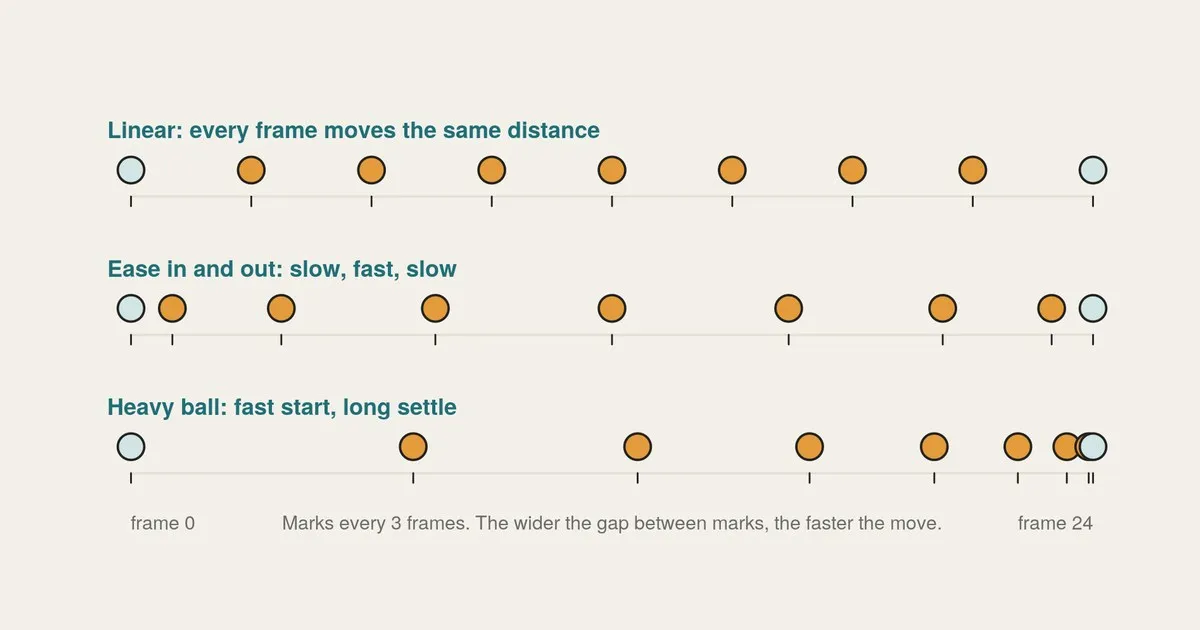
Software will happily move an object from A to B in a straight, mechanical line. That is exactly why so much CG feels dead. The twelve principles, formulated by Disney animators in the 1930s, describe why motion feels alive. They apply to a bouncing ball, a bottle cap and a character in equal measure.
Key points
- Timing is how many frames an action takes; spacing is how far it moves on each frame.
- In the graph editor, the slope of a curve is speed.
- A 1 m fall takes 0.45 s (about 11 frames at 24 fps): physics gives the first timing.
- Work in stages: blocking, splining, polish.
The Twelve Principles
| Principle | What it means | In product work |
|---|---|---|
| Squash and stretch | Shape changes show weight and elasticity | Soft goods, liquids, bouncing caps |
| Anticipation | A small opposite move before the main action | A cap lifts slightly before it spins off |
| Staging | Present the idea clearly, one thing at a time | The product is the clear focus |
| Straight-ahead and pose-to-pose | Two ways to animate: frame by frame, or key poses first | Pose-to-pose for control |
| Follow-through and overlapping action | Parts keep moving after the body stops, at different rates | Cloth, ribbons, liquid, antennas |
| Slow in and slow out | Motion eases at the start and end | Almost every move |
| Arcs | Natural motion follows curved paths | Camera and object paths |
| Secondary action | Smaller actions that support the main one | Reflections, sparkles, ripples |
| Timing | The number of frames sets weight, speed and mood | Pace of the ad |
| Exaggeration | Push it a bit beyond reality | Clearer read in short ads |
| Solid drawing | Convincing volume and weight | Shape discipline in 3D |
| Appeal | Charm and clarity | Brand character |
Timing and Spacing
- Timing: The number of frames between key poses. More frames = slower, heavier, calmer; fewer frames = lighter, snappier, nervous.
- Spacing: The distance moved each frame. Close spacing = slow; wide = fast. Spacing changes create acceleration.
- Slow-in/out: Place frames closer together at the start and end of a move.
- Weight: A heavy object accelerates slowly and decelerates slowly; a light object moves fast and stops fast.
- Gravity in frames: a falling object covers
d = ½ · g · t²(g = 9.81 m/s²). A drop of 1 m takes 0.45 s, about 11 frames at 24 fps; a drop of 10 cm takes 0.14 s, about 3 frames. If a fall looks floaty, check these numbers before adjusting curves by eye. - Holds: An object that stops for a few frames before the next action reads clearly. Do not move everything all the time.
- Beats in advertising: 6-, 15- and 30-second formats leave very little time; each action has 8–24 frames. Plan the time budget on paper.
The Graph Editor
- F-curve: A curve of a value (position, rotation, scale, opacity) against time. Keyframes are points; handles shape the curve.
- Interpolation types:
- Constant: Holds until the next key (stepped, for blocking).
- Linear: Even speed, mechanical.
- Bezier / spline: Smooth with controllable ease.
- Easing presets: Quad, cubic, back (overshoot), bounce, elastic.
- Reading the curve: Steep = fast; flat = slow; a flat top = a hold; a curve beyond its target = overshoot.
- Overshoot and settle: Moves that go slightly past the target and return feel physical.
- Cleanup: Remove redundant keys; fix unintended pops (sudden slope changes).
- Normalizing / offsetting: Use offsets so related parts move with a slight delay.
Blocking to Polish
- Thumbnails and animatic: Sketch the key poses and timing.
- Blocking (stepped): Only the key poses, held — checks story and timing.
- Splining: Switch to smooth interpolation, fix the curves.
- Polish: Overlap, secondary action, arcs.
- Reference: Film yourself acting out the move, or shoot the real product.
- Review early: A rough animatic is cheap to change; a rendered shot is not.
In the tools
- Blender: Animation workspace, Dope Sheet, Graph Editor (
Shift+Efor extrapolation, Normalize), Timeline, interpolation menu (T), Auto Keying, Pose Library, Grease Pencil for 2D thumbnails. - Unreal Engine 5: Sequencer with its Curve Editor; Control Rig for animating characters and objects inside the engine.
- Outside: Cinema 4D’s timeline and F-curves; After Effects graph editor for 2D motion.
Common mistakes
- Linear interpolation everywhere.
- Everything moving at once, with no hierarchy.
- Weightless objects: no overlap or settle.
- Over-animation: too many actions in 10 seconds.
- Curves with random bumps from careless keys.