Product Animation: a practical CGI guide
Standard product shots: reveal, hero, detail, turntable and packshot.
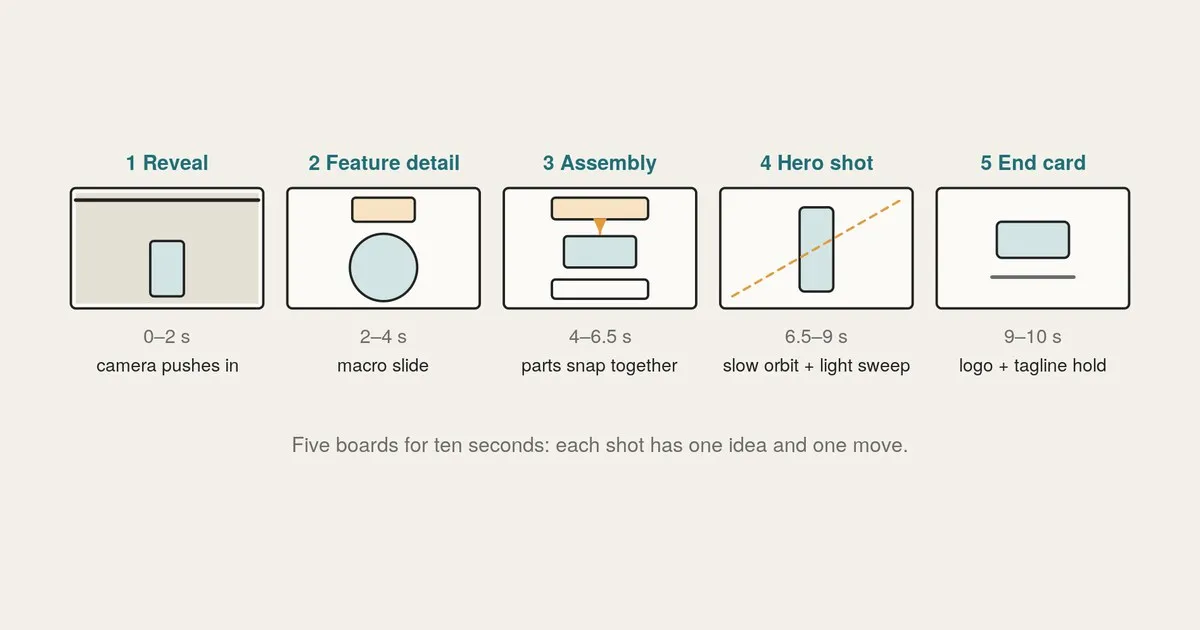
The most common CG job in advertising is a product that appears, shows what it is, and ends on a clean hero frame with the logo. The formulas are simple; the difference between average and excellent is timing, restraint and polish. this article gives the standard shot types and how to build them.
Key points
- Standard product shots: reveal, hero, detail, turntable and packshot.
- Spot length sets the structure: 6, 15 or 30 seconds, built from beats of 1–3 seconds.
- Hold the final packshot for about 1.5–2 seconds so the viewer can read it.
- Follow the brand’s logo animation exactly.
Standard Product Shots
- Reveal: The product appears from darkness, behind a surface, or out of liquid or particles. Define what the first frame looks like and when the product becomes fully readable.
- Turntable: A 360° rotation. A utility shot for approval and e-commerce; in a spot it is usually shorter and combined with a camera move.
- Hero move: A slow camera path around or toward the product with light moving over its surfaces.
- Feature shot: A close-up detail showing a specific benefit — a button, material, ingredient, mechanism.
- Exploded view: Parts separate along axes to show construction, then reassemble.
- Assembly: Parts fly in and snap together; staggered timing and arcs.
- Packshot final: The product at rest in a clean hero composition, with space for the logo, tagline and legal line; usually the last 1.5–3 seconds.
- Pour / splash: Liquid shots are simulation work but are timed and composed here.
Structure and Timing of a Spot
- Beats: Divide the film into beats of 1–3 seconds. Each beat has one idea.
- 6 seconds: Reveal → hero → pack. No time for explanation.
- 15 seconds: Hook (0–2 s), product (2–8 s), benefit (8–12 s), logo (12–15 s).
- 30 seconds: Add story or feature depth; same structure.
- Cutdowns: Plan the long version so shorter versions can be cut from it without re-render.
- Hold frames: Leave the final pack on screen for about 1.5–2 seconds, so the viewer can read it.
- Rhythm: Alternate fast and slow, wide and close. A constant pace is tiring.
- Audio: Hits, whooshes and music beats set when things happen.
Logo Animation and Brand Moments
- Logo sting: The final 1–2 seconds where the logo resolves. Brands often provide an animated logo; follow it exactly.
- Respect the logo: Do not change proportions, colors or clear space; follow the brand guide.
- Light sweep: A highlight passing over the logo is the classic, safe finish.
- 3D logo: Extruded with real bevels and a material; check legibility at small sizes.
- Text: Readable at mobile size and for long enough: roughly one second per few words.
Interaction and Believability
- Contact and shadows: An object touching a surface must have contact shadow and reflection; floating objects look fake unless intentional.
- Physics-lite: Settling, small bounces and overshoot give weight without simulation. Use simulation only when needed.
- Constraints and parenting: Keep pivots meaningful so hinges and caps rotate around the right axis.
- Mechanical correctness: If a part rotates, the animation must match how the real mechanism works.
- Variation: Different colorways animated by switching materials, not by re-animating.
Previs and Review
- Animatic first: A rough timed sequence with simple geometry or storyboard frames and music; get approval before polishing.
- Playblast reviews: Quick low-res renders for client rounds.
- Change management: Keep animation in separate versions; a client may return to an earlier take.
In the tools
- Blender: NLA Editor to reuse and layer animation clips, Shape Keys for morphs, Drivers for linked parameters (e.g., lid angle drives a light), Geometry Nodes for assembly timing; Markers for beats.
- Unreal Engine 5: Sequencer for timing; Variant Manager to switch colors and parts.
- DaVinci Resolve: Edit the beats to music and mark them with markers (M).
- Audio sync: Import the music track into the timeline and mark beats.
Common mistakes
- Every shot at the same speed.
- The product leaves the frame too early; no clean hero frame.
- No contact shadows.
- Missing the logo space and hold time.
- No plan for cutdowns.