Houdini Architecture: a practical CGI guide
Houdini works in contexts: objects, geometry (SOP), simulation (DOP), scenes (LOP/Solaris), compositing (COP) and tasks (TOP).
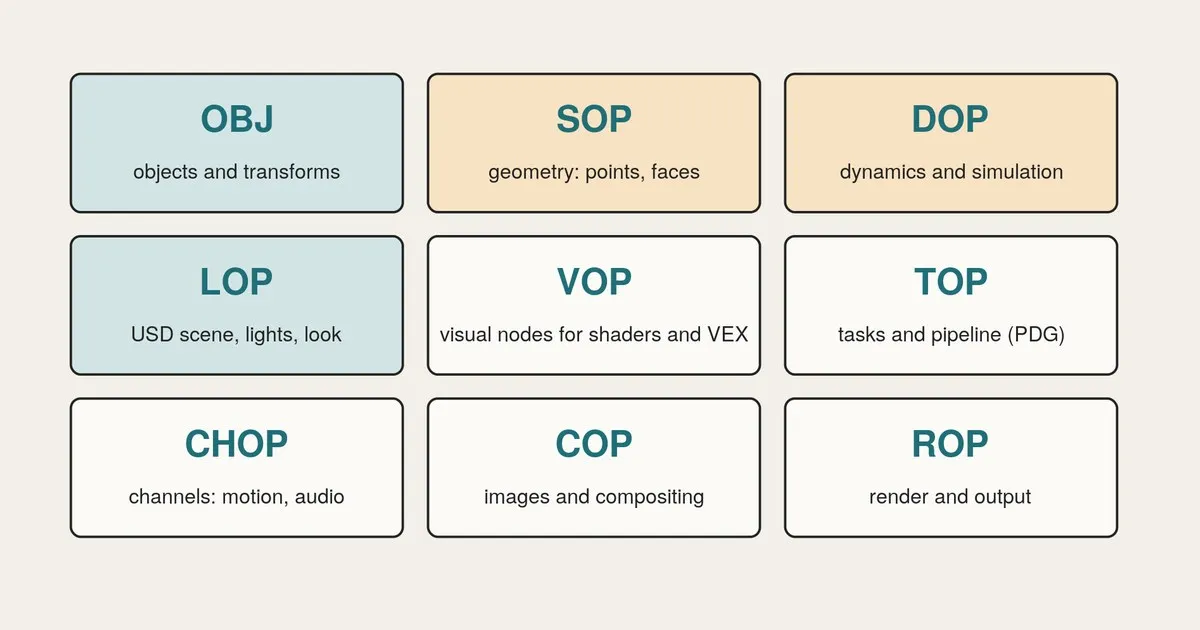
Most programs are collections of tools. Houdini is a system: everything is a node, every node reads and writes data, and the same data model runs from a single point to a fluid of ten million particles. Once you understand the architecture, the thousand nodes stop being a thousand things to memorize and become variations on a few ideas.
Key points
- Houdini works in contexts: objects, geometry (SOP), simulation (DOP), scenes (LOP/Solaris), compositing (COP) and tasks (TOP).
- Geometry is points, vertices, primitives and detail, each carrying attributes.
- VEX runs once per element, in parallel, and can process millions of points in seconds.
- A digital asset (HDA) packages a network into a tool with its own controls.
Networks and Contexts
- Node: A box with inputs, parameters and an output. Nodes connect into a network.
- Context: A network type, each processing one kind of data:
- OBJ: Objects and transforms (the scene level).
- SOP (Surface Operators): Geometry: points, polygons, curves, volumes. Most modeling and effects work happens here.
- DOP (Dynamics Operators): Simulation: solvers, forces, collisions.
- LOP (Lighting Operators / Solaris): USD scenes: layout, lookdev, lights, cameras.
- VOP (VEX Operators): Visual programming of VEX (below).
- TOP (Task Operators / PDG): Task graphs: batch processing, farm rendering, wedging.
- CHOP (Channel Operators): Motion and audio data as channels.
- COP (Compositing Operators): Image processing; newer versions replace classic COPs with a GPU-based system.
- ROP (Render Operators): Output: render and cache nodes.
- Subnetworks: Group nodes into a subnet; promote the controls you need.
- Cooking: A node cooks — computes its result — only when its output is needed, and re-cooks when an input or parameter changes. This lazy evaluation is why a network updates instantly when you change a value at the start.
The Geometry Data Model
- Point: A position in space. Geometry is built from points.
- Vertex: A point as used by a primitive; one point can have many vertices (a cube corner is one point, three vertices).
- Primitive: A polygon, curve, sphere, volume or packed object built from vertices.
- Detail: A single value for the whole geometry (the total count, a seed).
- Attributes: Named data attached to any of the four levels: position
P, normalN, colorCd, UV, velocityv, and anything you invent. A group is a named subset of points or primitives. - Example: A “distance to ground” attribute on points can drive color, a “variant” integer on points can choose which model to copy there, a “age” float on particles can drive size.
- Spreadsheet: The Geometry Spreadsheet shows every element and every attribute: the first debugging tool for any problem.
- Rule: If something looks wrong, look at the attributes; the answer is usually in the numbers.
VEX and Wrangles
- VEX: A compiled, parallel expression language: the same code runs on every element simultaneously.
- Attribute Wrangle: A node that runs a VEX snippet on all points, primitives, vertices, or once per detail (the Run Over menu).
- Attribute binding:
@namereads and writes the attribute with that name; prefixes set the type:f@float,i@integer,v@vector,s@string. - Parameters from code:
chf("height")creates a slider named height;chv,chi,chsfor vector, integer and string. - Example snippets:
// random gray per point
@Cd = rand(@ptnum);
// wave deformation
@P.y += sin(@P.x * chf("freq")) * chf("amp");
// delete high points
if (@P.y > chf("cut")) removepoint(0, @ptnum);
// choose one of 4 variants
i@variant = int(rand(@ptnum + chi("seed")) * 4);- Neighbors and queries:
nearpoints,pcfind,intersectfind nearby geometry — the core of scattering and avoidance. - VOP alternative: The same logic in visual nodes; good for learning, slower to write.
- Performance: Wrangles run in parallel; avoid Python for per-point work.
Control: Parameters, References and Expressions
- Parameter: A node’s input value; can be a number, a vector, a ramp, a string or a file path.
- Expressions:
ch("../box1/sizex")reads another node’s parameter;$Fis the current frame;$HIPis the project folder. - Ramp parameters: A curve of values (profiles, falloff, color gradients) used throughout.
- Promoting parameters: Expose a deep parameter at the top of a subnet or HDA with Promote Parameter — your interface.
- Display, render and bypass flags: Which node you see, which one is output, which are skipped.
- Naming and organization: Name nodes by function, color-code, add network boxes and sticky notes.
HDAs: Making Your Own Tools
- HDA (Houdini Digital Asset): A subnet saved as a reusable node with its own interface, help text and versions.
- Why: A rule you have solved once becomes a tool you drag in like a built-in node, and share with a team.
- Steps:
- Build and test the network with promoted parameters.
- Create Digital Asset: choose an operator type name with a namespace (for example,
yourname::bottle_gen::1.0) and a save location in the project or a shared library. - Arrange the Type Properties → Parameters interface: folders, labels, defaults, ranges, tooltips.
- Lock and version the asset; keep a changelog.
- Inputs and outputs: Define what the tool takes (geometry, curves) and what it produces.
- Guards: Add warnings for invalid input (missing attribute, empty geometry).
- Blender parallel: Node Groups with assets and exposed sockets play the same role.
In the tools
- Houdini: Network Editor (
Tabmenu to add nodes), Parameter pane, Geometry Spreadsheet, Scene View, Performance Monitor, Take List for variations, Wedge TOP for parameter sweeps, Python Shell. - Setup: Set the project folder (
$JOB), save with incremental versions, and keep a standard/obj/geolayout. - Learning path: Move a point, color it, copy to points, wrangle one line, wrap in an HDA.
Common mistakes
- Using Python for per-point work.
- Unnamed nodes and a tangle of wires.
- Forgetting to check the attributes in the Spreadsheet.
- Putting values deep in the network instead of promoting them.
- Hard-coded paths instead of
$HIP.