Portfolio and Showreel: a practical CGI guide
Show five to eight excellent pieces, not everything.
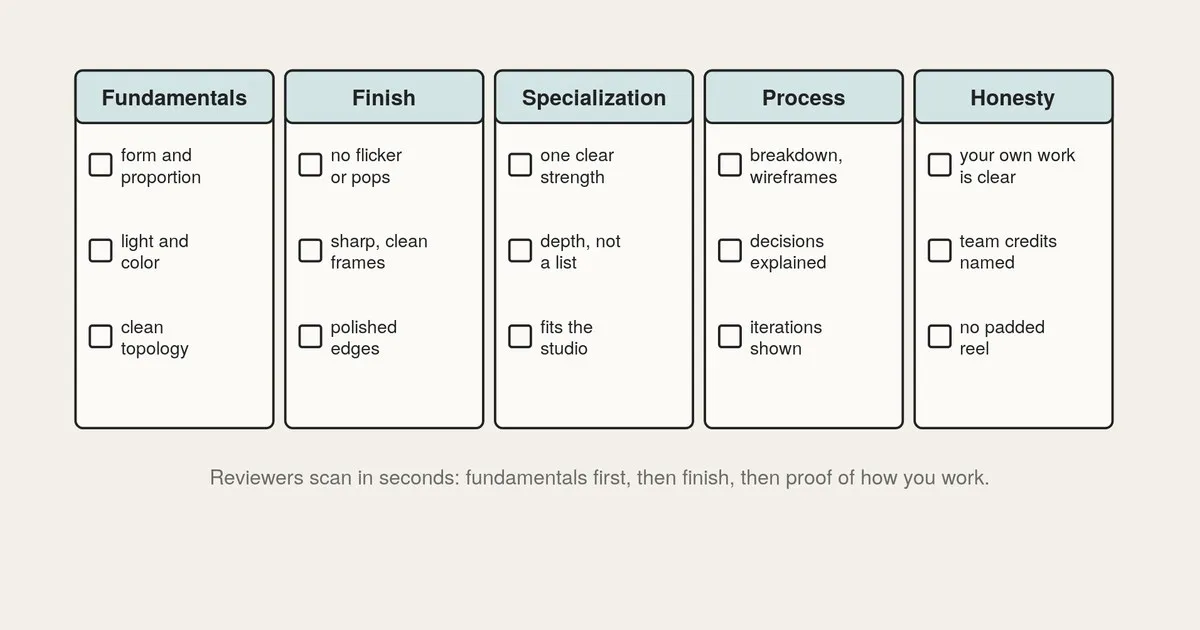
A recruiter or producer gives a reel thirty to sixty seconds before deciding. Your work will be judged in that time, by people who have seen thousands of reels. The portfolio is not a record of everything you did; it is an argument that you are the right person for a specific job.
Key points
- Show five to eight excellent pieces, not everything.
- A general reel is 45–60 seconds: best shot first, second best last.
- Credit your exact role on every shot.
- Breakdowns and case studies prove how you work.
What Studios and Brands Look For
- Technical tricks cannot hide weak fundamentals.
- Finish: Polished work: clean edges, no artifacts, correct color, sound that works.
- Specialization: A clear strength (lookdev, FX, animation, compositing, generalist product work) in a T-shaped profile: broad understanding, deep in one or two areas.
- Process and problem-solving: Breakdowns show you know how and why.
- Taste: The selection itself shows judgment.
- Honesty: Clear credits of what you did. Reviewers detect exaggeration quickly and it destroys trust.
- Target: Studios hiring for games, VFX, advertising or product visualization value different things; one reel does not fit all (below).
Choosing the Work
- Quality over quantity: Five to eight excellent pieces beat twenty uneven ones. One weak piece can pull down the impression of all the others.
- Mix: Show range inside your specialty: a hero product shot, an animated piece, a technical or procedural piece, a breakdown.
- Recent and relevant: Prefer work from the last two years; remove old pieces when stronger ones exist.
- Commercial and personal: Client work shows you can deliver; personal projects show taste and initiative; both are legitimate.
- Ask permission: Show client work only if allowed.
- Complete the thought: Finish projects. A polished 10-second piece is better than a half-finished two-minute one.
- Benchmark: Compare your work with the output of the studios you target; fix the largest gap first.
Author’s Case: Assembling a Portfolio From Unfinished Work
When the author prepared his own portfolio for an internship, he found the problem many students have: strong skills but too many projects “in progress”. His rule became: a small set of finished works in one folder, each with a case study, plus a reel. The public result lives on his website (a portfolio page), on Vimeo, on ArtStation and on LinkedIn, with the same name and photo everywhere.
-
CyberGun 2077 (hard surface): a sci-fi pistol inspired by a cyberpunk game, built in Blender around a modular body, internal mechanics and its place in the game’s world. The credited scope is concept, modeling, FX, light, render and edit, with DaVinci Resolve and Photoshop alongside Blender. It is shown as a full case study that follows the production in order:
- seven blueprint sheets that name every module;
- nine breakdown clips with the final frame beside the clay and wireframe, some with a screen recording from inside Blender;
- eleven presentation boards and two city shots;
- a downloadable PDF and a film on Vimeo.
The page names six stages: concept and blueprints, hard-surface modeling, materials and look development, FX simulation, rendering and compositing, scene shots.
-
INSEL G3 (product film): a promotional film for a lamp whose body is styled to look as if formed from molten lava.
-
KROON, Full Moon (product motion): a piece that shows Blender and motion design as one workflow, with a lean presentation; Unreal Engine, Houdini and neural networks are brought in only when a shot needs them.
-
Ultimatum (commercial CGI): a pipeline for a sports lighting unit that combines AI-generated foundations with hand refinement.
-
House-style matrix: a set of twenty frames across product, beauty, food, automotive, liquid, cloth simulation and environment, shown with only a title and a category. It tells a visitor the range at a glance without a long text for each frame.
-
Research piece: SMART ONE reconstructs the hidden volume of a photograph from light and shadow. It is presented through a finished interface, a 30-second promotional film and a short page; the core algorithm is deliberately not shown.
What works: one project shown from first sketch to final frame is more convincing than many unrelated thumbnails. Tip: add the year, role and tools to every entry, so a reviewer never has to guess.
Lesson for the reader: finish fewer things, show how they were made, and state your role and tools on every piece.
The Showreel
- Length: 45–60 seconds for a general reel; a short 15–30 second version for social media.
- Order: Best shot first; second best last; fill the middle in rhythm. Do not open with a logo or a long title.
- Rhythm: Vary shot length; cut to music; keep each shot long enough to read (about 2–4 seconds, shorter for flashy pieces).
- Titles and credits: A small lower-third with the project name and your role in each shot, readable on a phone.
- Breakdown reel (optional): A second video that shows wireframes, passes and compositing layers for selected shots.
- Music: Licensed, fits the style, not distracting.
- Quality: Export at least 1080p (4K for hero shots), high bit rate, correct color.
- Contact: Name, role, website, email at the end and in the description.
- Hosting: Vimeo or YouTube; do not require passwords for a public reel; keep an up-to-date direct link.
- Versions: A reel for advertising and product CGI; a different cut for games; one for FX.
Breakdowns and Case Studies
- Case study: A page per project: the goal, your role, the process with stills (reference, blockout, wireframe, lookdev, light, passes, comp), the tools and the final.
- Breakdown shots: The beauty render and its layers: a quick way to prove technical skill.
- Show decisions: Why you chose this camera, this light, this material.
- Evidence of problem-solving: A failed attempt and how you fixed it.
- Numbers: Render times, polygon counts, simulation sizes, schedule, team size, role.
- Short texts: Two paragraphs and good images; avoid long essays.
- Format: A page in your website, a PDF and an ArtStation post (below).
Website and Platforms
- Your own website: The main place: your name, reel, projects, about and contact; fast loading, simple navigation, the reel on the first screen. A personal domain looks professional.
- ArtStation: The standard for 3D artists and games; good for being discovered.
- Behance: Creative portfolios, popular with agencies and designers.
- LinkedIn: Professional network where recruiters search; your headline, reel link and project highlights.
- Vimeo / YouTube: Video hosting.
- GitHub or gist: For tools and scripts.
- Consistency: The same name, photo, short bio and links everywhere.
- Accessibility and mobile: The site and reel must work on a phone.
- Metrics: Track visits and reel plays to see what is watched.
Applying: Resume, Cover Note and Outreach
- Resume (CV): One page; role, skills, tools, experience, education; links to reel and site.
- Cover note: Short, specific; why this studio, what you offer, one or two relevant pieces.
- Targeting: Study the studio’s work and tailor the reel and message.
- Internships and junior roles: Show growth and learning speed; mention open-source tools and independent projects.
- Outreach: Email producers, supervisors and recruiters; keep it short; follow up once after a week or two.
- Tests: Studios may give a task; treat it as a deliverable, document your process, and respect the deadline.
- Portfolio reviews: Attend festivals and online reviews; accept critique.
- Rejections: Normal; ask for feedback and update the reel.
In the tools
- Images: Photoshop, Affinity or Krita for stills and breakdown sheets; screen captures from your 3D programs for process.
- Website: A static site generator or a portfolio builder; keep source and assets in one folder.
- Tracking: A spreadsheet of studios, contacts, dates and status.
Common mistakes
- Including everything.
- The best shot buried in the middle.
- No credit for what you did.
- Reel hosted behind a login.
- One generic reel for every job.