Art Direction and Team: a practical CGI guide
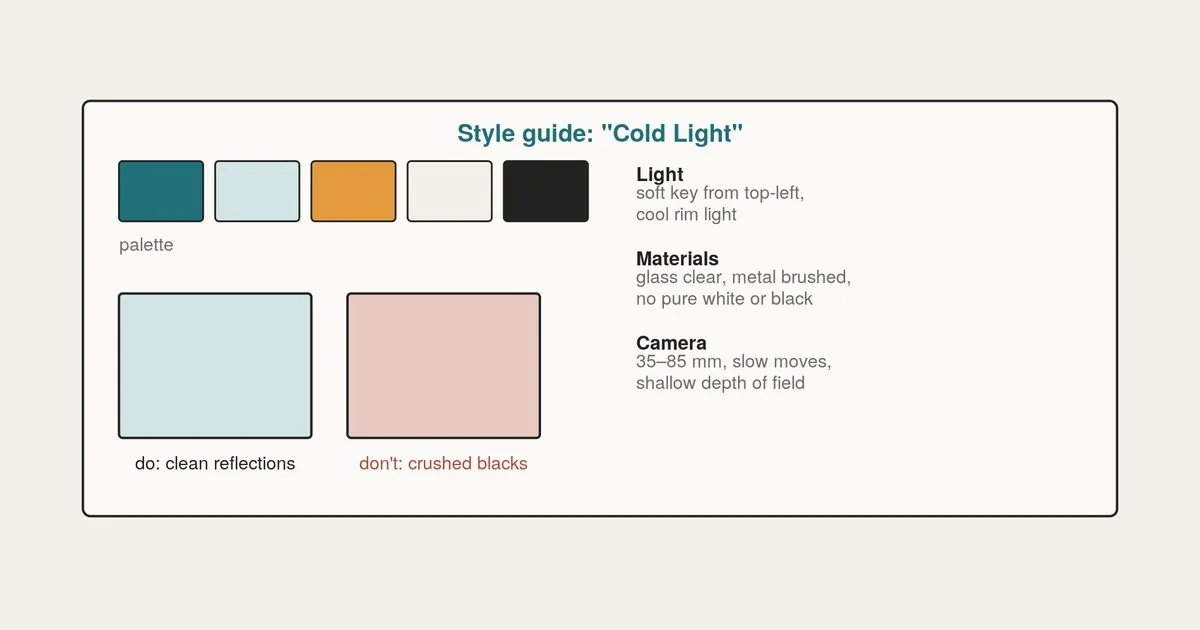
A style guide with do and do-not examples keeps a team's work consistent.
The largest projects cannot be made by one person. When you lead the look of a project, your craft changes. You set a visual direction, write tasks that others can follow, give critique without hurting the team, and keep the quality while someone else’s hands do the work. This is also where AI assistants and agents enter the pipeline as tools you direct and are responsible for.
Key points
- A style guide with do and do-not examples keeps a team’s work consistent.
- A good task states goal, reference, constraints, deliverable, acceptance criteria and deadline.
- Critique as observation → impact → suggestion.
- AI agents get narrow tasks, copies of files and a human check before anything enters the pipeline.
Setting the Direction
- Art direction: The set of decisions that make a film look like one film: shape language, palette, light, material rules, camera, motion and typography.
- Style guide: A short document with images and rules: “key light always from upper left, soft; palette limited to four colors; materials matte with one glossy accent; camera slow and low”.
- Do and do-not: Examples of what is on-style and off-style are more useful than words.
- Tests: A single reference shot, rendered in the final style, that every artist can match.
- Brand fit: Align with the client’s brand guidelines (colors, tone, logo rules).
- Constraints help: A narrow palette and a few camera rules produce coherence faster than total freedom.
- Change management: When the direction changes, update the guide and tell everyone.
Writing Tasks for Others
- A good task states:
- Goal: What the piece is for.
- Reference: Images, the style guide, similar assets.
- Constraints: Poly count, texture resolution, naming, file format, scale.
- Deliverable: What files, where, which version.
- Deadline and priority.
- Who to ask.
- Right size: Tasks of a half-day to two days: small enough to review and correct early.
- Dependencies: Say what the task depends on and what depends on it.
- Early check: Ask for a blockout or a first pass before the final polish.
- Assets and pipeline: Provide templates, scenes, rigs and publish tools.
- Clarity beats length: A one-page task with three images is better than a ten-page document nobody reads.
Critique
- Purpose: Improve the work and the person’s skill, not display the critic’s taste.
- Structure: Observation (“the rim light is brighter than the key”), impact (“the viewer’s eye goes to the edge, not to the label”), suggestion (“reduce rim to a third or move it behind the object”).
- Specific and kind: Point to a place in the image; use neutral words; praise what works, because it also needs to be kept.
- Priorities: Start with the large issues (composition, light, story), then details.
- Ask questions: “What are you trying to show here?” reveals the real problem.
- Receiving critique: Listen, write notes, ask for clarity, do not defend in the moment; decide later what to adopt. The goal is the image’s success.
- Client vs. internal critique: Internal critique is blunt about quality; client feedback needs translation into tasks.
- Dailies: A short regular session where work in progress is reviewed on screen; end with decisions and owners.
Leading and Mentoring
- Delegate outcomes: Give people the goal and trust their method; check results.
- Quality control: Review work against the style guide and the acceptance criteria; correct small issues quickly and personally.
- Protect focus: Reduce interruptions; shield the team from contradictory client messages.
- Credit: Name contributors; make sure the team shows the work in their portfolios.
- Mentoring: Sit with junior artists, show how you think, share your breakdowns and notes.
- Hiring and trial tasks: A short, paid test on a real small task shows more than a long interview.
- Conflicts: Address them early, privately and with facts; focus on the project’s goal.
- Wellbeing: Realistic schedules, rest after delivery and a culture where problems are reported early.
AI Assistants and Agents in the Pipeline
- What they are: Software that carries out tasks you describe: writing a script, renaming and sorting files, checking a folder against a naming convention, summarizing meeting notes, generating a report, preparing a shot list.
- Good tasks: Repetitive, checkable, with clear inputs and outputs: batch renaming, format conversion, comparing frame counts, listing missing textures, logging render times.
- Poor tasks: Creative direction, final taste decisions, sensitive client communication, anything where an error is expensive and hard to see.
- Rules for using agents:
- Scope: Give a narrow task and the folders it may touch; never the whole drive.
- Copies first: Work on copies or with version control; no destructive actions without confirmation.
- Logs: Keep a record of what was changed and why; read it.
- Verification: A human checks outputs against acceptance criteria before they enter the pipeline.
- Confidentiality: Do not give client files to services whose terms you have not checked.
- Responsibility: You are accountable for what the tools deliver.
- Knowledge base: A well-organized notes vault gives an assistant the context of your standards, naming and past decisions.
- Training the team: Share working prompts and checklists like any other tool.
It never renames or deletes anything. A person reads the report and decides. The agent saves an hour of checking per delivery, and its limits are clear: read-only, one folder, one report.
In the tools
- Style and tasks: A shared document or board with the style guide, reference shots and task cards (Notion, Trello, Kitsu or similar).
- Review: Annotated stills and video review tools; notes recorded against version numbers.
- Templates: Scene, rig and folder templates to keep work consistent.
- Automation: Scripts and agent-run checks for naming, scale, missing files and render logs.
Common mistakes
- Vague tasks: “make it nicer”.
- Critique that is personal or only negative.
- No acceptance criteria.
- Giving automated tools access to everything.
- Taking credit for the team’s work.