Rigid Bodies and Particles: a practical CGI guide
A simulation is a state, forces and a time step; substeps add accuracy and cost.
Things fall, collide, shatter and scatter. Animating that by hand is slow and never looks right; simulating it takes the right setup and some patience. Rigid bodies (solid objects that do not deform) and particles (many small points following forces) are the foundation of all dynamics.
Key points
- A simulation is a state, forces and a time step; substeps add accuracy and cost.
- Use real scale and real density: mass = density × volume (water 1,000 kg/m³, glass 2,500, steel 7,850).
- Fracture uses pieces held by constraints that break under force.
- Particles carry attributes such as velocity, age and size.
How a Simulation Works
- State: At each moment the simulation stores position, velocity, rotation and other properties for every object or particle.
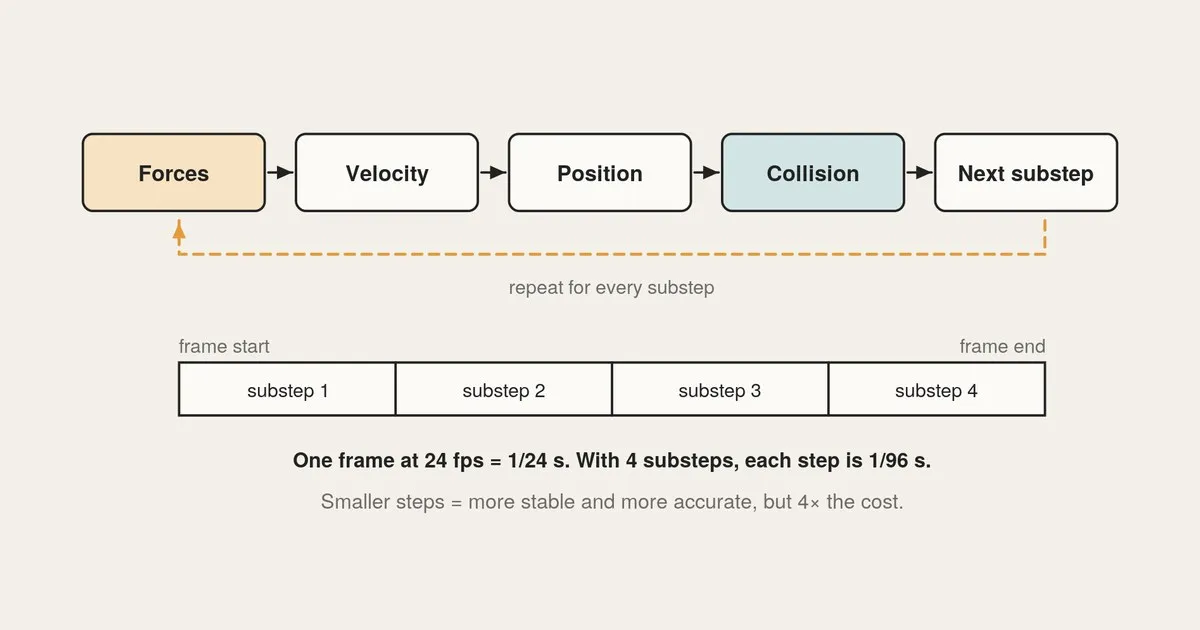
- Timestep: The simulation advances in small steps (for example, 1/24 s ÷ substeps). Smaller steps are more accurate and more expensive.
- Substeps: Subdivide each frame so fast objects do not tunnel through thin colliders.
- Forces: Gravity (9.81 m/s² at real scale), wind, drag, custom fields.
- Integration: Velocity changes by acceleration; position changes by velocity, per step.
- Determinism: The same inputs give the same results (mostly); changing frame range or cache can change results. Always cache simulation output.
- Real scale: Gravity, mass and speed assume meters and kilograms; a scene modeled in the wrong scale makes simulations look slow-motion or floaty.
Rigid Body Dynamics (RBD)
- Properties: Mass, friction, bounciness (restitution), initial velocity.
- Use density, not guesses: mass = density × volume. Approximate densities: water 1,000 kg/m³; wood 500–800; plastic 900–1,400; glass 2,500; aluminum 2,700; steel 7,850. A 0.5 L glass bottle weighs about 0.3–0.5 kg empty.
- Collision shapes: The solver uses simplified shapes:
- Primitive (box, sphere, capsule): fastest, least accurate.
- Convex hull: wraps around an object; good for most props.
- Concave / mesh: exact, slow, and only for static colliders.
- Proxy: A hand-built simple shape for a complex object (a bottle’s hull).
- Active vs. passive: Active bodies move under the solver; passive (static) ones are fixed colliders (floor, table).
- Constraints: Hinge, glue, spring, pin: they hold parts together or restrict movement.
- Stability: Penetrations, jitter and exploding objects come from too-large steps, thin colliders, interpenetrating start positions or wrong scale.
- Art direction of physics: Timing and stacking can be hard to control; use initial positions, forces and simulated “takes” selected from many.
Fracture and Destruction
- Fracture: Break an object into pieces before the simulation: Voronoi (shards), boolean cuts, slice or by pre-made patterns.
- Interior surfaces: The inside of a fractured object needs its own material and UVs.
- Glue constraints: Pieces are glued; the glue breaks above a strain threshold, giving realistic cracks.
- Multi-scale: Large pieces plus dust and small debris from separate particle systems.
- Glass: Real glass breaks into sharp radial/concentric shards; use appropriate patterns and thin shards with refraction.
- Product relevance: Chocolate snapping, cracking glaze, shattering ice, falling crackers.
- Rendering: Use instancing for thousands of pieces.
Particles
- Particle: A point with attributes (position, velocity, age, size, color) updated each step.
- Emitter: Where and how particles are born: from a surface, volume, point, with initial velocity and rate.
- Forces and fields: Gravity, wind, noise, vortex, attraction to a target or curve.
- Life and attributes: Age drives size, color and opacity: sparks fade, dust slows.
- Collision and sticking: Bounce, slide, die or stick on contact.
- Instancing: Replace each particle with geometry (confetti, sprinkles, seeds, sugar) or render as points/sprites.
- Grains: Particles with collision radii that behave like sand, salt or cereal.
- Control: Particles are simple; the art is the combination of forces and the shape of the emission over time.
In the tools
- Houdini: DOPs: RBD Bullet Solver and the RBD Material Fracture workflow; POP Network with POP Source, POP Force, POP Collision Behavior; Wedge for takes; File Cache SOP for saving results.
- Blender: Rigid Body physics (with Convex Hull and Mesh shapes), Cell Fracture add-on, Particle System (hair and emitter), Geometry Nodes Simulation Zone for procedural particles.
- Check: Always disable the simulation and keep only the cache for rendering; store the cache in
04_cache.
Common mistakes
- Using the render mesh as a collider.
- Running at the wrong scale.
- Too few substeps for fast objects.
- No cache: results change when scrubbing.
- Unrealistic perfection: no variation in particle size.