Scanning and Neural Methods: a practical CGI guide
Photogrammetry needs 60–80 % overlap between photos, soft even light and no reflections.
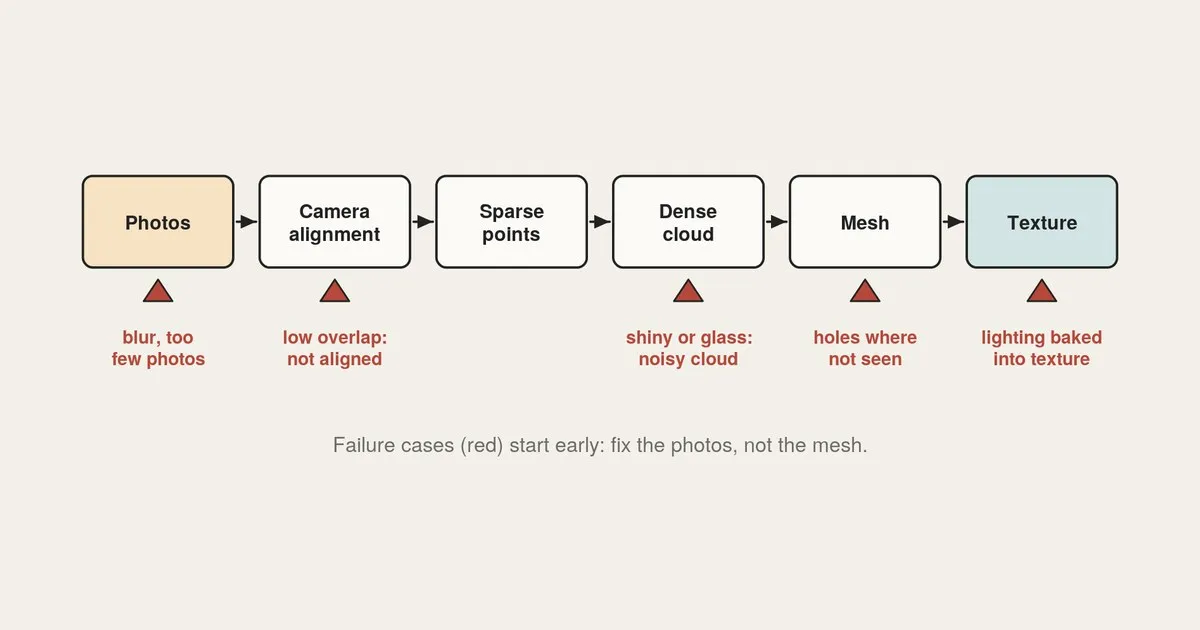
A camera can now capture a real object or place as 3D data, and neural models can generate textures, geometry and video. These tools speed up work and open new looks, but they bring new problems: unclean geometry, baked-in lighting, unpredictable results and legal uncertainty. The professional skill is knowing what each tool really gives you.
Key points
- Photogrammetry needs 60–80 % overlap between photos, soft even light and no reflections.
- NeRF and Gaussian splatting rebuild a scene from photos and render it with a photographic look.
- Separate what is measured from what is invented, and say which is which.
- Check rights and disclosure for every generated or scanned asset.
Photogrammetry
- Principle: Many overlapping photos of an object from different positions; software finds matching points, solves the camera positions (structure from motion) and builds a dense 3D surface (multi-view stereo).
- Capture rules:
- 60–80 % overlap between neighboring photos; shoot in rings at several heights.
- Soft, even light (overcast sky or a light tent); avoid hard shadows that change between shots.
- Fixed focus and exposure; sharp images; RAW if possible.
- Include scale markers or a measured object.
- Problem materials: Shiny, transparent, thin and uniform surfaces fail. Spray removable matte coating on a test object where permitted, or use cross-polarized light to remove reflections.
- Output: A heavy mesh with a baked color texture.
- Cleanup: Remove noise, fill holes, retopologize, bake normals and AO to a clean low-poly.
- De-lighting: Remove baked shadows and highlights to recover albedo, so the asset relights correctly.
- Tools: RealityCapture, Metashape, Meshroom (free), and phone apps with LiDAR or camera-based capture.
- Uses in advertising: Locations and props, hero reference, textures from real surfaces, human body scans (with consent).
Scanning Scenes: NeRF and Gaussian Splatting
- NeRF (Neural Radiance Field): A neural network learns how a scene looks from any viewpoint, from a set of photos. Excellent for view-dependent effects (reflections), slow to render and difficult to edit.
- 3D Gaussian splatting: The scene is represented by millions of small 3D Gaussians optimized from photos. It renders in real time with a photographic look.
- What you get: Photoreal novel views and camera moves through a captured place.
- What you do not get: A clean surface mesh, reliable collisions, or relighting; scenes often contain floaters (stray artifacts) and look wrong outside the captured views.
- Uses: Previs, backgrounds seen from limited angles, reference, immersive experiences; mesh extraction methods exist but are still imperfect.
- Tools: Open-source research code, plugins for Unreal, Blender and Houdini, and commercial apps; the field changes monthly, so test current versions.
- Pipeline tip: Use a splat as a background card or environment and composite real CG on top.
Author’s Case: SMART ONE, a Photograph Read for Its Hidden Volume
The author’s SMART ONE project reconstructs the hidden volume of a single photograph from light and shadow, and shows how far the evidence reaches. It illustrates the principles of this article.
- Division of labour: neural networks are used to measure (object masks, a depth map, surface normals); the invisible side of an object is set by an explicit rule with a few simple priors, not by a model that invents detail.
- Honest limits: one photo cannot contain the back of an object, so the result is a plausible closed volume, not the true one. The project says so openly, and publishes results only after they are measured.
- Presentation: a finished interface, a 30-second promotional film and a short presentation page. By the author’s decision, only the assembled service and its results are shown publicly; the core formula is not published here.
- Status: the interface is finished; the final stage is the clay-style transformation and scene finishing.
Lesson for the reader: separate what is measured from what is assumed, write the assumptions down, and say which parts of a reconstruction are true and which are plausible.
Generative Tools in a Production Pipeline
- Where they help:
- Concept and moodboard: Fast exploration of looks.
- Textures and patterns: Generating tileable maps and variations; convert to PBR sets and check by eye.
- Previs and animatic frames: Quick visuals for client alignment.
- Image-to-3D and text-to-3D: Rough base meshes and background props.
- Upscaling, denoising and in-painting: Clean-up of plates and frames.
- Video generation: Mood clips, backgrounds and reference.
- Where they struggle:
- Exact products and logos: Shapes, labels and text drift; clients need exact geometry.
- Control and repeatability: The same prompt gives different results; revisions are hard.
- Topology and UVs: Generated meshes are usually unusable without rebuilding.
- Consistency across shots: Characters and products change between frames.
- Rule: Generated material is a source, not a deliverable. Rebuild, verify and own what goes to the client.
- Quality checks: Inspect at 100 %; look for impossible details, melted text, extra fingers and inconsistent shadows.
Rights, Licenses and Disclosure
- Training data and licenses: Read the tool’s terms: who owns the output, whether commercial use is allowed, and what is excluded.
- Client contracts: Some clients forbid AI-generated content, some require disclosure, and some require indemnities; agree in writing.
- Likeness and brands: Do not generate the likeness of real people or protected brands without permission.
- Scanned content: Scanning a person needs a signed release; scanning a copyrighted object or a private location needs permission.
- Disclosure: Platforms and regulations increasingly require labels for synthetic or altered realistic content (check the current rules of the platform and region, including the EU’s AI transparency requirements).
- Provenance: Keep a log of tools, versions, prompts and sources for each asset. Content credentials (C2PA) metadata can record origin.
- Ethics: Do not use these tools to deceive viewers about what a product does or looks like; advertising rules apply to the final image.
In the tools
- Blender: Mesh cleanup (Decimate, Remesh, Quadriflow), bake tools, and add-ons for point cloud and splat import.
- Houdini: PolyReduce, Remesh, VDB from Polygons, Labs Maps Baker; scan clean-up HDAs.
- Capture: Phone or mirrorless camera on a tripod; a turntable for small objects; a gray card and scale bars.
- Generative tools: Treat as external services; keep an input/output record and verify license.
Common mistakes
- Capturing in hard sunlight with moving shadows.
- Using the raw scan in a scene (heavy, noisy and with baked lighting).
- Treating a splat as a mesh.
- Delivering generated content without checking terms or the client’s policy.
- No log of tools and versions.