Editing and Sound for Advertising: a practical CGI guide
Shots in ads are typically 1–3 seconds; hold the packshot for 1.5–2 seconds.
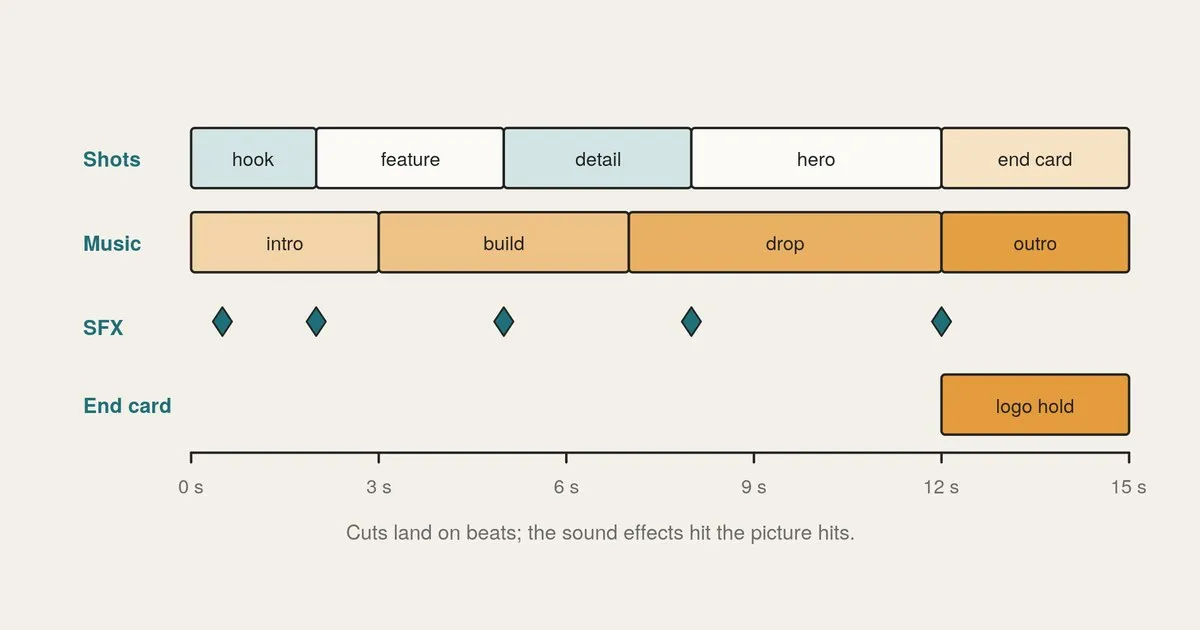
An ad lives for fifteen or thirty seconds, and half of it is what you hear. Editing sets the pace, sound sets the feeling, and together they decide whether a viewer watches to the end. CG artists who understand rhythm and audio deliver shots that cut well, and are the ones directors call again.
Key points
- Shots in ads are typically 1–3 seconds; hold the packshot for 1.5–2 seconds.
- Loudness: −23 LUFS (EBU R128) or −24 LKFS (ATSC A/85) for broadcast, about −14 to −16 LUFS online; true peak below −1 dBTP.
- Audio for video: 48 kHz, 24-bit.
- Cut on the music’s phrases; land the last hit on the logo.
Rhythm and Structure
- Structure for short films:
- 6 s: Hook, product, logo.
- 15 s: Hook (0–2 s), problem or desire (2–6 s), product (6–12 s), call to action and logo (12–15 s).
- 30 s: The same structure with room for a story or demo.
- The first 2–3 seconds: On social platforms the viewer decides immediately; show the strongest visual first.
- Shot length: Typically 1–3 seconds in ads; the rhythm should vary: fast sequences, then a longer hold.
- Hold the packshot: About 1.5–2 seconds for the final frame.
- Pacing curve: Plan energy up and down, not a constant intensity.
- Cutdowns and versions: Plan so that 30 s → 15 s → 6 s can be assembled from the same shots.
- Variants: Different aspect ratios need different edits, not only crops.
Cuts and Transitions
- Cut on action: Cut during a movement; the motion hides the join.
- Match cut: Two shots with similar shape, position or movement connect smoothly.
- Contrast cut: A change of scale or tone for impact.
- J-cut and L-cut: Audio of the next shot starts before the picture changes (J), or the audio of the previous shot continues over the next picture (L).
- Dissolves and fades: Rare in modern ads; use them when time or mood needs it.
- Speed ramps: Slow and fast within a shot; usually created with the shot’s frame rate.
- Eye trace: Position the point of interest in consecutive shots at a similar place so the viewer’s eye does not search.
- Continuity: Direction of motion, product orientation and lighting stay consistent across cuts.
Music
- Choose music with the idea: Genre, tempo and energy express the brand.
- Tempo and cuts: Cut on beats or in half-beats; place the key product moment on a strong beat.
- Structure: Music phrases of 4, 8 and 16 bars; build and drop for tension and release; the last hit or a clear ending should land on the logo.
- Temp music: A placeholder track used while editing; replace it with a licensed one in time to avoid being attached to a track you cannot use.
- Licensing: Use royalty-free libraries, commissioned original music or tracks with clear commercial licenses. Check the terms for broadcast, online and paid media.
- Edits: Cut and loop a music track by phrase, with crossfades on beats.
Sound Design
- Layers: Music, dialogue or voice-over, sound effects (SFX), ambience.
- Foley and SFX for CG: Product shots are silent; every touch, click, pour, whoosh and impact must be added. Sound makes materials believable: glass, metal, liquid and fabric all have distinctive sounds.
- Whooshes and risers: Sweeps that accompany camera moves and reveals; match their length to the motion.
- Impacts and hits: Land on the visual event (the logo, the packshot).
- Ambience: A quiet bed of room tone or atmosphere makes the world feel real and covers cuts.
- Silence: A short silence before the final hit gives impact.
- Sync: Sound slightly before the visual event is often perceived as tighter; check by playing at full speed.
- Voice-over and dialogue: Record clean, with a consistent room sound; edit breaths; match levels.
Mixing and Loudness
- Balance: Voice is clear; music supports; effects punctuate. Duck the music under the voice.
- Loudness measurement: Measured in LUFS (loudness units relative to full scale), with true-peak limits.
- Typical targets (check the current spec of each channel):
- Broadcast TV: about −23 LUFS (EBU R128) in Europe, and −24 LKFS (ATSC A/85) in the US.
- Online and social platforms: commonly around −14 to −16 LUFS; platforms may normalize.
- Cinema: has its own calibrated standard.
- True peak: Keep peaks below roughly −1 dBTP to avoid clipping after compression.
- Audio format for video: 48 kHz sample rate, 24-bit, stereo (or 5.1 when the platform asks for it).
- Listening environments: Check the mix on headphones, on a laptop speaker and on a phone; many ads are heard on small speakers.
- Sound-off viewing: Much social viewing is muted: the picture must work without sound, and text or captions should carry the message.
- Accessibility: Provide subtitles, and audio description where required.
Workflow and Delivery
- Picture lock: The edit is approved before the final sound mix and grade; changes after lock are costly.
- Round trips: Editing → comp updates → grade → mix; track versions.
- Stems: Deliver separate music, effects and voice stems so versions and languages can be made later.
- Masters: Final video file plus audio specification; archive project files and sources.
- Quality control: Watch the final delivery start to end with sound on a clean player; check sync, levels and legal text.
In the tools
- DaVinci Resolve: Edit, Cut, Fusion, Color and Fairlight (audio) in one program; free version covers most work.
- Premiere Pro, Final Cut Pro: Popular editors; use After Effects or Fusion for linked motion graphics.
- Audio: Reaper, Audacity (free), Adobe Audition for cleanup and mixing; plug-ins for loudness metering.
- Blender Sequencer: Basic editing and previs inside Blender.
Common mistakes
- Using unlicensed music in a client project.
- No sound effects on CG: the shot feels lifeless.
- Music too loud; the voice cannot be understood.
- Long logo hold or none.
- Approving sound only on studio monitors.