Unreal Engine for Advertising: a practical CGI guide
A real-time engine renders each frame in milliseconds: about 16.7 ms at 60 fps.
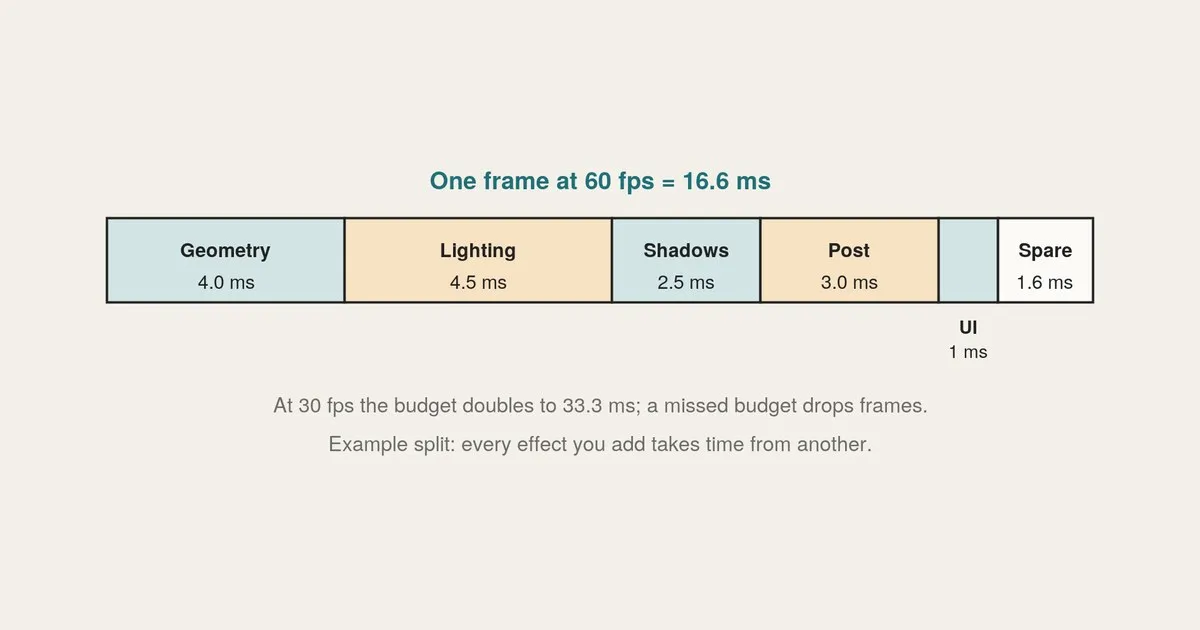
A real-time engine renders a frame in milliseconds, so you can change light, camera and materials live with the client in the room. That makes it a natural fit for product configurators, interactive experiences, virtual production and fast-turnaround films. It also asks for a different discipline: budgets for every frame and asset.
Key points
- A real-time engine renders each frame in milliseconds: about 16.7 ms at 60 fps.
- Unreal Engine is Z-up and measures in centimeters.
- Sequencer and Movie Render Queue turn the engine into a film renderer.
- Configurators and virtual production use the same scenes in real time.
How a Real-Time Renderer Thinks
- Frame budget: 60 frames per second means about 16.6 ms per frame for everything; 30 fps gives 33 ms. Offline rendering has minutes per frame; real-time has milliseconds.
- Rasterization with ray-traced helpers: Modern engines combine rasterization with ray-traced or screen-space techniques for reflections, shadows and global illumination.
- Unreal’s main systems:
- Nanite: Virtualized geometry that renders very high polygon counts efficiently.
- Lumen: Dynamic global illumination and reflections without baking.
- Path Tracer: An offline-quality mode inside the engine for final reference frames.
- Niagara: Particles and visual effects.
- Sequencer: The timeline for cinematics (cameras, animation, lights).
- Blueprints: Visual scripting for interaction.
- Movie Render Queue: High-quality offline output of real-time scenes.
- Trade-offs: Speed and interactivity against exact physical accuracy and complex glass or volumes; test the look early.
- Alternatives: Unity and web engines (Three.js, Babylon) are common for lightweight interactive ads (below).
Bringing Assets In
- Import paths: FBX, glTF/GLB, USD, Alembic; Datasmith imports CAD and some DCC scenes with materials and hierarchy.
- Scale and axes: Unreal uses centimeters and Z-up; check units on import.
- Materials: Rebuild shading in Unreal’s material editor; the PBR logic is the same. Use Substrate or the default shading model for advanced layers.
- Texture setup: Correct sRGB flags, compression, mip-maps and streaming; texture memory is a budget.
- LOD and instancing: Level-of-detail meshes and instanced static meshes; Nanite reduces the need for manual LOD on static geometry.
- Lightmaps and baking: Lumen works dynamically; static lighting still gives the best performance on weak devices.
- Naming and structure: Use a clear folder structure and prefixes (
SM_static mesh,M_material,T_texture). - Version control: Use Perforce or Git LFS for the project.
Cinematics in Real Time
- Sequencer: Build the film with camera cuts, animated actors, lights and effects; the engine plays it in real time.
- Cameras: Cine Camera actors have sensor size, focal length, aperture and focus.
- Quality: Use Movie Render Queue with anti-aliasing temporal and spatial samples, warm-up frames and high-resolution tiles for final output; export multilayer EXR with passes.
- Color: Use the right color pipeline (ACES/OCIO) so the engine output matches the rest of the pipeline.
- Iteration: Change lighting and camera live with the art director; save versions of the level and the sequence.
- When it works: Environments, vehicles, stylized looks, fast revisions. When it does not: Complex glass with caustics, very heavy volumes, hair in extreme close-up.
Interactive Products and Configurators
- Configurator: A live 3D product that the user rotates and customizes (colors, materials, parts).
- Variants: One model with swappable materials and parts; use a Variant Manager or a data table.
- Streaming and deployment: Pixel Streaming sends rendered frames from a server to a browser; lightweight alternatives are glTF/GLB in a WebGL viewer.
- AR: USDZ (Apple Quick Look) and glTF (Android Scene Viewer) let the user place the product in their room; models must be light (a few megabytes, optimized textures).
- Performance on phones: Low polygon counts, compressed textures, few draw calls, baked lighting.
- Tracking and analytics: Interactive pieces report interaction data; handle privacy rules.
- QA: Test on real devices; frame rate, loading time and color are different on every screen.
Virtual Production
- LED volume: A large LED wall (and ceiling) displays a rendered environment behind real actors or products; reflections and light on the real subject come from the screen.
- In-camera VFX: The wall shows the part of the 3D scene that matches the camera’s view, updated live from camera tracking (nDisplay in Unreal).
- Benefits: Real reflections on glossy products, immediate results and less post-production for some shots.
- Constraints: Moiré patterns, color and brightness limits of the wall, latency, large crews and cost; planning with the cinematographer.
- Camera and color: The wall, the camera and the engine must share a color pipeline; test with the real camera.
- Scale for advertising: Smaller LED stages, or large screens as a “digital background”, are a practical use for product spots.
- Fallbacks: Use green screen or CG backgrounds when a volume is not available.
In the tools
- Unreal Engine: Editor with Content Browser, Level Editor, Material Editor, Sequencer, Niagara, Movie Render Queue, Datasmith, Variant Manager, Pixel Streaming, nDisplay; free to download; check the current license terms, since royalty rules differ between linear content and interactive products.
- Blender to Unreal: Export FBX/USD/glTF with correct scale; the Send to Unreal tools help; keep material names consistent.
- Houdini to Unreal: Houdini Engine plugin runs HDAs inside the editor, so procedural tools can drive Unreal scenes.
- Alternatives: Unity, web engines, and offline render engines with real-time previews.
Common mistakes
- Importing with the wrong scale or axes.
- Too many polygons and texture memory for the target device.
- Expecting identical results to an offline renderer.
- No color management between engine and compositing.
- No device testing.