USD and Solaris: a practical CGI guide
USD describes a scene as layers that override each other without destroying the original.
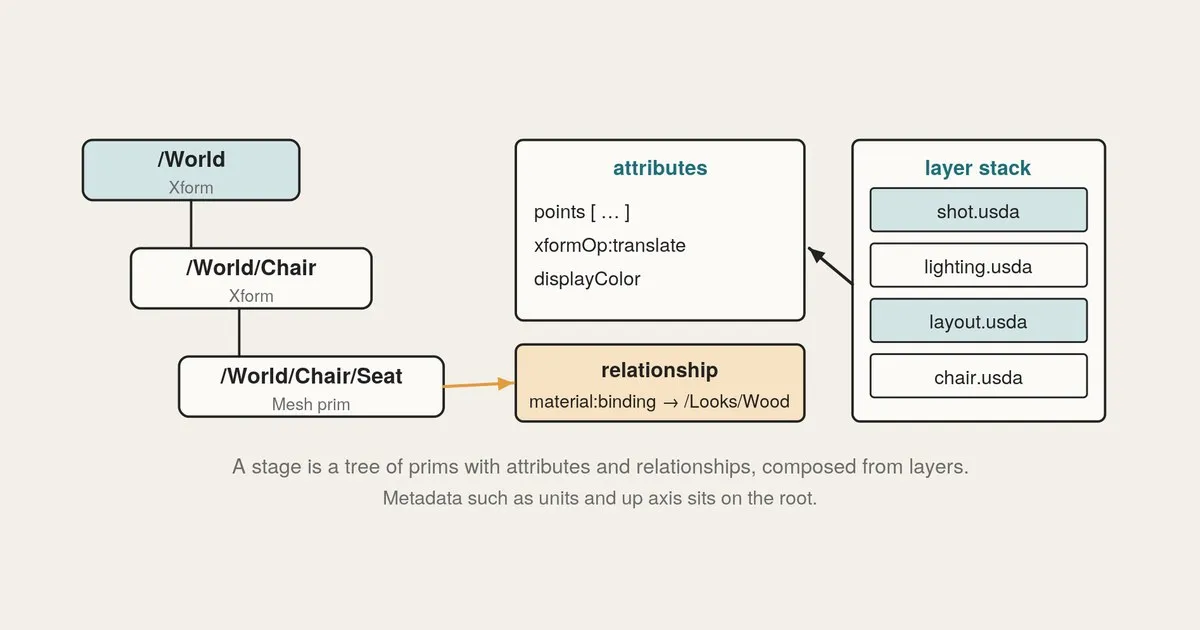
In a team, many people touch one scene at once. The modeler fixes a mesh, the lookdev artist changes a material, the layout artist moves a prop, the lighter adjusts a lamp. If everything is saved into one file, they overwrite each other. USD (Universal Scene Description) solves this by letting each person contribute a layer that is combined non-destructively. Learning it now means entering any modern studio pipeline ready.
Key points
- USD describes a scene as layers that override each other without destroying the original.
- Sublayers, references, payloads and variants let many people work on one shot.
- Solaris is Houdini’s USD environment for layout, lookdev and lighting.
- A small team needs only a few clear rules: folders, names, layers, publish steps.
What USD Is
- USD: An open scene description framework developed by Pixar and now widely adopted (Houdini, Maya, Blender, Unreal, Omniverse, Apple).
- Stage: The composed scene you see when USD layers are combined.
- Prim (primitive): A node in the scene’s hierarchy: a transform, mesh, light, camera, material or group.
- Attribute: A named value on a prim (points, color, intensity), which can be animated over time.
- Relationship: A link from one prim to another (a mesh bound to a material).
- File formats:
.usda(readable text),.usdc(compact binary),.usd(either),.usdz(a zipped package for AR). - Hydra: The viewport and render interface that lets different renderers read the same USD stage.
- Standards: MaterialX and UsdPreviewSurface carry materials between renderers.
Layers and Composition
- Layer: A file of changes. Many layers are stacked; stronger layers override weaker ones without editing them.
- Composition arcs: The ways of combining scene description:
- Sublayers: Stack whole files.
- References: Insert an asset into the scene (one asset many times).
- Payloads: References that can be loaded or unloaded to save memory.
- Variants: Alternatives inside one asset (colorways, level of detail).
- Inherits and specializes: Share and override properties between prims.
- Opinion strength (LIVRPS): The order in which USD resolves conflicts: Local, Inherits, Variants, References, Payloads, Specializes.
- Non-destructive overrides: A lighter can change a material’s color in a shot layer without touching the asset file.
- Asset structure: A clean asset has a root prim, geometry, materials, variants and metadata; in a studio it is published in a standard folder with versions.
- Shot assembly: Sequence → shot → layers (layout, animation, FX, lighting), each by a different department.
Solaris in Houdini
- LOPs (Lighting Operators): Nodes that build and edit a USD stage; the Scene Graph Tree shows the composed hierarchy.
- Typical flow:
- Component Builder wraps geometry, materials and variants into a standards-compliant asset.
- Reference or Sublayer brings assets into the shot.
- Layout tools position props.
- Material Library and Assign Material define and bind shading (MaterialX / Karma Material Builder).
- Light nodes and Light Mixer set lighting; Camera defines the view.
- Karma renders the stage; USD ROP writes it to disk.
- Edit Properties and Set Variant: Make shot-specific overrides, such as switching a colorway.
- Animation and caches: Bring Alembic or USD animation from other programs.
- Lookdev and lighting: Solaris is the standard tool for lookdev and lighting in USD pipelines.
Pipeline Design for Small Teams
- Publish step: A model or material is published as a new version, never overwritten.
- Naming and paths: Standardize asset names, variants and file locations; scripts and HDAs automate the publish.
- Colorways with variants: One product asset with variants for each colorway; the shot picks the variant.
- Instancing and payloads: Large environments load only what the camera sees.
- Interchange with Blender and Maya: Export and import USD with cameras, transforms, meshes, simple materials and animation; check what survives.
- Automation: Python (pxr) scripts to inspect and modify stages, check naming, validate assets.
- Review and version tracking: Production-tracking tools (ShotGrid, ftrack, Kitsu) hold versions and reviews.
- Pitfalls: Over-engineering for a one-person project; unclear naming; too many layers.
In the tools
- Houdini Solaris: Stage context, Scene Graph Tree and Scene Graph Details, Component Builder, Material Library, Karma LOPs, USD Render ROP.
- Blender: File → Import/Export → Universal Scene Description with options for materials, instancing, animation and cameras; limited layer features.
- Other tools: Maya USD plug-in, Unreal USD Stage, NVIDIA Omniverse, Apple Reality Composer/USDZ tools,
usdviewandusdcatcommand-line tools. - Learning approach: Read a
.usdafile in a text editor; USD is easier to learn when you can read it.
Common mistakes
- Editing the asset file for a shot-specific change.
- Overwriting versions instead of publishing new ones.
- Using USD without a naming convention.
- Assuming everything transfers between programs.
- Building a complex pipeline for a simple project.