Render Engines: a practical CGI guide
Engines differ in method (path tracing, real-time), hardware (CPU, GPU) and pipeline fit.
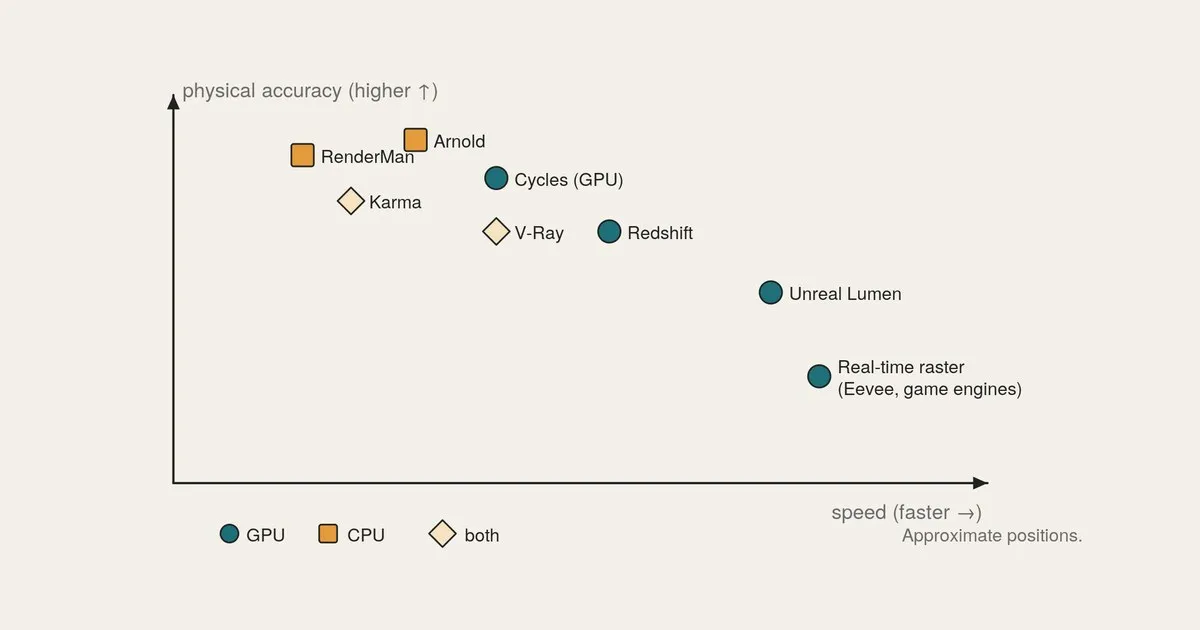
The same scene looks and costs differently in different engines. Studios choose an engine by project, team and budget, and clients rarely care which one made the picture — only that it arrives on time. Know the main families and how to decide.
Key points
- Engines differ in method (path tracing, real-time), hardware (CPU, GPU) and pipeline fit.
- Compare engines at the same noise level and resolution, not at the same sample count.
- Choose by deliverable, deadline, hardware and what your team or client uses.
Families and Trade-offs
| Engine | Type | Strengths | Typical use |
|---|---|---|---|
| Cycles | Open-source path tracer (CPU/GPU) | Free, integrated with Blender, good glass | Blender users, solo artists |
| Karma (CPU / XPU) | Houdini’s engine, USD-native | Pipeline power, large scenes, volumes | Houdini and Solaris pipelines |
| Arnold | CPU/GPU path tracer | Robust for complex scenes, studio standard | Film, advertising, Maya/Houdini/C4D |
| Redshift | GPU-accelerated, biased options | Speed, many artists in advertising | Cinema 4D, Houdini, Maya |
| Octane | GPU, unbiased/hybrid | Fast, physically intuitive | Motion design, C4D |
| V-Ray | CPU/GPU | Wide support, archviz and product | 3ds Max, architecture, product viz |
| Unreal (Lumen/Path Tracer) | Real-time + path tracer | Instant feedback, interactivity | Real-time, virtual production |
- CPU vs. GPU: GPU renderers are fast but limited by VRAM; CPU renderers handle huge scenes and memory. Hybrid CPU+GPU engines (Karma XPU) try to combine them.
- Biased vs. unbiased: Unbiased is simpler to trust; biased can be faster and more art-directable.
- Interchange of materials: MaterialX and USD aim to carry looks between engines.
How to Choose
- Your DCC and team: The engine with the best integration in your main program usually wins.
- Scene size: Heavy volumes and huge instancing favor CPU or out-of-core engines; product shots with moderate geometry suit GPU engines.
- Look: Check the specific features you need — good glass, SSS, hair, volumes, motion blur, deep compositing.
- Farm and budget: Cloud farm support, license cost per node.
- Client or studio requirement: Some pipelines are fixed (a studio standard).
- Re-test: Render your own hard test scene (glass, SSS, small text, motion blur) in two engines before committing.
Comparing Fairly
- Same scene, same light, same camera, same color management.
- Same time budget: Compare noise at equal render time rather than at equal samples; sample counts mean different things in different engines.
- Same denoiser setting or none.
- Compare features, not just speed: What is missing — caustics, a certain light type, a shading model?
Real-time as a Production Engine
- Why: Real-time engines render in milliseconds; you iterate lighting and camera live. For advertising, product configurators and virtual production, they are increasingly final-quality.
- Costs: Different asset constraints (LOD, texture limits), different material workflow, different lighting model.
- Hybrid pipelines: Model and shade in a DCC; assemble and render in the engine; final composite still in a compositor.
In the tools
- Blender: Render Properties → Render Engine: EEVEE (fast, real-time-like), Cycles (path tracer), Workbench (viewport/clay); third-party engines through add-ons.
- Houdini: Karma CPU and Karma XPU in Solaris/LOPs; Mantra, the older engine, is being phased out in favor of Karma; other engines (Arnold, Redshift, Octane) via plugins.
- Switching: Keep materials in portable form (MaterialX, USD Preview Surface, or baked textures) when you expect to change engines.
- Unreal Engine 5: Rasterization with Lumen, hardware ray tracing and a Path Tracer in one editor, rendered to disk with Movie Render Queue.
Common mistakes
- Choosing the engine by forum fashion.
- Comparing at equal sample counts.
- Material setups tied to a single engine with no export path.
- Ignoring license cost on the farm.
- Using real-time without accounting for its asset limits.