Producing the Film: a practical CGI guide
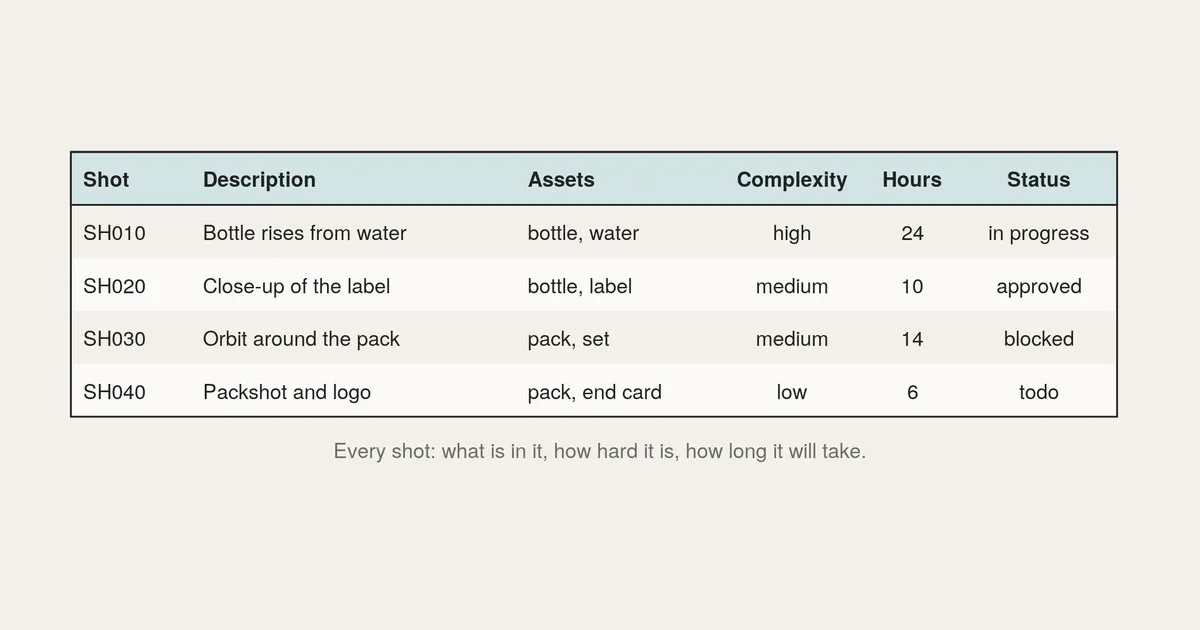
Break the film into shots and tasks, then estimate hours for each.
Most failed CG projects do not fail on technique. They fail on estimation, unclear approvals, unlimited revisions and missed deadlines. Production is the craft of making sure the film that was sold is the film that is delivered, on time, and still profitable for you.
Key points
- Break the film into shots and tasks, then estimate hours for each.
- Cost = hours × rate + render + licenses + 10–20 % contingency.
- Plan milestones and a fixed number of revision rounds.
- Manage risk early: test the hardest shot first.
Breaking Down the Film
- Shot list → breakdown: For each shot, write what it needs: models, materials, animation, simulation, lighting, comp.
- Complexity levels: Rate each shot (simple, medium, complex) with agreed hour ranges.
- Asset list: Identify shared assets (the product, the environment) and build them once.
- Risk shots: Mark shots with simulation, hair, glass with caustics, or heavy comp; give them a larger contingency.
- Dependencies: Which tasks block others (the product model blocks lookdev, which blocks lighting).
- Technique choices: Decide offline or real-time, CPU or GPU, and the render budget per frame.
Estimating Time and Cost
-
Formula:
price = (labor hours × hourly rate) + render and cloud costs + licenses and assets + subcontractors + contingency + margin. -
Labor: Sum hours per task: concept, modeling, UV, texturing, lookdev, animation, simulation, lighting, rendering supervision, comp, grade, sound, project management, revisions.
-
Render cost: Frames × minutes per frame × price per hour ÷ machines, with a safety factor of 2–3.
-
Licenses: Software seats, plug-ins, stock assets, fonts, music.
-
Contingency: 10–20 % for the unknown; more for new techniques.
-
Margin: Money for the business, taxes, equipment, downtime.
-
Illustrative hour split (not a rule): a 10-second product spot can be split into five roughly equal parts:
- modeling and look development;
- animation and camera;
- simulation and effects;
- lighting, rendering and passes;
- compositing, finishing, sound and project management.
Scale each part with the brief.
-
Estimate with ranges: Give best case, expected and worst case, then quote near the expected plus contingency.
-
Compare actuals: After each project, compare the estimate with logged hours to improve.
Schedule and Milestones
- Milestones and gates: Kick-off → concept approval → animatic lock → model approval → lookdev approval → animation approval → final lighting → comp → grade and sound → delivery.
- Approvals gate the work: Do not start the next stage until the previous is approved in writing.
- Client time is part of the schedule: If feedback takes three days, schedule it.
- Render time as a block: Reserve the last third of the production calendar for rendering and final fixes; late changes can destroy the render deadline.
- Buffer: 10–20 % for the unknown, placed before the delivery date.
- Parallel work: Models, lookdev and animation can proceed together when approved assets are versioned.
- Tools: A simple spreadsheet or Gantt tool, a task board (Notion, Trello, Kitsu), calendar reminders.
Reviews, Feedback and Revisions
- Number of rounds: Define them in the contract (for example, two rounds per stage). Further rounds are billed separately.
- Review package: Send a clear version: a playblast or render with version number, date, what changed and what to look at.
- Consolidated feedback: Ask for one set of notes from one person; contradictory notes from many voices are the biggest time-waster.
- Interpret notes: A client says “make it pop”; you translate to contrast, saturation, light or motion, and confirm.
- Respond: Confirm that each note is understood, flag the ones that are costly or conflicting, and explain the impact on time.
- Change orders: New requests beyond the scope are written, priced and approved before work starts.
- Version discipline: Never overwrite; keep every version viewable and named.
- Dailies: Internal reviews of the current work; give and take critique without ego.
- When feedback is wrong: Explain, offer an alternative, show a side-by-side test; keep it factual.
Managing Risk and Quality
- Risk register: A short list of what could go wrong (a client changes the product, a simulation fails, a file is lost), the impact and a plan.
- Test early: Render the hardest shot first and measure the cost.
- Quality gates: Check each delivery against a list: resolution, color, frame range, passes, artifacts, text and legal lines, sound.
- Backups and archive: Back up daily; archive at delivery.
- Communication: Short written updates at fixed times; record decisions; do not promise by voice what the contract does not state.
- Stress and workload: A schedule that requires eighty-hour weeks is a bad schedule; negotiate scope, not sleep.
In the tools
- Planning: Spreadsheet templates for breakdown, budget and schedule; the same files can be reused across projects.
- Tracking and review: ShotGrid, ftrack, Kitsu (open source), or a board in Notion/Trello with links to versions; frame.io-like review tools for annotated feedback.
- Time tracking: A simple timer (Toggl or a spreadsheet) so estimates improve.
- Communication: Email for decisions, chat for quick questions; keep a decision log.
Common mistakes
- No estimate, or estimating only modeling and animation.
- Forgetting render time, revisions and project management.
- Unlimited revisions.
- Starting the next stage before written approval.
- Taking contradictory feedback from several people.